
EMAIL SYSTEMS / DELIVERABILITY RESEARCH · ECOM RATINGS
Systeme.io Email Deliverability: Domain Authentication, Limits and Monitoring
Editorial analysis · Sources checked October 28, 2026 · Practical research guide

Editorial takeaway. Systeme.io includes unlimited email sending on its plans, but deliverability is earned through authenticated domains, permission-based contacts and consistent performance. The operating constraint is not simply a message quota: it includes contact-plan limits, first-campaign reviews, sender reputation and mailbox-provider requirements.
An email tool can display “sent” while the commercial result remains disappointing. A product launch reaches only a fraction of the audience; welcome emails sit in spam; a campaign pauses after its first hundred deliveries. These symptoms can have very different causes, and treating them as one generic problem wastes time. Systeme.io provides a useful integrated stack for newsletters, campaigns and automations, yet the account owner still controls the quality of the sender identity, list and schedule. This guide turns the official rules into an operational diagnostic method rather than promising a magical inbox rate.
Domain authentication is the foundation, not a decorative DNS task
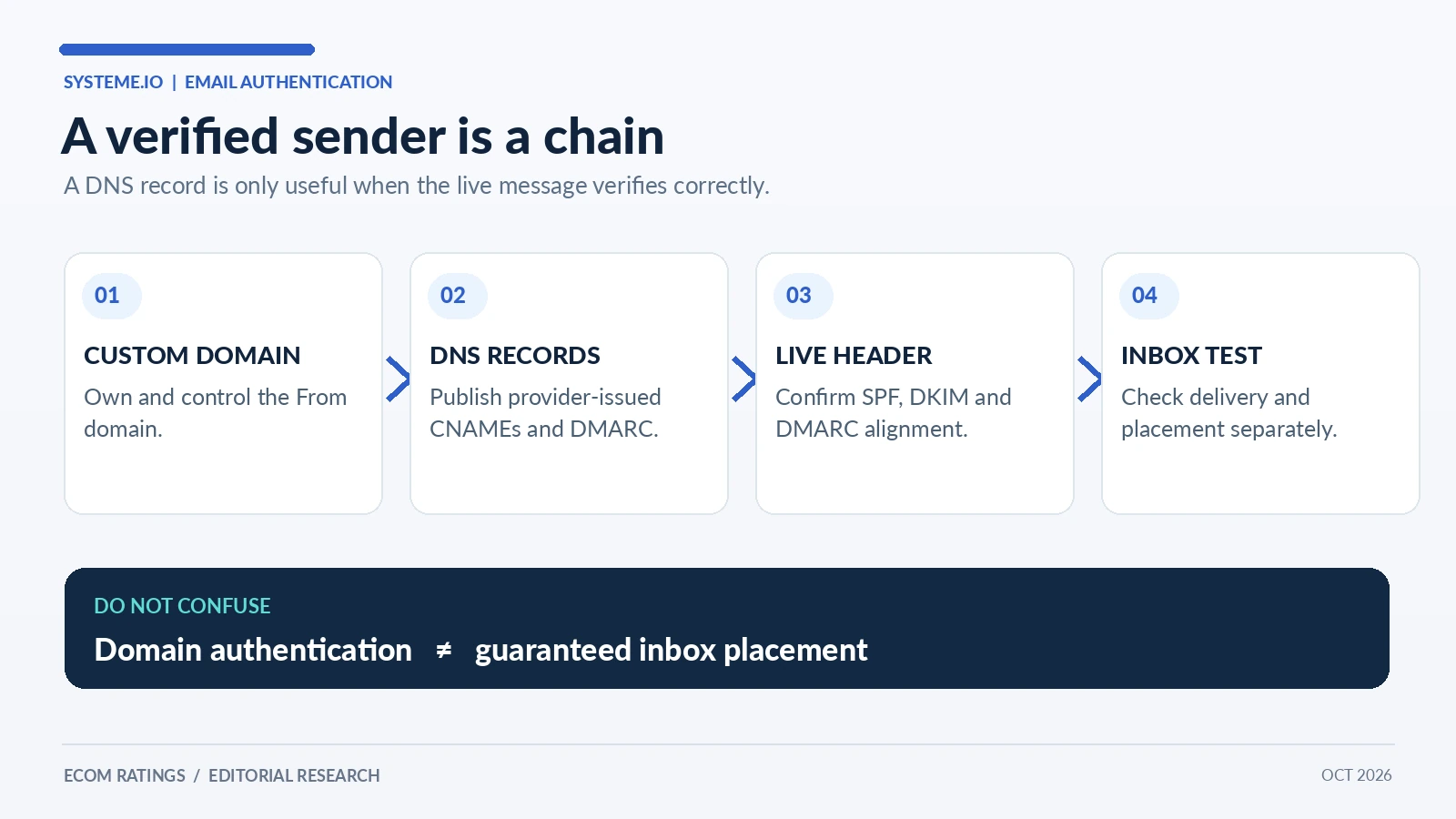
Systeme.io requires authentication of the custom domain used for email sending. In the account, the route runs through Settings → Emails → Domains, where the domain is entered without www. The platform generates DNS entries to publish at the registrar or DNS host. Current instructions describe three CNAME records and a DMARC TXT record. Copy the values from your own account; example values in articles are not interchangeable with the records issued for a real domain.
There is a subtle but important distinction between a website domain and a sending domain. A successful website connection does not prove that email authentication has passed. Likewise, adding DNS records is not the same as confirming that they resolved publicly and the sending service accepted them. DNS propagation and pre-existing records can delay the change. Record the exact hostnames and values you entered, then verify the authentication status in Systeme.io before broadcasting to subscribers.
The provider specifically warns that the domain should point to a functioning website. A domain that leads only to a 404 page can weaken mail-provider trust. It also says that public mailbox domains such as Gmail, Yahoo and ProtonMail cannot be authenticated as your own custom sending domain. For a serious publication or online business, a real sender address like [email protected] is preferable to trying to impersonate a personal mailbox through a marketing service.
An authenticated domain is the minimum entry ticket. It does not guarantee inbox placement. A domain with perfect DNS records can still develop a poor reputation if recipients never expected the messages, addresses bounce or campaigns contain misleading calls to action. Treat authentication as a prerequisite for reputation management, not as a reputation substitute.
What SPF, DKIM and DMARC actually tell receiving mail servers
SPF, DKIM and DMARC are often listed as if they were interchangeable checkboxes. They are not. SPF authorizes mail servers to send for a domain in the envelope path. DKIM verifies a cryptographic signature on a message and associates it with a domain. DMARC asks whether SPF or DKIM aligns with the domain visible in the message’s From header, and provides a policy and reporting mechanism for failures.
The practical point is that a marketer must think about alignment, not just record existence. Seeing an SPF record in DNS does not tell you whether the specific campaign used an aligned envelope sender. Seeing a DKIM key does not prove the live message carries a passing signature. DMARC reports can expose that difference. Use a test message to a mailbox where you can inspect original headers, then look for spf=pass, dkim=pass and dmarc=pass together with the relevant domains.
Systeme.io’s record generator abstracts much of the setup, which is beneficial for nontechnical owners. But it does not eliminate conflicts with older services. If the same domain previously sent through another platform, an unrelated SPF record or duplicate DMARC record may be present. Do not add a second SPF TXT record just because an online tutorial says so. Review all DNS entries with the actual mail providers you use, and maintain a single coherent authentication design.
A real setup sequence for a new Systeme.io sender
Start with the From address and reply workflow. Create a mailbox that can actually receive customer replies; avoid a no-reply address when a human conversation is desirable. Make the display name match the company or publication represented by the domain. The sender name and address should look like two parts of the same identity, not unrelated organizations.
Next, authenticate the domain and validate it independently of the platform’s green indicator. Send small test messages to Gmail, Outlook and another provider if those destinations matter to your list. Check whether the message arrived, whether it landed in inbox or spam, and whether its headers authenticate. These are three separate observations. A message can be delivered to the spam folder while technically passing SPF, DKIM and DMARC.
Then review the receiving path. Confirm that links and reply-to addresses work, the unsubscribe link is visible, and the landing page matches the promise in the subject line. Sender reputation is partly about user behavior. If recipients click a link expecting a free guide and land on an unrelated sales page, technical authentication will not protect engagement. Keep the first message especially straightforward, with a clear reason why the person subscribed.
Finally, document the baseline. Record the initial test dates, a sample header, DNS changes, audience size, bounced count and early performance. Without a baseline it is hard to distinguish a DNS regression from a weak subject line or a sudden list-quality problem. An operating log also prevents support discussions from becoming vague conversations about whether email is “working.”
Unlimited emails does not mean unrestricted campaigns
Systeme.io documents unlimited email sending across its plans. This is an attractive pricing model compared with services that meter every message. But the word unlimited describes a pricing dimension, not a promise that the platform will transmit an arbitrary new campaign immediately. Systeme.io explicitly uses deliverability checks and reputation controls to protect the shared sending infrastructure.
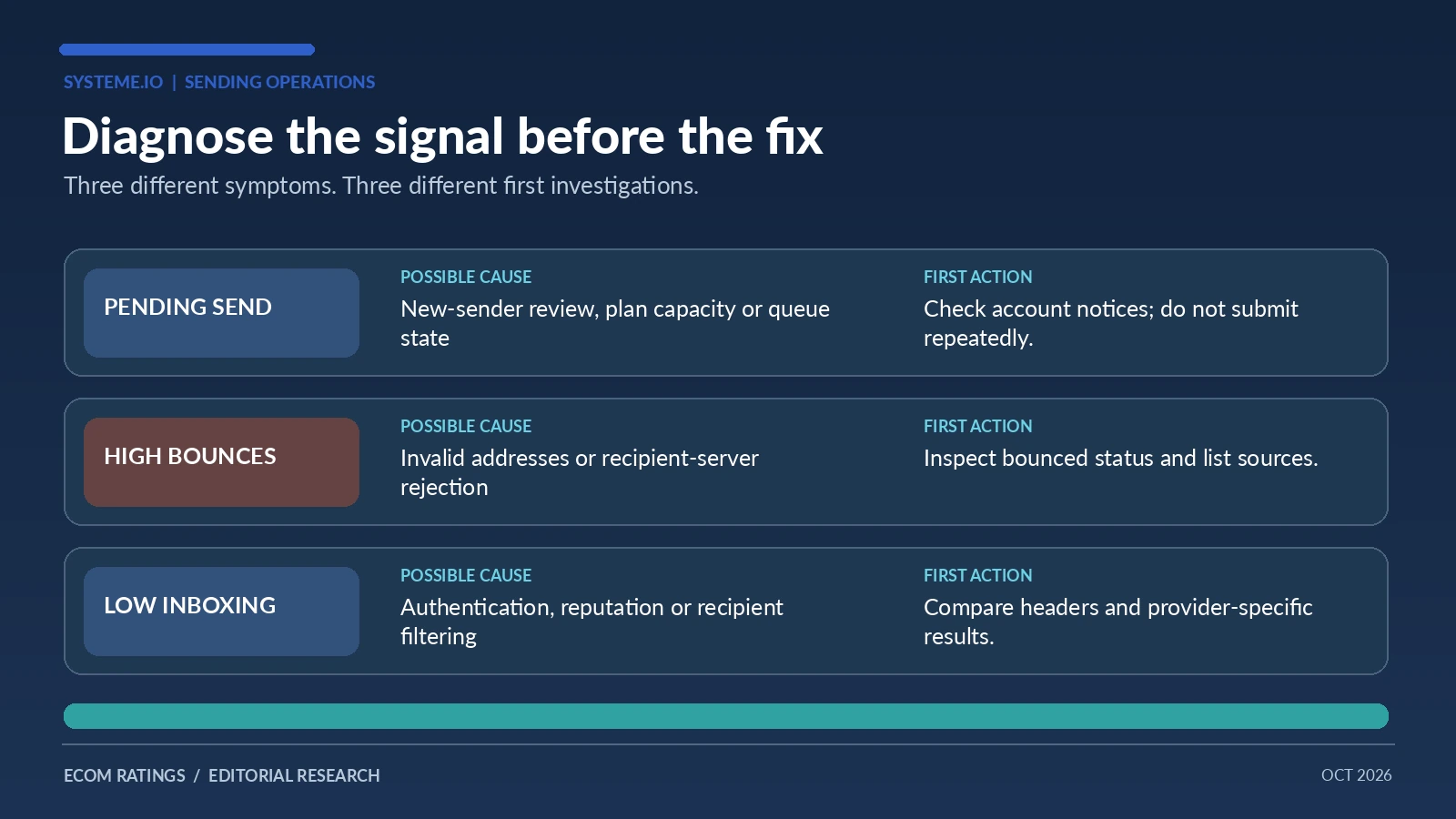
Its help center explains that new users may initially send only the first hundred emails before the system pauses to evaluate statistics. When the initial signals are satisfactory, another hundred can be released; this process can repeat while the account establishes a sending history. If someone sends a campaign to thousands of contacts and sees a pending state, repeatedly clicking send is not a solution. The pause may be an intentional safety check rather than a broken queue.
Systeme.io also organizes senders into reputation pools using factors such as opens, bounces and spam reports. These are platform-specific operational controls. A sender with clean records may benefit from a stronger pool; one with many complaints may be isolated. The documentation contains threshold ranges and minimum-volume rules, but they can change. The important operational response is to monitor the signals and avoid triggering a higher-risk classification in the first place.
A second type of limit is based on contact capacity. The documented account restrictions include contact counts tied to subscription tiers; exceeding the allowed count may restrict new newsletters, pause scheduled emails and block some test activity. Thus, when an email will not send, ask which limit you are seeing: provider throttling, reputation protection, account plan restriction, or an ordinary audience selection issue. These require different fixes.
The Gmail bulk-sender threshold is not a Systeme.io daily cap
Google’s rules for bulk senders commonly cause confusion in marketing discussions. Around 5,000 messages a day sent to personal Gmail accounts from a primary domain can place that domain in Google’s bulk-sender category. This is a mailbox-provider threshold that triggers additional compliance expectations, not a Systeme.io pricing cap or a target worth pursuing. The same root domain may aggregate mail sent from several subdomains.
Bulk senders need appropriate authentication, DMARC alignment and easy one-click unsubscribe for marketing messages, alongside low complaint levels. Smaller senders still need legitimate lists and functioning authentication. Sending 4,900 unwanted messages does not make a campaign safe, and sending 5,100 wanted messages is not automatically bad. The threshold simply means the provider applies a more demanding rule set to that sending identity.
Do not split messages across artificial subdomains to evade the threshold. It can damage sender consistency and does not remove the root-domain calculation. The better approach is to keep a stable cadence, send only to opted-in recipients and maintain a consistent From identity. If you manage transactional notifications separately, use a deliberate architecture rather than a series of disposable names.
When preparing a high-volume send, test unsubscribe behavior before the campaign begins. A prominent unsubscribe mechanism is not a weakness; it gives people a clean exit and is usually better than forcing them to mark unwanted mail as spam. Review the actual campaign header and unsubscribe path, not only the wording at the bottom of the email.
A monitoring dashboard that can separate symptoms from causes
Useful monitoring starts with denominators. Bounce rate measures failed deliveries relative to attempts. Complaint rate measures spam reports within the relevant provider’s reported base. Open rate and click rate are engagement proxies, but opens are imperfect because privacy proxies and image blocking can inflate or suppress tracking. For operational decisions, clicks, orders and replies may be stronger measures of genuine engagement.
Systeme.io’s own deliverability guidance identifies bounced contacts, complaints and opens as key signals and gives examples of healthy and unhealthy ranges. Instead of copying a threshold into a permanent policy, keep a live reference to the current help center. Thresholds used by a platform to assign IP pools are not necessarily identical to a marketer’s business success metrics. A campaign with a good open rate but almost no purchase intent can still be commercially weak.
A practical weekly review can include the following columns: send date, audience segment, message type, attempted volume, delivered volume if available, hard and soft bounces, complaints, opens, clicks, unsubscribe count and a note about creative or list changes. Add one field for the DNS or sending-domain version. That field helps explain an unexpected downturn after a site migration, a registrar move or a new CRM integration.
Look at trends rather than isolated green numbers. If bounce rates rise sharply after an imported list is added, investigate that source. If spam reports climb after a topic change, revisit the original subscription promise. If only one destination provider shows problems, inspect headers and provider-specific rejections before changing every campaign. Monitoring is most useful when it points toward a testable hypothesis.
List quality, consent and inactive contacts: the part software cannot automate away
Systeme.io’s public guidance prohibits importing contacts who have not authorized marketing email. Purchased or scraped lists are not a workaround for a small audience; they can quickly damage the domain and shared sender reputation. For each signup source, preserve how consent was obtained, what information the person expected and whether that permission still applies to the messages being sent.
The platform recommends identifying bounced and inactive contacts. A hard bounce usually indicates a persistent address problem; a temporary mailbox problem may appear as a soft bounce. Treat them differently when investigating a one-off incident, but do not keep sending to addresses that are persistently rejected. Systeme.io identifies contacts in bounced status and prevents further sends to them, reducing repeat errors.
Inactive subscribers need a different response. Someone who has not opened an email for months may have stopped paying attention, or their mailbox may block tracking pixels. Before deleting the whole segment, examine clicks, recent purchases and the original consent context. Consider one respectful re-engagement campaign for subscribers who have a legitimate relationship with you. Do not use a sequence of increasingly aggressive subject lines to force engagement.
Cleaning a list may reduce the headline contact count while improving the real audience. That can be especially useful where plan limits depend on managed contacts. But do not delete paying customers’ service records simply because their marketing engagement is low. Keep contractual communication and marketing eligibility as separate fields, with retention periods that fit your actual obligations.
Troubleshooting: diagnose in the right order
When a new campaign stays pending, begin with the account state. Is the sending domain authenticated? Is this the first campaign, subject to staged verification? Has the account hit a contact plan limit or reputation restriction? Is the campaign scheduled rather than due? Those checks should come before editing copy or switching providers.
If the platform says sent but recipients report silence, inspect at least three real destinations. Ask whether they are missing from the audience, marked bounced or unsubscribed, or present but routed to spam. Follow up with headers from a delivered test message. A campaign-level success rate cannot tell you whether a single recipient filtered mail locally. Similarly, repeatedly sending duplicate tests to the same mailbox can produce misleading results.
If delivery fell after a DNS change, compare current SPF, DKIM and DMARC records with the saved baseline. If only Outlook recipients are affected, isolate that symptom rather than assuming Gmail has the same problem. If clicks decline but delivery remains stable, test the subject-to-content match and landing-page experience. Better diagnosis limits the number of changes made at once and preserves interpretability.
Escalate with evidence: sender domain, campaign identifier, approximate send times, target provider, sample anonymized message headers, visible error codes and the steps already tried. Support teams can usually act faster on a bounded delivery problem than a complaint such as “no one gets my email.” Remove unnecessary personal data from the support bundle.
A 30-day operating schedule for sustainable sender growth
Week one: authenticate the domain, confirm a reply-capable sender, send seed tests and start with a small, genuinely engaged group. Record what mailbox providers did with the messages. Do not import a huge cold audience and begin with a promotional blast. This week should establish the system’s baseline, not maximize volume.
Week two: run a consistent campaign cadence and review bounces, complaints, clicks and unsubscribes. Compare segments without changing the entire campaign framework every day. If provider verification pauses occur, follow the documented process rather than retrying aggressively. Learn whether list selection or message content is affecting performance.
Week three: expand gradually to more opted-in subscribers while keeping topic, sender identity and cadence consistent. If the audience grows near the plan’s contact limit, assess capacity before the account becomes restricted. Validate that automations and scheduled messages still work correctly after any plan change.
Week four: audit the month as an operation: which acquisition sources generated genuine engagement, which addresses bounced, which campaigns produced replies or sales, and which settings changed? Decide which experiments to keep. A strong deliverability routine produces useful evidence and fewer surprises even when the raw number of messages increases dramatically.
An evidence-based checklist before you send the next campaign
A ready sender can answer seven questions without guessing. Is the From address on a custom authenticated domain? Can a recipient reply? Do headers pass SPF, DKIM and DMARC alignment? Is every recipient entitled to receive this kind of email? Has the account avoided capacity or reputation restrictions? Does unsubscribing work? Are results logged after the send?
For a multi-product business, add an eighth question: does the email’s promise match the landing page it links to? Deliverability and conversion are connected through expectations. Reliable, helpful content is more likely to generate real engagement and fewer spam complaints. Technical compliance makes the message acceptable to mailbox servers; relevance makes it welcome to readers.
The value of Systeme.io is that the email workflow lives near funnels, contacts and automations. That integration makes it easier to coordinate audience journeys. Yet no integration can replace responsible list collection, sensible segmentation and continuous observation. Treat the dashboard as an instrument panel, not as the engine that generates sender trust automatically.
Conclusion: the practical definition of “unlimited email”
Systeme.io can be a cost-efficient choice for businesses that need frequent campaigns without per-email pricing. The more important lesson is that message allowance and message placement are separate disciplines. Authentication establishes identity. Permission establishes legitimacy. Consistent sends and clean lists build reputation. Monitoring tells you which part has begun to fail before the problem becomes a full campaign outage.
Before scaling, audit the domain, review contact capacity and sender-pool rules, and establish a reporting habit that distinguishes rejected, delivered, inboxed and engaged mail. That approach closes the information gap left by a simple marketing claim about unlimited sending: the platform may allow the volume, but the sender must still earn the right to reach the reader.
For broader platform context, see our Systeme.io editorial review. This guide focuses on a narrower implementation and compliance question.
Primary sources and methodology
- Systeme.io: How to authenticate your domain
- Systeme.io: Why aren’t my emails being sent?
- Systeme.io: Account restrictions and contact limits
- Systeme.io: Email deliverability and sender pools
- Systeme.io: How to improve email deliverability
- Systeme.io: Sending frequency and bulk-sender requirements
This article distinguishes provider-stated requirements from editorial operating recommendations. The weekly schedule and monitoring checklist are practical suggestions, not guaranteed inbox-placement benchmarks. Reviewed October 28, 2026.