
A practical, reassuring reconciliation guide for Ecomzy Mall customers who want to identify a card charge, locate the matching purchase, and keep reliable records without exposing sensitive payment information.
Documentation-based research · Verified November 2, 2026
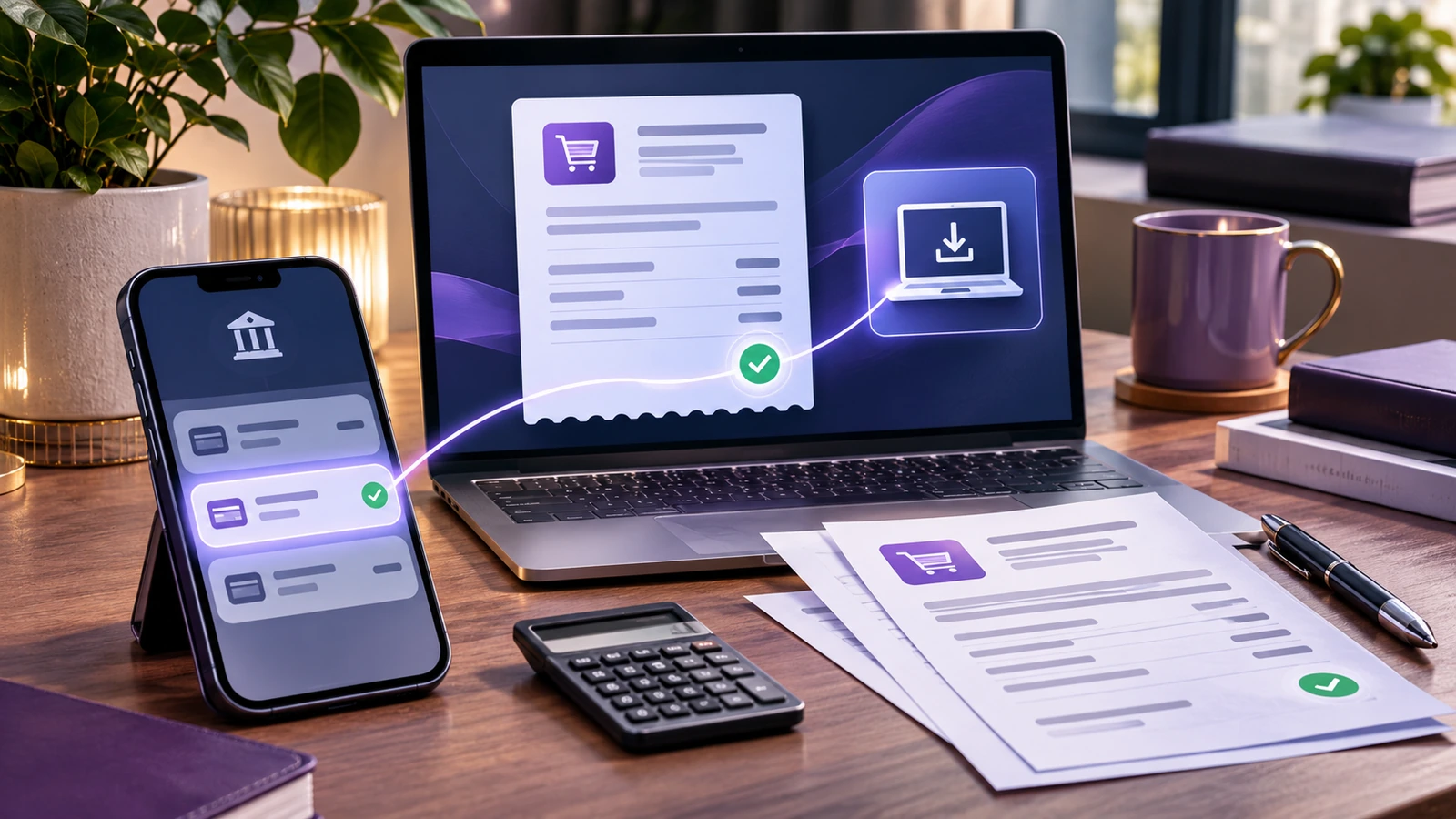
Quick answer: start with the merchant name, amount and account email
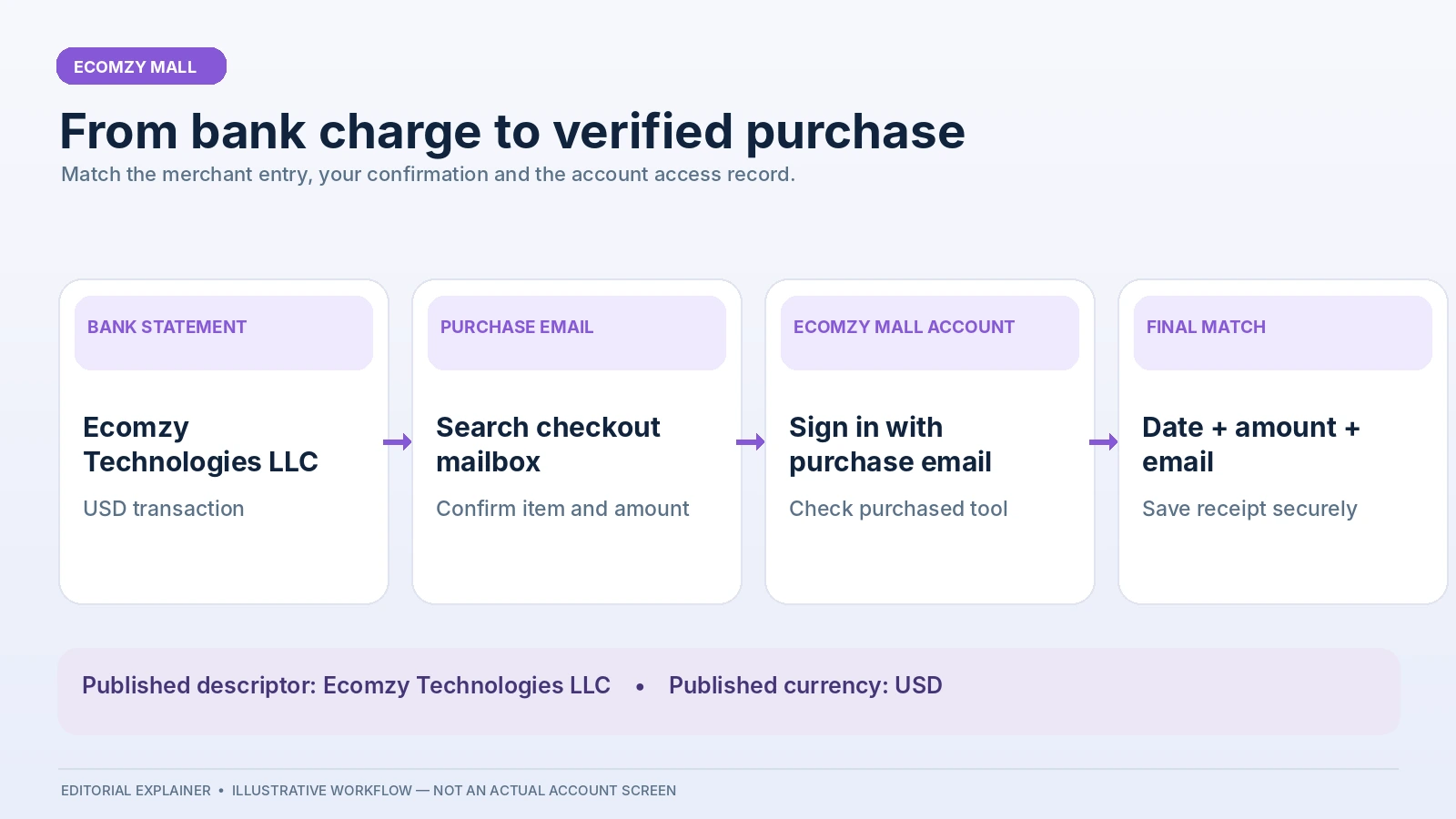
A bank statement does not always show the same name as a website’s homepage. That difference can be confusing, particularly with a digital purchase: there is no parcel arriving later with a printed invoice, and the customer may remember the name of a tool more readily than the company processing the payment. Ecomzy Mall’s published FAQ provides a useful starting point. It says that a charge should appear on a bank statement as Ecomzy Technologies LLC, that charges are made in US dollars, and that card or wallet payments are processed through Stripe or PayPal. Those are documented service details, not guesses about a bank’s exact abbreviation.
For a successful reconciliation, compare at least three independent clues: the statement entry, the order confirmation or payment receipt, and the purchased item shown in the Ecomzy Mall account opened with the checkout email. A match in descriptor alone is helpful but does not prove which particular purchase generated the charge. Equally, an email that names a product but has no consistent amount or date should not be treated as conclusive until the transaction records align. This guide shows how to make that comparison in a repeatable way.
Unlike a general review of the Ecomzy Mall catalog, the focus here is financial recordkeeping. The goal is to turn an unfamiliar-looking transaction into an understandable order record, or to assemble enough precise information for support to investigate quickly. The workflow also helps buyers who use several tools, have changed email addresses, or purchase from more than one device.
Why a digital purchase can be hard to recognize on a statement
The product a buyer selected may be named after a specific task: reviewing a bill, creating a resume, preparing an itinerary, or another digital workflow. The statement, however, identifies the payment merchant rather than the individual tool. A statement line therefore may not contain the product title, the same site branding, or the language displayed at checkout. Ecomzy Mall identifies its statement merchant as Ecomzy Technologies LLC. That is the most reliable published anchor when searching transaction history.
Banks can abbreviate descriptions to fit a small screen, append their own identifiers, or show a pending authorization before posting the completed transaction. These are general payment-system behaviors; they are not a claim that Ecomzy Mall uses any particular undocumented descriptor variation. For that reason, search for the core merchant name, not a guessed list of alternate descriptors. A merchant name alone is still insufficient if multiple orders have the same amount, so record the charge date and any transaction reference your bank provides.
Match a charge to a receipt in five deliberate steps
| Field | Where to check | Expected use |
|---|---|---|
| Merchant | Bank statement | Ecomzy Technologies LLC |
| Amount | Bank and checkout receipt | Compare original USD |
| Purchase email | Confirmation and account | Find the correct user |
| Tool access | Ecomzy Mall account | Confirm purchased item |
First, open the bank or card transaction details and record the posted amount, currency, date, merchant description and last four card digits if available. Do not send full card numbers, security codes or account passwords to support. A cropped screenshot that hides the rest of the statement is normally easier to assess and safer to share than a complete monthly statement.
Second, search your inbox for the confirmation email sent after checkout. Ecomzy Mall’s FAQ says access instructions are emailed after payment confirmation. Search the inbox, spam folder and promotions tab, and review any alternate mailbox you may have used. A purchase for a work project may have gone to a business email, while the customer’s usual banking notifications arrive in a personal inbox. That is a common reason an authentic charge initially looks unfamiliar.
Third, sign in directly at mall.ecomzy.com using the email that was entered at checkout. According to the FAQ, purchased tools should be available in the account even if the confirmation email was overlooked. This is an important advantage of browser-based access: the customer does not need to find a long-lost installation file or remember a device-specific download location to verify an earlier purchase. Verify the tool name, visible order details if available, and whether access works.
Fourth, create a simple comparison line: payment date, statement amount in USD, item name, confirmation-email date, checkout email and any visible order reference. If the bank converts the charge into a local currency, compare the original USD transaction amount where the banking app exposes it. The currency-converted amount may differ because of the card issuer’s exchange rate or separate bank charges; do not infer that Ecomzy Mall increased the price without checking the original transaction.
Fifth, if the records still do not line up, contact [email protected] with the minimum information needed for a lookup: purchasing email, approximate transaction date, amount, product name if remembered and a safely redacted statement capture. Ecomzy Mall’s FAQ expressly directs customers to support when an expected purchase does not appear in the account. This is a reconciliation request, not an admission that the charge is fraudulent or that the seller made an error.
A worked example: USD purchase versus a local-currency bank entry
Consider a fictional buyer who orders a browser-based tool advertised for $29.00 USD on a Tuesday. The Ecomzy Mall receipt identifies the tool and confirms the $29 charge. The bank, operating in euros, shows a posted amount of €27.20 on Wednesday and lists Ecomzy Technologies LLC as the merchant. If the bank shows an original transaction amount of $29.00, the merchant amount matches even though the displayed local-currency figure and posting date differ. The €27.20 is an illustration of conversion, not a published Ecomzy price or a current exchange rate.
Now suppose the customer finds two purchases, each for $29.00. The amount is no longer a unique identifier. Separate order confirmations, purchase dates, item names and bank transaction references become important. In this situation, the buyer should resist the temptation to choose whichever email seems closest. A useful reconciliation log allows more than one candidate, labels uncertain matches, and records the final support response when available.
Finally, imagine the bank entry is a pending authorization rather than a posted charge. It would be premature to assume there are two completed payments if an initial authorization and later settlement appear separately in the banking app. The buyer should check the bank’s own status labels and ask the issuer for clarification if needed. Neither an authorization nor a screenshot of a shopping cart proves that the merchant captured a final payment; the transaction and the order record must be considered together.
One-time tools, subscriptions and the importance of product-page terms
Ecomzy Mall describes most tools as one-time purchases: users pay once and keep account access to the purchased tool. The FAQ also says any product using a subscription model should be identified on its product page before checkout. This distinction makes ordinary reconciliation easier because a one-time purchase should be classified as a completed acquisition of a particular tool, while a subscription must be checked against its renewal terms.
Do not assume a second charge means an automatic renewal merely because an amount repeats. Two purchases can have identical prices, and a person may buy separate tools for different tasks. Conversely, when a product explicitly uses recurring billing, compare each payment with the stated billing cycle and related account record. The right first step is to identify the actual product and its checkout terms, rather than treating every Ecomzy Mall transaction as belonging to one subscription category.
For bookkeeping, label each line with the specific tool or service, purchase date and whether the payment is one-time or recurring. The same label can be used in a personal budget or business expenses worksheet. That small habit saves time later when a charge must be explained to an accountant or a family member, especially if the bank provides only the merchant name.
Which information belongs in a strong purchase record?
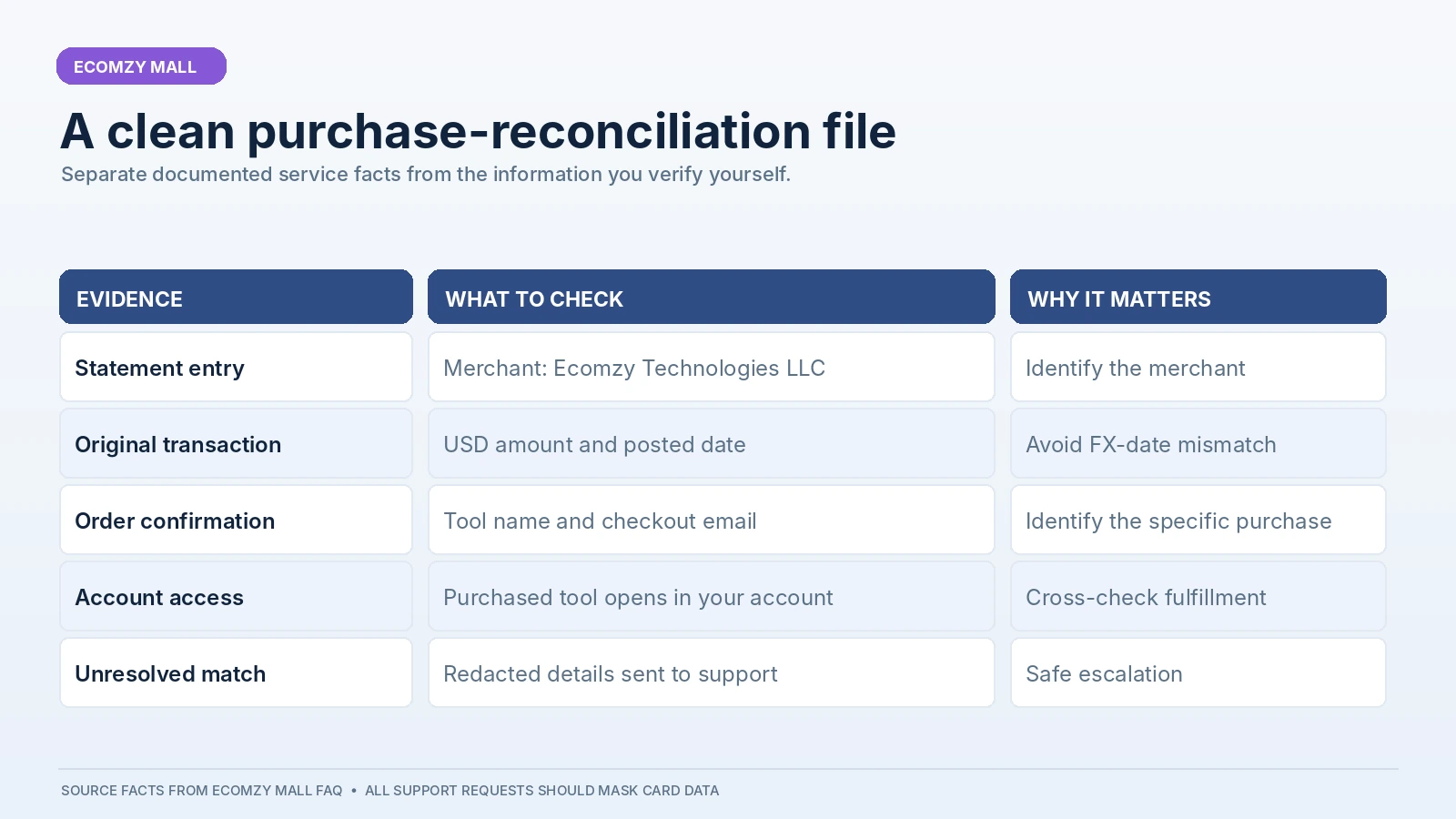
A useful purchase record is more than an email saved in an inbox. It includes the original invoice or receipt if one was provided, the tool or service name, the USD price, transaction date, the email used for checkout and a note about where the purchased tool can be accessed. Preserve the relevant refund terms as they existed at the time of purchase when possible. This is a general recordkeeping recommendation, not a statement that Ecomzy Mall exposes every one of these fields in one downloadable dashboard.
Customers should also preserve the support case number or email thread if assistance was required. When an order needs manual investigation, the final resolution can explain why a charge posted later than expected, why the purchasing email differed, or how account access was restored. Maintaining a short audit trail is particularly helpful when a charge is questioned weeks or months after the original transaction.
How to handle a receipt that cannot be found
Begin with the least disruptive explanation: search every relevant mailbox and check the account tied to checkout. Ecomzy Mall says its browser-based tools do not require a separate application download or installation, and that purchases are available from the customer’s account. This gives buyers a second verification route when email delivery or filtering causes confusion. The ability to revisit the tool can be more meaningful than the availability of a single confirmation email.
If the item is visible but the confirmation message is absent, the buyer has two different issues: an order was likely recognized in the account, while the email is missing. These should be reported separately. Support may need a different set of facts to investigate an access problem compared with a request for proof of payment. A clear request such as “the tool is accessible but I cannot locate the confirmation for my expenses” is more actionable than “the purchase failed” when the product clearly works.
If neither the email nor the item appears, verify that the buyer did not inadvertently use another address or sign-in method. Then prepare the redacted transaction details for support. Avoid trying repeated new purchases to test whether access will appear: additional completed payments may make matching harder. When an attempted charge’s status is unclear, the bank’s posted/pending label and the platform’s confirmation should be checked before placing the order again.
Refunds: distinguish the request date from the bank credit date
Ecomzy Mall’s FAQ describes a 30-day money-back guarantee and says customers can contact support within that period. It also states that refund requests are processed in one to two business days and that funds generally take another five to ten business days to appear in the bank, depending on the provider. These are the site’s published expectations; they should not be presented as a promise that every bank posts the credit on an identical date.
A refund creates a separate reconciliation event. Keep the original charge and the refund together in the expense record, without deleting the initial purchase. Record the date support confirmed the refund and the date the bank credited the funds. Differences between those dates are common. If the bank converted the original USD purchase, the local-currency refund may differ because the conversion occurred on another day or under different issuer rules; that should be checked with the card provider.
For clarity, do not classify a missing refund as a second charge. It is an outstanding credit. The record should show an original debit, refund approval if documented, and expected or actual credit. This approach keeps the timeline understandable and helps support answer the right question. The documented email contact is a good first route for seeking clarification; a bank dispute can remain a separate option under applicable card rules if a transaction is genuinely unauthorized or unresolved.
Security: share enough to investigate, not enough to expose yourself
A purchase-reconciliation request should not require the customer to reveal full card credentials. Ecomzy Mall says payments are processed by Stripe or PayPal and that it does not store the buyer’s full card number or CVV. When contacting support, use the purchasing email, a masked transaction image and the amount and date. Do not share banking passwords, one-time passcodes, complete card numbers or the CVV through email or chat.
A screenshot is most useful when it shows the merchant descriptor, date, currency and posted amount. Hide unrelated merchants, running account balances, card details beyond the last four digits and any personal identifiers not necessary to identify the order. If customer support asks for additional verification, evaluate that request through the official support channel rather than a link found in an unsolicited message. Phishing emails may mimic legitimate receipts, so navigate to the known site independently.
For shared family or company cards, also check with authorized users before treating a recognized merchant descriptor as fraud. One person may have purchased the tool using another person’s card with permission. Document who made the purchase and which account holds access. That is a practical administrative check, not a suggestion to ignore unauthorized activity. When a charge is genuinely unknown, cardholders should follow their bank’s security and dispute procedures promptly.
An audit worksheet that saves time every month
For someone who purchases digital tools regularly, a lightweight reconciliation worksheet is usually enough. Create columns for bank posting date, merchant description, statement currency, original USD amount, purchased tool, checkout email, receipt location, one-time/recurring status and resolution. A simple matching status can be “matched,” “pending,” “awaiting support,” or “refunded.” Do not add unnecessary sensitive data to the worksheet.
The best time to fill this in is immediately after purchase. Capture the confirmation while it is easy to find; confirm the tool appears in the account; then, when the card statement is issued, reconcile the bank entry. This turns an occasional mystery charge into routine bookkeeping. It is also more efficient than searching months of emails every time an expense report is due.
The workflow is especially valuable for Ecomzy Mall because its tools address distinct tasks while the bank uses the merchant company’s name. A buyer might use several separately purchased tools over a year and still see only Ecomzy Technologies LLC on statement lines. Matching merchant-level charges to product-level receipts is the natural bridge between those two views of the same transactions.
Final checklist before escalating an unexplained charge
Check the statement description for Ecomzy Technologies LLC. Verify whether the amount is in USD or a converted local currency. Check if the payment is pending or posted. Search checkout emails and the spam folder. Log into the Ecomzy Mall account with the email actually used for the transaction. Match the product name, receipt amount and purchase date with the statement. Distinguish a one-time tool purchase from a clearly disclosed subscription. If a refund is involved, record both debit and credit timelines separately.
If any item remains uncertain, send a concise support request containing the purchase email, approximate date, USD amount and a redacted statement capture. This is the most useful kind of escalation: the seller receives enough data to investigate without being sent unnecessary financial information. Ecomzy Mall’s published contact route is [email protected], and the FAQ expressly invites customers to use it for access problems and unresolved questions.
The result should be a clean, traceable record of the transaction, not an elaborate investigation. Ecomzy Mall’s combination of a recognizable legal merchant name, account-based browser access and published customer support steps makes the process comparatively straightforward when customers preserve the right documents. Clear records are the simplest way to turn a brief moment of statement confusion into a resolved, auditable purchase.
Primary sources and editorial method
- Ecomzy Mall FAQ: bank statement descriptor, payments, access and refunds
- Ecomzy Mall: official website
This is a documentation-based practical guide, not a record of an actual customer account. The $29 example, currency conversion and case scenarios are illustrative, not observed transactions. The official merchant name, USD billing information, payment providers and support guidance come from the published FAQ. Local banking display conventions and recordkeeping steps are editorial advice.
For a broader platform profile, see the Ecom Ratings company review.