
DIGITAL SELLING / EU VAT & INVOICING · ECOM RATINGS
Payhip EU B2B Sales: VAT IDs, Invoices and Seller Responsibilities
Editorial analysis · Sources checked October 28, 2026 · Practical research guide

The practical problem: a business buyer can enter company details and a VAT number on an invoice without that fact automatically proving the sale qualifies for reverse charge. Payhip says it acts as reseller and assumes digital EU and UK VAT responsibilities for transactions handled under its automatic tax service. Merchants still need to understand the commercial chain, invoice evidence, customer support and their own income-tax and accounting obligations.
A small software publisher or digital creator often receives the same request after a European sale: “Please put our VAT number on the invoice and remove the VAT.” It sounds like one administrative operation, but it contains several different questions. Was the purchase actually made by a VAT-registered business? Which legal entity supplied the digital item to that customer? Did Payhip collect tax at checkout? Does the invoice accurately document the completed supply? Can the tax treatment be changed after the payment, and who has authority to do it? This guide separates those issues instead of assuming every company purchase is a zero-VAT transaction.
Start with Payhip’s role in digital EU VAT
Payhip’s public tax material states that, by default, it handles EU and UK VAT for digital products. Its tax-feature page goes further, explaining that for those transactions it acts as a reseller and assumes responsibility for collecting, reporting and remitting the relevant digital tax. This distinction is central. It differs from a simple website builder that only gives the merchant a checkout button and leaves every local tax decision entirely with the seller.
The available documentation explains the standard buyer-location logic for digital EU and UK VAT. If a customer in an applicable jurisdiction buys a qualifying digital product, the platform calculates the relevant VAT and can either add the amount to the listed price or account for it within the price depending on settings. Payhip illustrates both methods using an example with a French buyer and a 20% standard VAT rate. Those examples are useful for understanding tax-inclusive versus tax-exclusive pricing, but they are not a full B2B tax determination for every jurisdiction.
The platform also allows sellers to opt out of its automatic digital UK and EU VAT handling in settings. That is a material operational choice. A business that disables the default service should not continue describing Payhip as though it still handles every tax obligation for that store. Document the current setting, the products covered and the dates on which it was enabled or changed.
A safe editorial conclusion is precise: Payhip offers a substantial tax-handling benefit for qualifying digital EU and UK sales under its default system. That benefit does not eliminate the need to check how a specific B2B order was treated, whether the buyer’s invoice is accurate, or what the creator must report as income from the Payhip relationship.
Why business customers and private buyers are not interchangeable
EU VAT law distinguishes transactions with taxable persons from transactions with private consumers. For many cross-border business-to-business services, the general EU rule shifts VAT accounting to the recipient through the reverse-charge mechanism. For certain electronically supplied services to consumers, taxation follows the customer’s location. These rules can produce different invoices and prices even if the product being downloaded looks identical.
But classification requires evidence. A buyer typing a company name into a billing field does not, by itself, demonstrate VAT registration or establish the treatment of the supply. An EU VAT number can be checked through VIES, the EU’s VAT Information Exchange System. VIES tells the user whether the national VAT data currently recognizes the number for cross-border purposes; an invalid response can have several explanations, including an unactivated intra-EU registration.
The supplier also matters. A creator who resides in one country may not be the same entity that supplies the digital content to the end buyer for VAT purposes when a reseller or merchant-of-record arrangement is used. General explanations of cross-border reverse charge cannot simply be pasted onto the checkout without checking who appears as supplier on the underlying transaction.
What Payhip’s automatic VAT documentation actually confirms
Payhip confirms that the EU and UK digital VAT service is enabled by default, that the user can adjust tax-inclusive pricing, and that digital VAT collected is reflected in reporting. It also explains that a customer can generate an invoice from the email receipt and enter billing details including a company name, address and VAT number. These are documented features, not merely assumptions based on a screenshot.
What those sources do not establish is equally important. The public materials reviewed here do not demonstrate that entering a VAT number in the post-purchase invoice generator automatically validates that number through VIES, recalculates a completed order, or retroactively turns a VAT-charged checkout into a reverse-charge sale. Those steps require a separate system rule or action that should not be invented in editorial guidance.
Consequently, a seller should avoid assuring a buyer that “adding your VAT number removes the tax.” The buyer might reasonably want a corrected invoice, but entering new display fields may change only the document’s recipient details, not the underlying tax event. If the buyer believes tax was charged incorrectly, the correct next step is to review the order and ask Payhip support how the transaction can be handled under the actual seller-of-record arrangement.
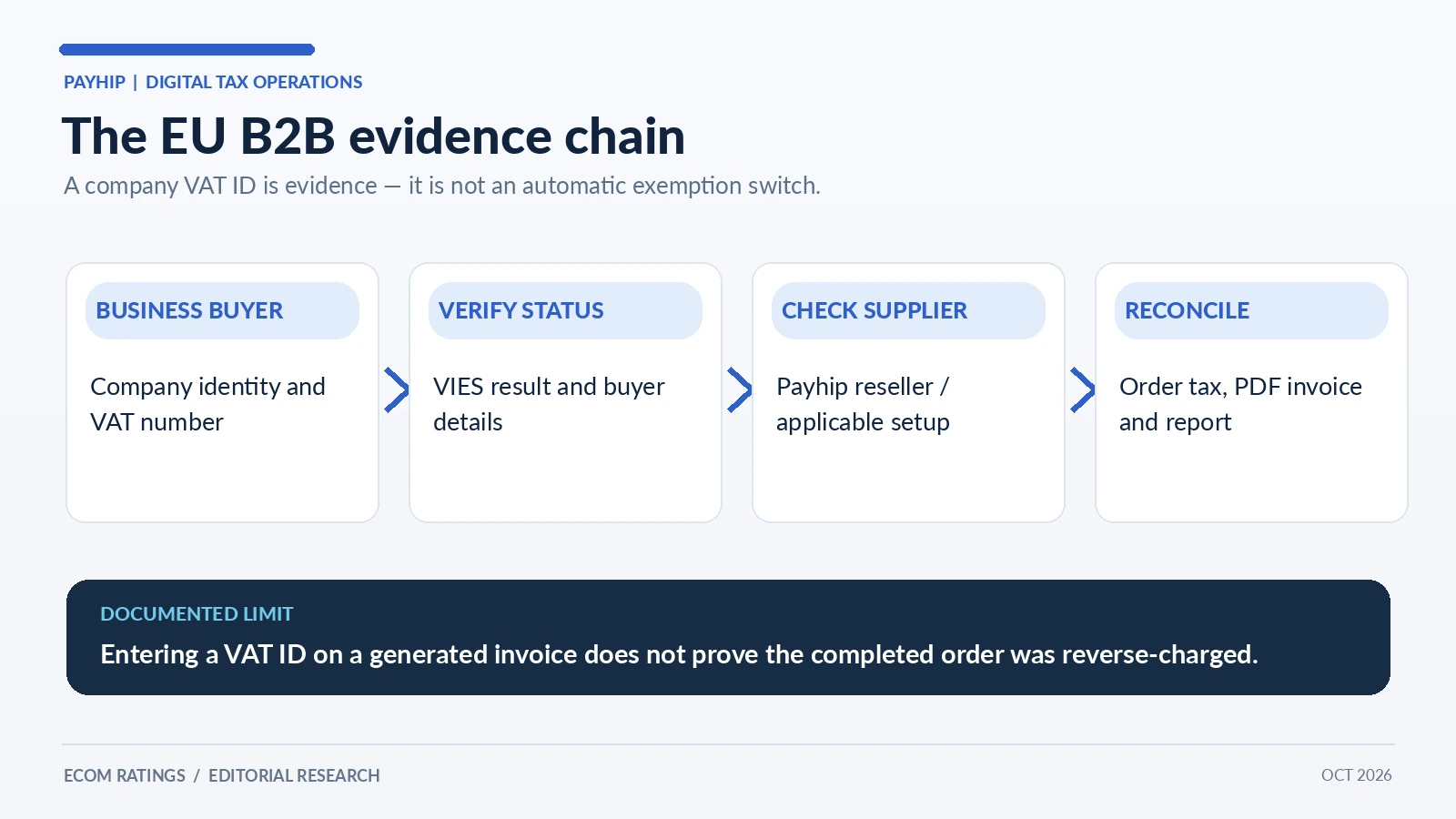
The distinction between a VAT number on an invoice and validated tax treatment is subtle but fundamental. The invoice is evidence describing the transaction. It should not be treated as a button that independently determines the tax law.
Four EU business-purchase scenarios worth testing
Scenario one: an EU business buys a digital guide and VAT is charged. The business emails after payment and provides its company VAT number. The seller should confirm the order details and the PDF invoice, then determine whether the customer is disputing the original tax treatment or merely requesting complete billing details. Adding the VAT number to the invoice may be appropriate as documentation, but it does not prove that the original VAT collection was a mistake.
Scenario two: an EU company enters its VAT information before purchase. The customer’s intention is clearer, but a legal analysis still depends on the supplier and the actual taxable supply. A valid VAT number is important evidence, not a universal exemption voucher. The checkout must show the tax treatment supported by the relevant commercial arrangement. If Payhip’s default reseller service is in use, its support and records should be consulted before applying independent reverse-charge assumptions.
Scenario three: the buyer is a company without a VAT number. Not every organization can present a valid cross-border VAT identification. Some are small businesses, some are not activated for intra-EU transactions and some may be buying for purposes that require additional classification. The seller should not automatically label the transaction B2C or B2B based on a single missing field. Treat it as an exception that needs documentation and appropriate advice if the tax treatment matters.
Scenario four: a seller turns off Payhip’s automatic digital EU VAT handling. The checkout configuration has changed. The merchant now needs to identify and meet obligations that would otherwise have been handled under the default digital tax service. At this point, it is especially unsafe to use a previously generated FAQ answer about Payhip collecting everything automatically. Record the setting and involve a tax professional if cross-border volumes are significant.
These scenarios are decision exercises, not statements that Payhip implements a particular automatic B2B validation flow. The useful test is whether every transaction can be explained from the available order, tax and invoice evidence.
Invoice generation: what buyers can do themselves
Payhip’s help center states that after completing a purchase, the buyer receives an email receipt. That email contains a Generate link for creating a downloadable invoice. The buyer can enter billing details, including personal or company name, address and VAT number where relevant. The finished invoice is produced as a PDF. This is a convenient self-service feature, especially for business buyers who need purchase documents for expense records.
A seller can guide a buyer to the receipt rather than manually inventing an invoice template. That usually minimizes typing mistakes and preserves the product and amount recorded in the purchase flow. A good support answer tells the customer to use the same email address as the order, open the receipt, select the invoice-generation link and verify the resulting PDF before filing it.
However, checking the PDF is essential. Does it identify the correct buyer, seller or reseller, date, product, currency, total and any VAT amount? Does the number entered match the buyer’s verified business identity? Are the invoice details consistent with the payment actually processed? A downloadable document is useful only when it is accurate enough for the customer’s accounting purpose.
If the invoice needs a tax correction rather than merely a company-name edit, the seller should not casually create a second conflicting invoice. Ask who is authorized to issue a corrected document under Payhip’s resale model, and preserve the original order history. Parallel invoices with inconsistent VAT can create more problems than the original request.
VAT ID checks: what VIES can and cannot prove
The European Commission’s VIES checker is the right starting place for verifying an EU VAT number used in cross-border trade. It queries national records. A valid result shows that relevant VAT information was recognized. A negative result does not always mean fraud or that the organization is nonexistent; it may mean the number is not enabled for cross-border dealings or the national system has not yet updated.
For an important B2B sale, record the date of the check, the country prefix, the validated number and the result. Where available, save relevant confirmation information. If the buyer provides a name or address that conflicts with the number, ask for clarification rather than silently “fixing” the invoice. A clear record will help if either party later questions the tax treatment.
Yet VIES is only one layer. Validation says something about registration status; it does not determine whether the precise Payhip transaction should be taxed or reverse-charged. That determination also depends on who legally supplies the service, where the parties are established, whether the product is a qualifying digital supply and whether an exception applies.
For the same reason, sellers should resist the common shortcut of applying a single 0% rule to every invoice with a business VAT number. The European Commission’s own business guidance emphasizes that exceptions exist. Under a reseller model, the seller should first establish the role and correct invoice issuer rather than assuming the creator’s country automatically controls the sale to the end buyer.
A worked tax-inclusive versus tax-exclusive example
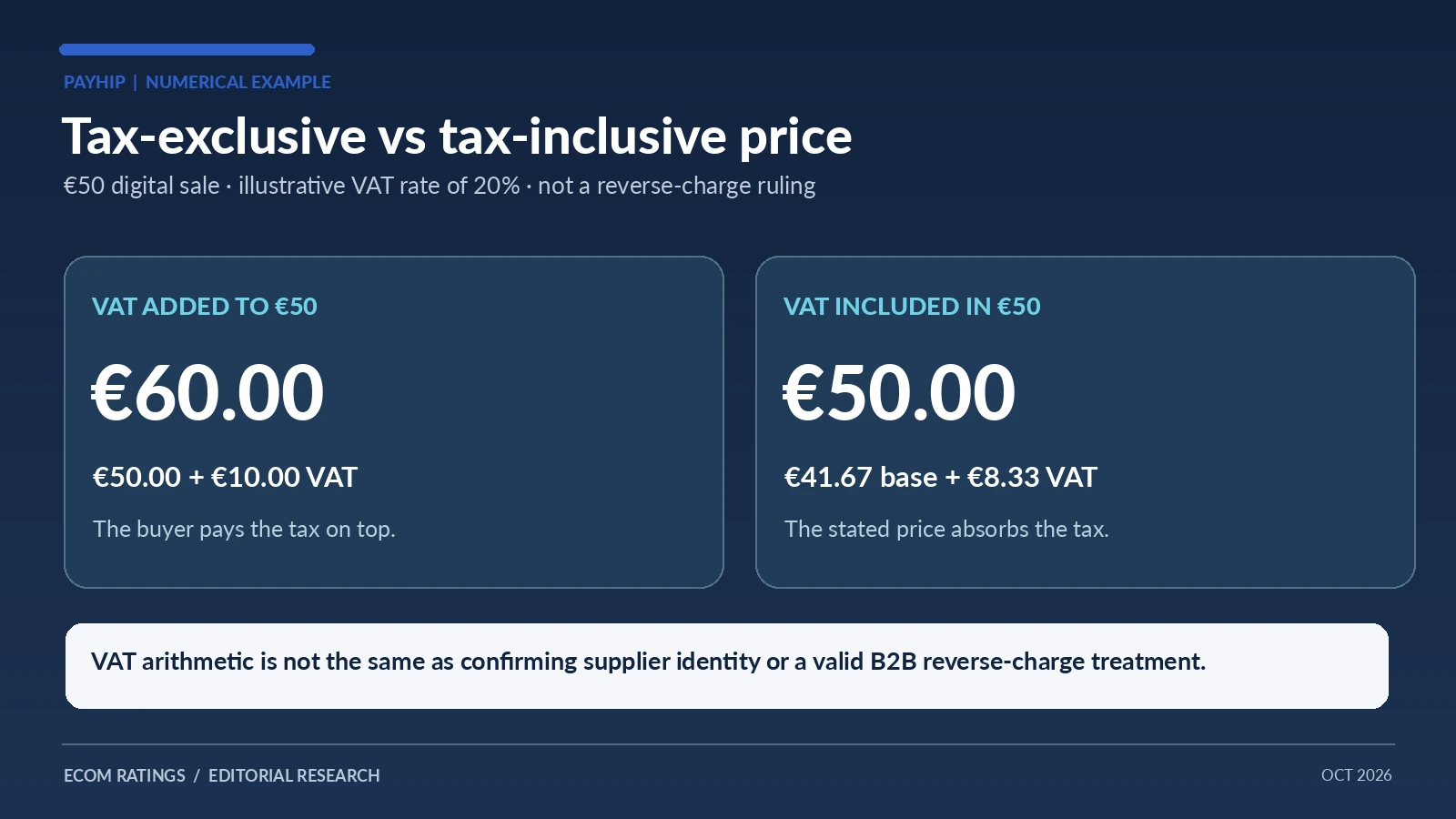
Consider a digital product with a displayed base price of €50 and an illustrative VAT rate of 20%. In a tax-exclusive presentation, adding 20% produces €10 VAT and a €60 customer total. In a tax-inclusive presentation where the customer total is €50, the pre-tax amount is €50 ÷ 1.20, or approximately €41.67, and the VAT portion is €8.33. The difference is commercial: in the first case the customer pays extra; in the second the displayed price absorbs the tax.
That arithmetic is a useful way to understand the Payhip settings, but it is not a quotation of a real Payhip buyer transaction. Actual tax rates vary by country and product treatment; some ebooks may qualify for reduced rates. Platform charges and payment-processor fees also affect the seller’s net receipts. Do not combine the VAT amount with the platform fee into a single “tax rate.” They represent different obligations.
For a B2B buyer, even perfect tax-inclusive arithmetic does not settle whether reverse charge should apply. That remains a legal and contractual classification question. The right process is to determine the applicable treatment first and then use the transaction records to reconcile the amounts. Working backward from a customer’s desired invoice total is not a reliable tax procedure.
What sellers can export and retain for reconciliation
Payhip provides monthly sales reports through the dashboard’s Customers → Sales Report area. These reports include EU and UK VAT totals, payment processor fees, Payhip fees and product sales figures. They are a sensible starting point for reconciling what buyers paid with what the business earned. Store the monthly PDFs alongside statements from the connected payment processor.
The export-customers feature also exposes useful transaction-level fields. Payhip’s documentation lists columns indicating whether EU VAT was applied, the amount of VAT, whether tax was included in the price, the relevant country, payment type, Payhip fee and processor fee. These are more valuable for a disputed corporate purchase than an isolated screenshot of the product page.
A practical reconciliation file can include order identifier, date, customer email, reported country, VAT application flag, VAT amount, total amount, invoice status and support-ticket reference. Keep confidential buyer identifiers in secure systems, not in public spreadsheets or marketing reports. Share only what is needed if asking a specialist to review a disputed tax position.
On the business side, separate Payhip’s digital VAT handling from the creator’s ordinary income tax, domestic business reporting and other obligations. A service that collects a particular transaction tax on an end-customer sale does not thereby file the creator’s entire tax return or take responsibility for every tax connected with the seller’s activity.
A support workflow for “please remove the VAT” requests
The first reply should gather facts, not promise a refund. Ask the buyer for the order reference, date, email used at purchase, company name and VAT number, and the country of the company that made the purchase. Confirm that the request refers to a digital product covered by the relevant Payhip tax process. Then retrieve the order’s tax fields and the customer’s existing invoice.
Second, determine whether the request is about invoice identity or transaction taxation. If the buyer only needs company billing details displayed on the invoice, Payhip’s self-service generator may solve the issue. If the buyer wants the VAT amount removed or recovered, the order needs a substantive tax review. A new VAT number added after purchase cannot be assumed to reverse a prior tax charge.
Third, consult the actual Payhip terms or support for a tax-treatment adjustment under the reseller arrangement. If necessary, include the original order values, the verified customer details and your understanding of the issue. Avoid sending full bank-card details; they are not needed to decide VAT treatment. Keep the answer to the buyer clear about what is confirmed and what remains under review.
Finally, archive the resolution, including corrected invoice documents if issued by the authorized party, and reconcile any resulting payment changes. A one-off request may reveal an important checkout communication gap. If several corporate customers ask the same question, improve the purchase FAQ so expectations are clear before checkout instead of leaving every buyer to discover the rules through support.
What remains the seller’s responsibility even when Payhip handles VAT
The creator still needs to provide accurate product descriptions and appropriate license terms, respond to buyers about the content sold, maintain accounts and reconcile revenue. They also need to understand what Payhip actually promises in its tax and resale terms. Automatic digital VAT handling is a significant simplification, but it is a defined service, not a transfer of every legal duty associated with being in business.
The seller should ensure buyers know how to obtain a PDF invoice, where to find support and how the platform handles VAT within the purchase flow. If the seller chooses to disable automatic tax handling or changes their product category, they should re-evaluate the tax setup rather than assuming old checkout behavior still applies.
Bottom line
Payhip’s default digital EU and UK VAT handling removes a substantial operational burden for creators who sell to buyers across borders. Its reseller model, invoice-generation link and sales reports provide real advantages. The tricky edge case is a B2B buyer who supplies a VAT ID and asks for reverse-charge treatment or a corrected document. That request cannot be solved safely by equating an entered number with a legally established 0% rate.
The robust workflow is to identify the seller of record, validate relevant business information, check what the completed transaction actually did, and distinguish adding invoice details from changing tax treatment. Use Payhip’s documented reports for reconciliation and seek platform or professional clarification where the public documentation does not establish an automatic B2B procedure. This is how the convenience of an automated digital-tax platform translates into dependable business records.
For broader platform context, see our Payhip editorial review. This guide focuses on a narrower implementation and compliance question.
Primary sources and methodology
- Payhip: Digital EU VAT and UK VAT
- Payhip: VAT and sales-tax features
- Payhip: Generate an invoice from a receipt
- Payhip: Monthly sales reports
- Payhip: Export customer and VAT fields
- European Commission: Check VAT numbers in VIES
- European Commission: Cross-border VAT for businesses
- European Commission: VAT invoicing rules
Editorial method: platform features are attributed to Payhip; general EU legal principles to official EU guidance. No undocumented automatic VAT-ID exemption, refund or retroactive reverse-charge function is assumed. The €50 scenarios are arithmetic illustrations, not live Payhip orders. Reviewed October 28, 2026.