
ECOM RATINGS / EDITORIAL RESEARCH
A card decline is frustrating, but it is usually diagnosable. Sellvia's different payment configurations make the first question especially important: who actually operated the checkout? This guide explains how to identify the correct route, document the event, and get a useful answer without guessing at payment data you cannot see.
Source review: October 28, 2026 · Independent editorial guidance · Category: Editorial
Start by identifying which checkout took the payment
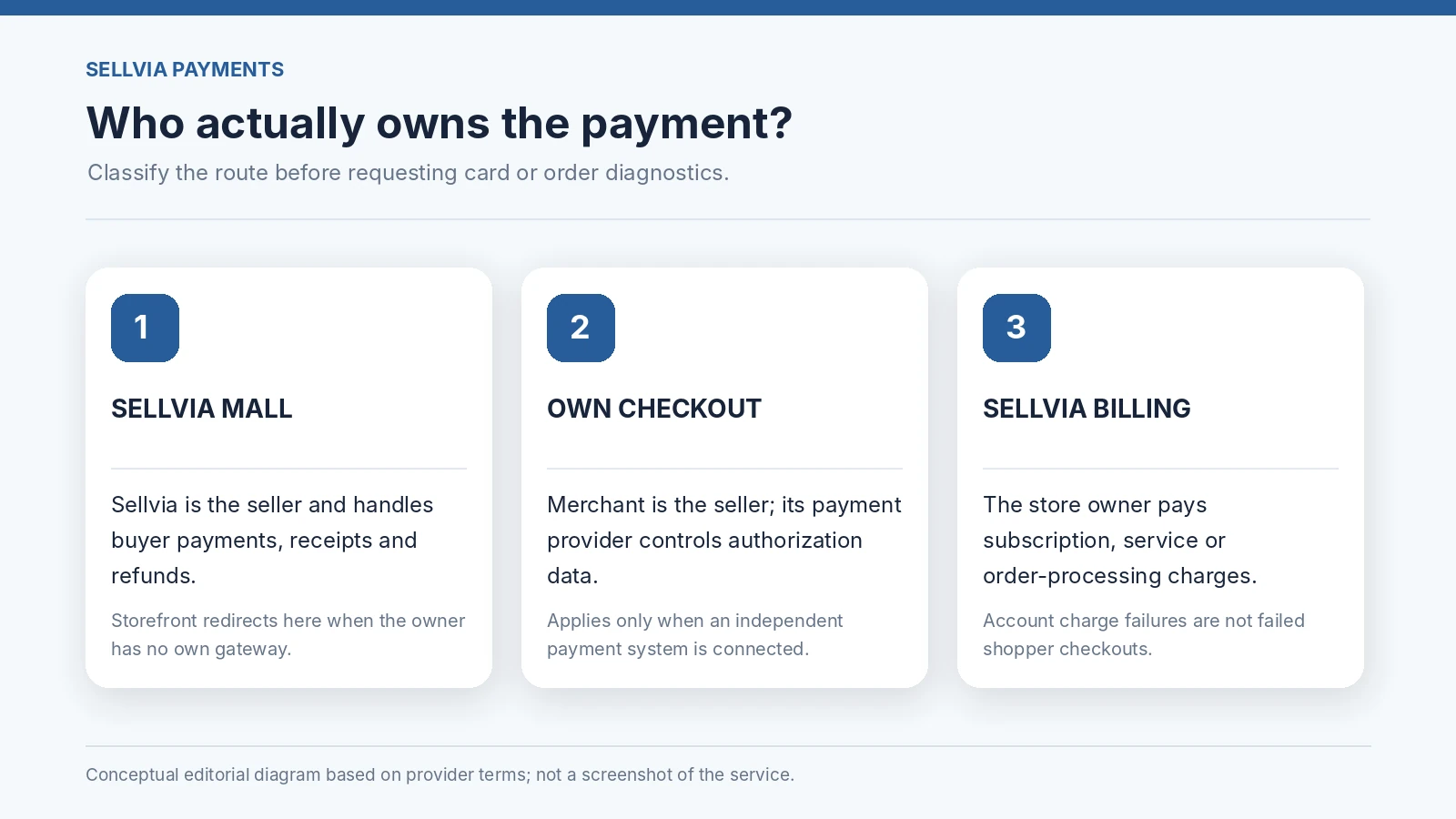
A Sellvia store can operate in two materially different configurations. Under the standard Storefront Configuration, the store displays catalog information and sends shoppers to Sellvia Mall to complete the purchase. Sellvia is the seller and is responsible for payment acceptance, receipts, refunds, and chargebacks. By contrast, a customer who has connected an independently operated payment system to their own store accepts shopper payments directly and acts as the seller for those transactions. Sellvia's published terms distinguish these arrangements explicitly.
This distinction is the foundation of useful troubleshooting. When a buyer reports that a card failed on Sellvia Mall, a storefront owner should capture the shopper's report and guide the issue to the Sellvia-operated checkout team. The owner should not promise that a specific processor code or payment retry is visible in the owner's dashboard. When the card fails on the merchant's own checkout, the merchant needs the logs and controls of their selected payment provider. A third category is a card failing when the store owner pays a Sellvia subscription, service charge, or order-processing fee: that is account billing, not a customer's ecommerce checkout.
The strength of this arrangement is clarity once it is identified correctly. Rather than contacting everyone at once, the owner can match the symptom to the system that owns the transaction. That avoids misdirected tickets and keeps personal card details out of unnecessary channels.
Three failure types that look similar but have different owners
A failed shopper payment, a completed payment with a missing order confirmation, and an unpaid order-processing charge can all appear to a newcomer as “the payment failed.” They are not interchangeable. A bank-declined shopper card means the payment may never have been authorized. A browser or redirect failure may happen after the buyer's bank has authorized a payment but before the visible confirmation arrives. A store-owner processing charge may be declined even though the separate end-customer purchase was completed successfully under Sellvia's selling arrangement.
Your first evidence record should contain the approximate date and time, shopper region where volunteered, the landing page and checkout destination, the exact text of the error, and whether the browser returned to the order confirmation screen. Record whether the buyer sees a pending authorization or settled charge on their own statement, but do not collect screenshots showing full account or card details. The relevant transaction identifier, if available from the authorized payment interface, is much more useful than a full card number.
The crucial question to write at the top of the ticket is simple: “Was this a Sellvia Mall checkout, my own connected checkout, or my Sellvia account billing?” Once you choose that branch, the remainder of the checks become narrower, quicker, and more accurate.
| Checkout route | Who handles the charge | Correct escalation |
|---|---|---|
| Sellvia Mall checkout | Sellvia is the seller | Sellvia payment support |
| Independent merchant gateway | Store owner is the seller | Merchant gateway and bank |
| Sellvia subscription or services | Store owner pays Sellvia | Sellvia account billing |
What the customer can check safely before anyone escalates
There are a few checks a shopper can perform without technical access. They can verify that the card number, expiry date, security code, and billing address were entered accurately. They can confirm that their bank allows online or international payments and that a security verification challenge was not left incomplete. They can try a supported alternative payment method if the current checkout offers one. None of these steps guarantees approval, because the issuer and payment processor ultimately decide whether a card payment is accepted.
It is also sensible to avoid repeatedly submitting the same request while a charge is uncertain. A pending authorization is not necessarily a settled charge, and multiple retries can make the situation harder to explain. Ask the shopper to pause, check the bank's transaction history and purchase confirmation email, and report whether a clear payment status is visible. If the shopper believes money was captured but received no product access, treat that as a reconciliation question rather than simply telling them to try another card.
For a Sellvia Mall checkout, Sellvia Mall's published payment guidance recommends checking card and billing details, consulting the bank when a payment is blocked, trying a different supported method, and contacting its payment support if the issue continues. Those are sensible first-line actions. They are not a claim that every failed Sellvia order uses Stripe, PayPal, or the same payment method: the payment route must be established from the actual checkout.
Read the error message, not your assumptions about the bank
An on-screen “payment failed” banner is a symptom, not a diagnosis. A bank may decline a transaction for insufficient available balance, issuer security settings, an expired credential, cross-border restrictions, authentication failure, or reasons it does not disclose to the merchant. A checkout may also be unavailable due to a temporary network or configuration issue. The store owner should not tell customers that “Sellvia rejected the card” merely because the purchase screen carries a Sellvia brand.
Capture the precise error message and where it appeared: payment entry, 3-D Secure verification, redirect back to checkout, or purchase confirmation. These locations suggest different next steps. A rejection before authentication points toward entered data, issuer decisions, or eligibility; an abandoned authentication flow suggests the buyer should check whether a bank challenge was completed; a failure after an apparent authorization requires confirmation of the actual transaction state.
This is why a good support message says “The customer saw X at Y stage at approximately Z time” instead of “The platform has a payment bug.” The first gives a support engineer an actionable search starting point. The second encourages assumptions and often triggers unnecessary back-and-forth.
A useful distinction: issuer decline, authorization hold, and captured payment
Store owners do not need to become acquiring-bank specialists to handle basic payment questions, but three concepts prevent expensive confusion. An issuer decline is a refusal to approve the payment request. An authorization hold can temporarily reserve money even though no final capture has occurred. A captured payment is a successfully completed transaction that may appear on a statement and require fulfillment or an appropriate refund if the order cannot be located.
A customer might see a pending line item and assume the merchant took money, or might see a payment confirmation from a wallet before the storefront displays the success page. These circumstances demand reconciliation, not a blind retry. If the customer sends a redacted bank statement excerpt, do not keep more financial information than needed. Prefer the last four digits, timestamp, amount, currency, and reference code, where sharing those details is appropriate.
An owner's role is to record what can be verified and direct the request to the party that actually holds the payment records. Under Sellvia's Storefront Configuration, that party is Sellvia. Under independently managed payments, it is the merchant and the merchant's processor. Proper routing is a customer-service advantage as well as a compliance safeguard.
Why order-processing charges require a separate investigation
Sellvia's terms describe order processing as an approval step that releases an attributed order for fulfillment after the applicable service amounts have been paid. Those charges can be paid by card or, where supported, with Order Processing Credits. The credits are prepaid units for order processing, not shopper deposits or funds held on behalf of store owners. An owner who cannot approve an order because their own card payment fails is dealing with a different problem from a shopper whose purchase attempt failed.
For this route, inspect the Sellvia account's billing history, subscription status, any visible failed-charge notice, the processing method chosen, and the available service-credit balance. Record the order identifier and the fee being requested. A screenshot showing the account-level charge and its status can be appropriate when it does not expose private payment credentials. Avoid using a customer's purchase receipt as evidence that an unrelated account processing fee has already been paid.
This distinction also prevents confusion about commissions. The public terms describe commission as a Sellvia-funded promotional incentive, not a split of the shopper's card payment. An end-customer receipt and a store-owner commission entry should not be treated as two views of the same bank transfer. They are separate records for separate obligations.
The owner-run checklist for the first ten minutes
Start with the destination URL. Did the shopper complete the purchase on Sellvia Mall, or did the store use an independent gateway? Next, capture the error state once with the timestamp and device type. Ask whether any completed or pending payment appears on the bank side and whether an order confirmation arrived. If an order ID exists, record it. If there is no order ID, report the checkout route, approximate time, item and the non-sensitive payment reference if available.
Then make a single controlled reproduction where appropriate. Verify the checkout link works on a normal browser session, and note whether the page redirects to the expected domain. Do not use real customer cards in a test. Do not publish screenshots of a customer's billing data. If the problem affects only one buyer, a bank or authentication issue is plausible. If several buyers see the same failure on the same checkout step, preserve a summary of separate occurrences for the payment-owning support team.
The outcome of this ten-minute check is not a definitive root cause. It is a clean evidence package that makes escalation faster. A good support process produces a concise timeline and avoids guessing about issuer responses or processor logs that the owner cannot directly see.
What belongs in an escalation ticket
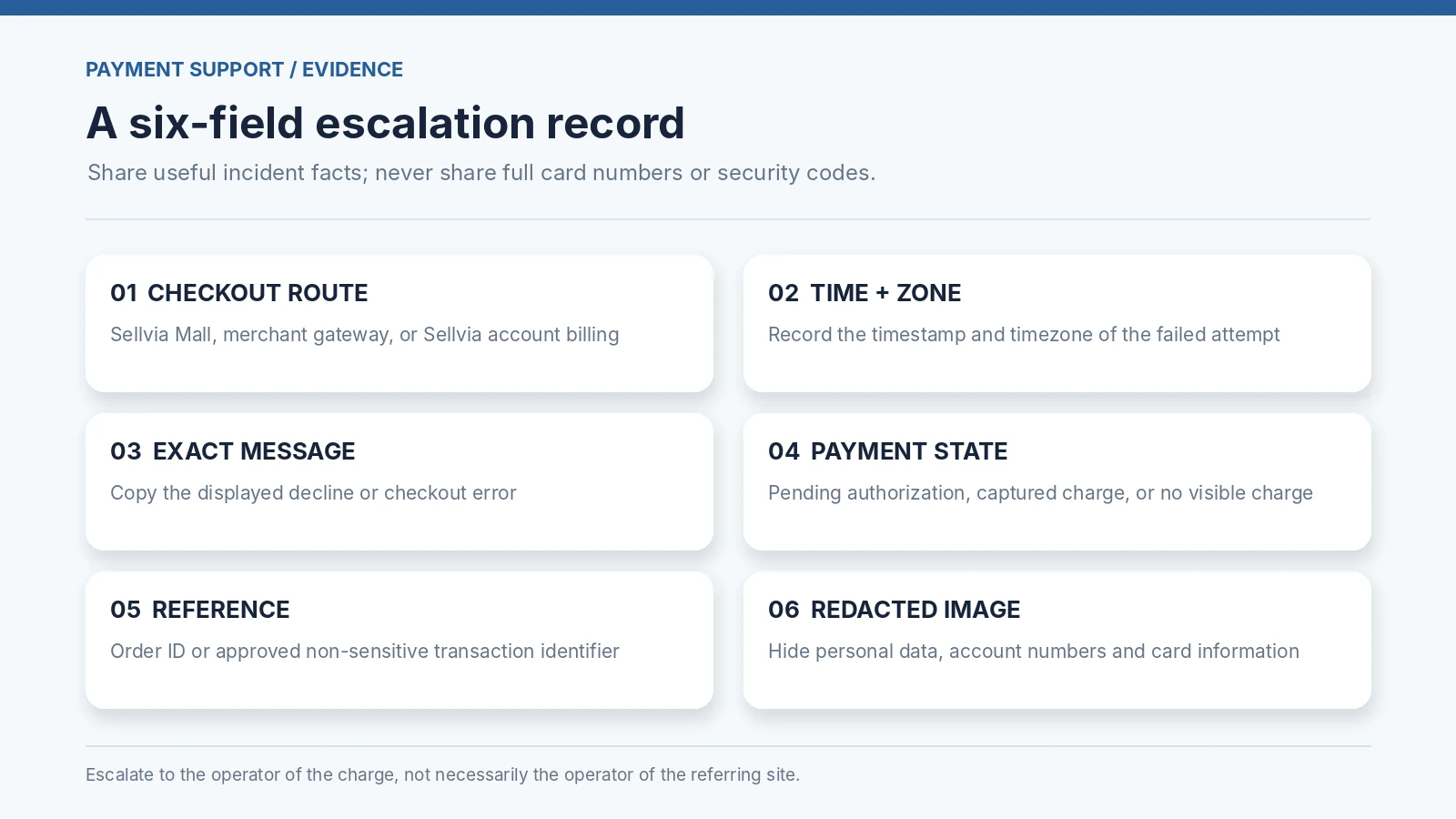
A strong ticket has six fields. First, checkout route and the exact public domain where the failure occurred. Second, incident time, timezone, and the customer's country if relevant. Third, the product and amount, including currency. Fourth, the exact visible error and whether an authentication challenge appeared. Fifth, whether the customer received a confirmation or sees an authorization/settled charge. Sixth, screenshots with all sensitive information redacted, plus any order or transaction reference legitimately available to the person opening the ticket.
Do not send full card numbers, CVV codes, passwords, security codes, or payment-session tokens. Those items are not needed for ordinary troubleshooting and create avoidable security risk. If a support team requires an additional diagnostic field, use its approved secure channel rather than including confidential payment data in a general email thread.
A clear title might be “Sellvia Mall checkout | declined after verification | Oct 28, 14:20 UTC | no order confirmation.” Another would be “Customer-managed checkout | bank authorized but order not created | processor reference available.” The wording makes the key distinction visible before the support engineer opens the evidence.
What the merchant can and cannot confirm in each model
For a Sellvia-operated checkout, the merchant can usually confirm the landing page, referring campaign link, whether the shopper was redirected to the official checkout, and what the shopper reported. The merchant should not assume they can see Sellvia Mall's acquiring-bank logs or modify Sellvia's payment acceptance rules. Sellvia's published terms assign the actual sale, receipt, and payment-related obligations to Sellvia when that storefront route is used.
For an independently managed checkout, the merchant's access depends on the gateway they configured. The merchant may be able to inspect authorization events, webhooks, fraud-rule responses, payment attempts, and failure codes through that provider. These are capabilities of the independent payment system, not necessarily features of the Sellvia dashboard. The merchant is responsible for payment disputes and customer-facing transaction handling in this configuration.
For Sellvia account billing, the merchant can inspect account notices and billing records, and request help with the specific unpaid service amount. Do not conflate a promotional commission balance with money available for a card capture. Keeping these records separate is what makes a support investigation reliable.
When the issue is not really a card failure
Some reports initially labeled “card failed” are actually post-payment access issues. If the buyer has a receipt and an authorized charge but cannot open the digital item, a different workflow is needed: confirm the purchase reference and provide the payment-owning seller with details needed to locate the entitlement. If the buyer has only an abandoned cart and no successful payment, investigating missing downloads is premature.
Other reports come from redirects, browser extensions, blocked cookies, or a device-specific checkout session. Do not assume a particular browser is at fault. Ask the customer to record whether the issue persists in a second supported browser, but do not use that test to claim a processor defect. If the URL unexpectedly changes to an unfamiliar domain, treat it as a security issue and verify the official payment destination before the shopper re-enters credentials.
Finally, a missed order-processing fee has its own account-level resolution path. The owner may need to update the service payment method or use eligible processing credits according to the current dashboard configuration. Diagnosing the correct type of failure avoids asking the wrong team to fix an unrelated transaction.
An after-incident review that improves the next checkout
When the incident is closed, keep a short internal record: classification of the route, verified cause if supplied by the operator, workaround used, whether a duplicate attempt occurred, and the next preventive action. Review checkout links and browser compatibility after significant store changes. Keep the official support contact accessible in account documentation. If several buyers report similar difficulties, compare error stages rather than relying on anecdotal impressions.
A simple quarterly checkout audit can be valuable even when no major outage occurs. Test that product pages link to the expected destination, that support instructions describe the current model, and that customer communications do not promise refunds or retries through an entity that does not operate the charge. For independently managed payment systems, verify webhook delivery and order-status reconciliation with your gateway's documented procedures.
The advantage of a clear Sellvia workflow is that the store owner can focus on marketing and shopper communication while directing payment-specific investigation to the relevant operator. That division only works if the merchant knows which payment configuration the store is actually using.
How to handle a possible duplicate payment without creating another problem
When a shopper reports two charges for one attempted order, the immediate priority is to establish whether both are settled payments or whether one is a temporary authorization. Ask the buyer to compare the transaction dates, amounts, currencies and descriptions with the actual checkout confirmations. Do not ask for full card screenshots. A duplicate-looking pending entry can disappear without becoming a final charge, while two completed captures require the payment operator to reconcile them.
Under the Sellvia Mall storefront route, refer the buyer and the redacted evidence to the Sellvia-operated seller. Under a customer-managed checkout, examine the merchant's processor records and its duplicate-payment or refund tools. If the issue concerns two Sellvia subscription or service charges, use the owner's billing support route instead. The purpose of these distinctions is to avoid issuing a refund from the wrong system or instructing the customer to submit a third payment when the first two are unresolved.
A useful internal safeguard is to record each incident under a single reference and keep follow-up messages in one support thread. That creates a traceable resolution while minimizing repeated requests for sensitive details.
Bottom line: route first, investigate second
Sellvia card failures are easier to handle when the first question is not “Why did this card fail?” but “Which checkout and which payment obligation are we discussing?” A Sellvia Mall buyer payment, a customer's independently managed checkout, and a store owner's service charge have different records and different responsible parties. Once the route is known, collect a compact evidence set: timestamp, error message, domain, confirmation state, amount, and non-sensitive reference. Then escalate to the operator of that charge.
This process is useful precisely because it avoids unsupported promises. An owner does not need private processor data to help a buyer. They need accurate routing, consistent documentation, and a safe handoff. Those habits reduce confusion, protect customer information, and make the support experience more professional.
Sources and editorial method
Sellvia Mall official Payment Methods and Failed Payments guidance
The article distinguishes documented platform responsibilities from general payment troubleshooting guidance. It does not claim access to private Sellvia logs, any specific merchant dashboard, or the reader's issuer decisions. Reviewed October 28, 2026.