
EDITORIAL RESEARCH / ECOM RATINGS
A calm, practical recovery guide for customers who cannot locate an access email or see a purchased digital tool in their Ecomzy Mall account.
Independent documentation analysis · Sources checked October 28, 2026 · Practical guide
Buying a digital tool should be much simpler than buying something that needs to be shipped. That is the idea behind Ecomzy Mall: once payment is confirmed, the customer receives an email with access instructions, signs in to a personal account, and can use the purchased tool in a browser. The platform’s public FAQ also says purchases can be revisited without a general usage limit.
Yet one common question remains after online checkout: what should you do if the payment appears successful but the purchased tool is not visible where you expected it? Usually the best first move is a short, structured check of email, account identity and the payment record. This guide explains that process using the platform’s published help materials and distinguishes official instructions from general troubleshooting recommendations.
First identify what is actually missing
“I cannot find my purchase” can describe several very different situations. One customer completed payment but cannot locate the confirmation email. Another has the email but is signed in under a different address. A third sees a pending bank authorization rather than a completed transaction. Someone else may be trying to open a product on an unsupported browser extension or using a cached page that has not refreshed.
The easiest diagnostic method is to separate the purchase into three events. Payment is the financial event: was a transaction completed? Notification is the communication event: did the customer receive instructions? Entitlement is the account event: is the purchase attached to the correct Ecomzy Mall identity? The public FAQ confirms that after payment confirmation, access instructions are emailed and the purchased tool should be ready when the customer logs into their personal account.
These three events often complete within a short interval, but do not assume that a notification delay proves the product is unavailable. Account access can be checked directly. Equally, do not interpret a temporary card authorization as definitive proof that the merchant has received final payment. Use the actual receipt, provider status and support confirmation rather than a guess based on what a banking app shows.
The fastest official recovery route
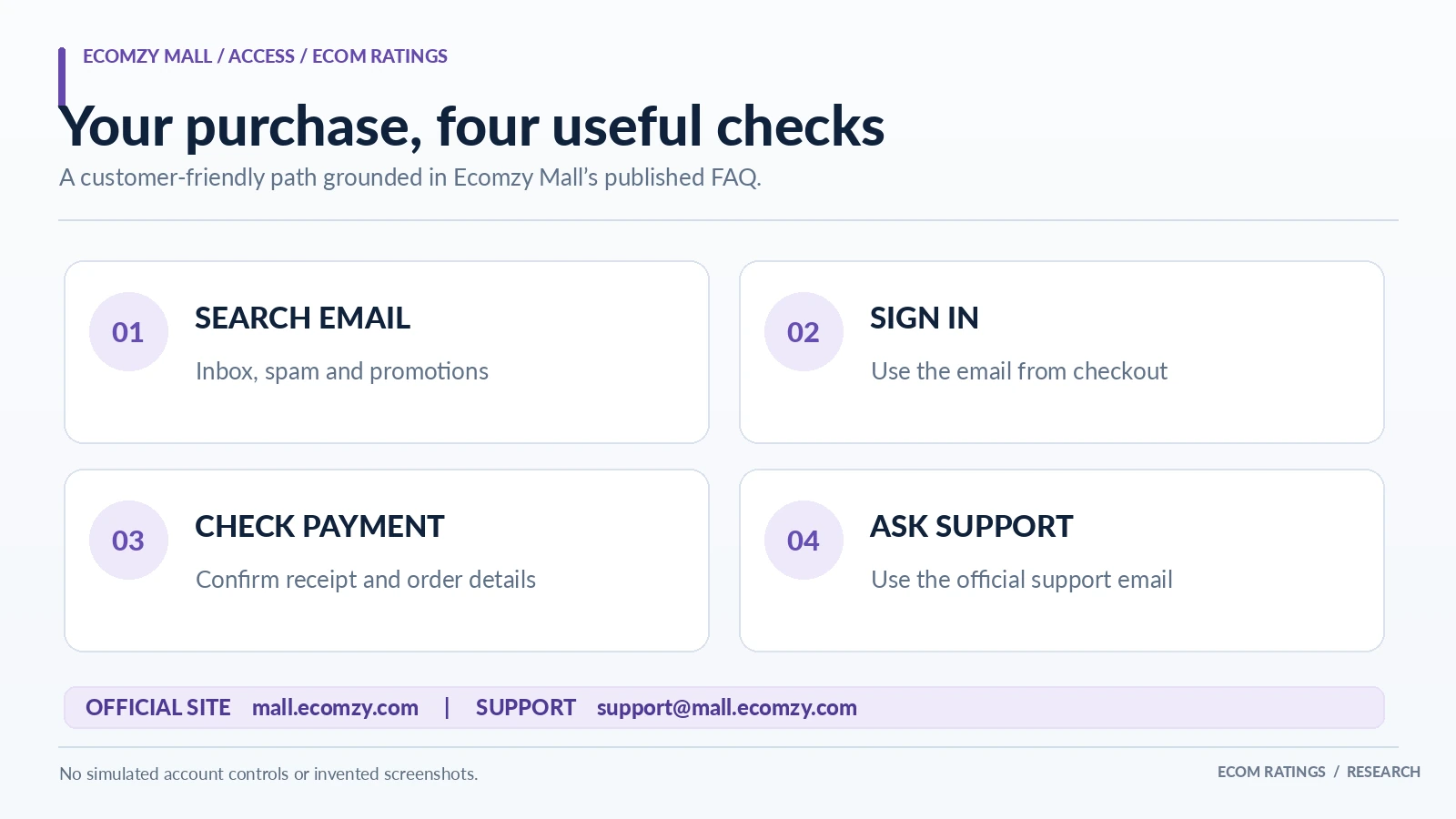
The Ecomzy Mall FAQ gives a concise set of official first steps. Check the email inbox, including spam or junk and promotions folders. If the access email is not there, go to the actual mall.ecomzy.com website and sign in using the same email address entered at checkout. The FAQ says the purchases should be available in the account. If this does not resolve the problem, contact [email protected], including the checkout email and a description of the issue.
Those instructions are unusually useful because they provide a recovery route that does not depend entirely on the confirmation message. A customer who no longer has the original email can still try to access the product through the account. In practice, that makes Ecomzy Mall’s login-based model more resilient than a product that can only be retrieved through a one-time message.
A sensible order is important: verify the address first, sign in second, collect payment information third, and contact support fourth. Opening duplicate accounts or buying the same item again should not be the first response to a missing email. Duplicate actions can introduce further confusion around which account owns the entitlement and whether a second payment was necessary.
Why the checkout email is the key to finding the order
The most useful identifier in the official troubleshooting instructions is not the purchaser’s display name. It is the email used at checkout. This matters because people frequently have multiple inboxes, use different browsers with stored logins, or pay through digital wallets associated with another email address. A customer can sincerely believe they are “in the right account” while the original purchase is attached to a separate address.
Start by looking for transaction-related messages across the inboxes you actually control. Search for the mall name, the purchased tool’s title, order confirmation phrases and the date of purchase. Include the spam, promotions and archived folders. If the payment was made by PayPal, check the email on the PayPal transaction as well, while recognizing that the wallet’s contact email and the email entered at the merchant checkout are not necessarily identical.
Once you identify the likely checkout address, use it to sign in on the official website. Do not send passwords or one-time authentication codes to someone claiming to offer order recovery. Ecomzy Mall’s FAQ does not instruct customers to reveal those credentials to support. The correct goal is to establish account ownership through the site’s ordinary authentication flow or the support team’s authorized process.
Distinguish a completed charge from a pending authorization
Before assuming that access should already exist, review the payment status. Credit and debit card systems can display pending authorizations while a charge is still being finalized, and a bank’s terminology may not match a merchant’s fulfillment status. A screenshot showing a temporary hold is useful context for support, but it does not always prove a settled order. The strongest customer-facing evidence is a successful checkout confirmation, a receipt, or a clearly completed payment record.
The Ecomzy Mall FAQ says the business accepts Visa, Mastercard, American Express and Discover, as well as Apple Pay, Google Pay and PayPal. It identifies Stripe and PayPal as its payment processors. This matters because the buyer may recognize a wallet or processor confirmation rather than the exact website name on every notification. Avoid assuming that an unfamiliar line in a wallet history is a separate merchant purchase until you compare amount, time and transaction reference.
For bank statements, the FAQ names Ecomzy Technologies LLC as the charge descriptor and USD as the transaction currency. If the bank shows a converted amount in another currency, compare the USD charge and its approximate timestamp rather than expecting the local-currency number to match the catalog price exactly. Payment-provider and foreign-exchange details can explain superficial differences without indicating an unauthorized charge.
Do not confuse a tool with a file you must download
A distinctive advantage of Ecomzy Mall’s model is that its tools are designed to run in the browser. The FAQ says there is nothing to install, and customers can access their products from phones, tablets, laptops or desktops. A purchaser looking for a ZIP attachment or an installer may mistakenly think the order is missing when the purchased experience is actually an account-based tool.
That distinction changes troubleshooting. Instead of searching only for a “Download” folder, open the official account experience and look for the item associated with the purchase. Use the access instructions if they arrived. Do not treat browser-based access as a lesser form of ownership; it is simply how this category of product is delivered. The FAQ states that purchased tools can be revisited and used again through the account.
For personalized AI-assisted tools, the actual output may be generated only after the purchaser provides inputs. The product entitlement and the generated result are separate stages. If the tool is accessible but the result is not appearing, the issue may concern a browser session, input validation or a temporary technical fault rather than the original payment. Describe that distinction accurately when contacting support so the team can investigate the right layer.
A practical recovery checklist for desktop and mobile
Before contacting anyone, open a clean browser tab and type the official address directly rather than following a link from an unknown message. Sign in with the checkout email. If the product does not appear, refresh the page and confirm the user identity displayed in account settings. If possible, compare the experience on a second supported device or browser; that helps distinguish a local display issue from a missing account entitlement.
Use private or incognito mode only as a diagnostic step, not as a workaround for forgotten credentials. A private window will not carry an existing authenticated session. If signing in requires a password reset or another account recovery action, use the site’s official flow; do not invent an account with a new address just to continue. If an email link does not open, try the main website first, as the FAQ suggests.
Keep troubleshooting proportional. Clearing all browser data, disabling security software, or repeatedly retrying payment is often unnecessary. Start with the least disruptive checks: correct domain, correct email, account sign-in, order evidence, then support. This sequence is both faster and safer for most customers.
What to include in a support request
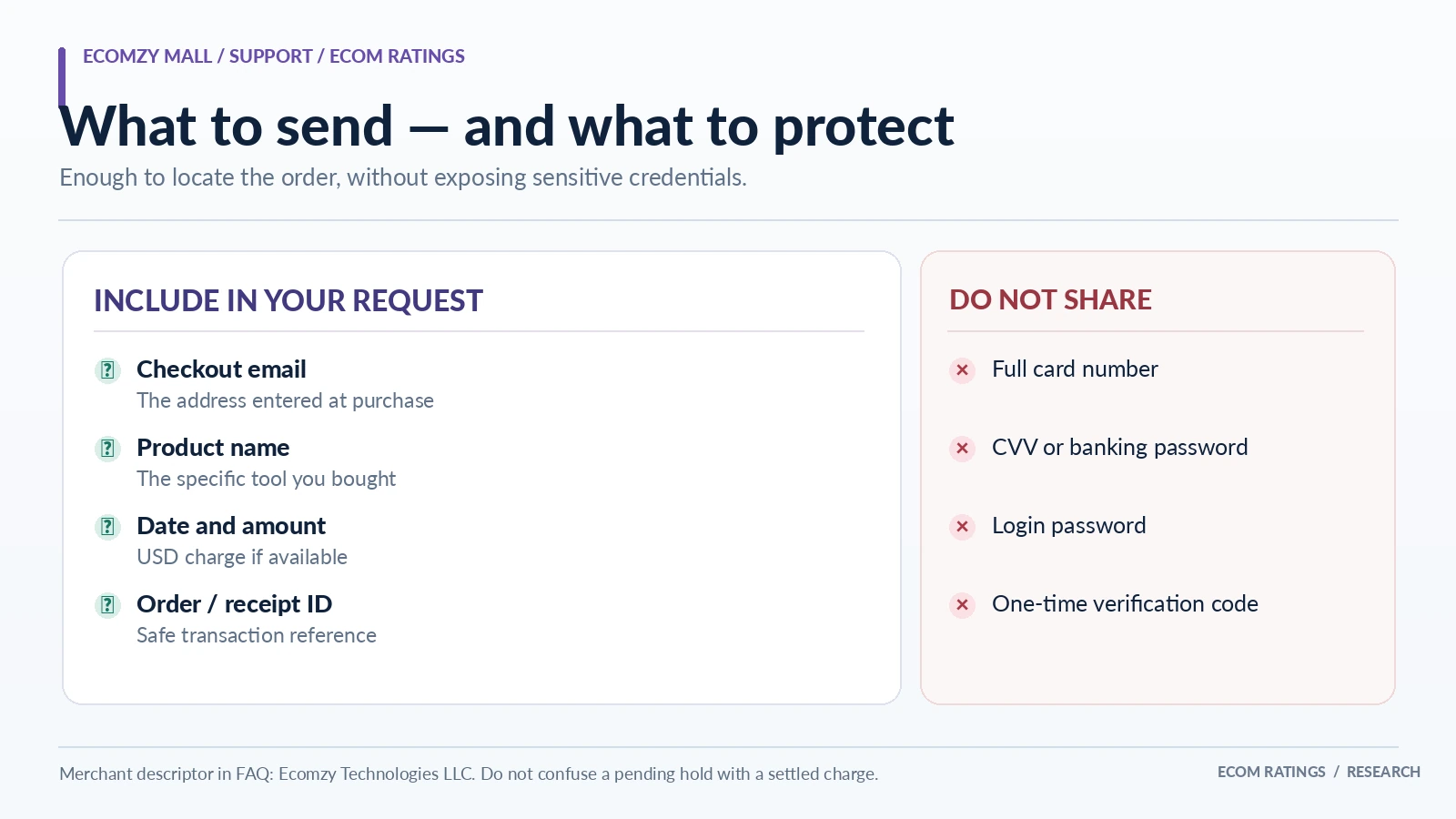
Ecomzy Mall’s FAQ says to email [email protected] with the checkout email and a description of the issue. You can make that request more actionable by including the product name, date and approximate time, amount, payment method category and available receipt or order reference. If a bank descriptor is visible, mention it. If the payment is merely pending, say so plainly instead of describing it as completed.
A clear message might explain: “I purchased [tool name] on [date] using [email]. I checked spam and promotions, and signed into mall.ecomzy.com with that address, but I cannot see the tool. My payment provider shows [completed/pending] for [amount]. Please check which account has the purchase and how I can access it.” This structure lets support search the right transaction and follow a traceable sequence.
Protect privacy. Do not email a full card number, CVV, password, one-time sign-in code or unrelated bank statement. If a screenshot is needed, crop it to the merchant descriptor, date, amount and safe transaction reference. The goal is to verify the purchase, not to disclose financial credentials. A support agent can ask for additional appropriate identifiers through official channels if genuinely necessary.
Three realistic situations and how to handle them
Situation A: payment completed, email missing. Check junk and promotions, then sign in with the checkout address as the FAQ recommends. If the product appears, the entitlement may already be correct and only the notification was missed. Save the purchase reference for future use, and consider adding relevant service emails to the address book.
Situation B: email exists, account does not show the tool. Confirm that the login address matches the checkout email character for character. A personal mailbox and a business mailbox are not interchangeable. If they differ, contact support with the two addresses and ask for guidance rather than trying to bypass account ownership checks. A confirmation email is helpful evidence but should not be assumed to authorize account transfers automatically.
Situation C: bank charge visible, no confirmed receipt. Verify whether the bank entry is pending or complete and whether the timestamp and amount match the attempted purchase. Gather safe evidence and ask support to trace the order. Avoid purchasing again merely to test whether the first order works. The issue may be payment confirmation rather than delivery, and a second purchase can complicate reconciliation.
What if the wrong email was typed at checkout?
A mistyped address is more difficult than a lost email because the merchant may have sent the notification or attached the entitlement to a mailbox the purchaser cannot access. The correct response is not to attempt to sign in as somebody else. Contact the official support address and explain the likely typo, giving the correct contact email and safe details of the payment.
Do not assume that an email correction can be performed automatically or without identity checks. The public FAQ does not specify an account-transfer policy or exact verification steps. Those are support decisions. A merchant should take care to avoid granting an order to an unrelated person who merely knows a name or amount. A patient, documented correction process protects both the original buyer and the platform.
For customers, a useful prevention habit is to verify the email on the checkout confirmation page before completing future purchases. For businesses operating digital tools, it is equally useful to keep a single dedicated account mailbox rather than rotating between personal, work and wallet addresses. That simple choice reduces many access issues.
How Ecomzy Mall’s account model supports repeat use
The platform’s public materials explain that once a tool has been purchased, the buyer can return and use it through the account without a general usage limit. That is a meaningful feature for tools used repeatedly: a planner, writing assistant or analysis workflow can be opened again when circumstances change instead of being treated as a disposable download. In practical terms, a successful recovery restores ongoing utility, not just possession of one file.
The FAQ also states that most tools are one-time purchases; subscriptions, when applicable, are identified on the product page. That distinction helps explain why an account may contain a lasting purchased tool alongside any separately labeled subscription-based access. If you are checking whether a particular order should be available today, review the actual product terms rather than assuming every product behaves identically.
Keep receipt, account and product records together
Avoid sharing account credentials. Shared notes should identify the administrative owner of the purchase, not include passwords or permanent authentication tokens. For especially important tools, periodically confirm that the login still works and that the owner can retrieve the product through the official website. This is an access-continuity habit, not a statement that the platform regularly loses purchases.
If you want an internal checklist for teams, use five columns: product, purchase date, checkout email, payment reference and current access status. A sixth column can store a support ticket reference if assistance was needed. This light recordkeeping is enough for most small operations without turning digital purchases into a complicated asset-management project.
When a refund question is separate from recovery
A missing access email is not automatically a refund dispute. Ecomzy Mall advertises a 30-day money-back guarantee in its FAQ and explains how to contact support, but an access-recovery request and a refund request are different actions. If you still want the tool, ask support to restore or locate access first. If you wish to request a refund, follow the current refund policy and state that intention clearly.
The FAQ says refund requests are processed within one to two business days, while bank or payment-provider posting may take five to ten business days after processing. Those are published expectations, not a guarantee for every exceptional case. Keep refund correspondence and the transaction reference in case you need to follow up with the merchant or payment provider.
Do not open a card dispute simply because an account email was delayed if the issue can be resolved directly and promptly. The better first step is to use the published contact route, describe the facts and let support trace the transaction. That does not remove any consumer rights; it simply avoids escalating a recoverable access question before the basics have been checked.
A ten-minute recovery sequence you can reuse
Minute one: identify the payment date, product and exact email used at checkout. Minutes two and three: search inbox, spam, promotions and archived mail. Minutes four and five: type mall.ecomzy.com directly and sign in using that checkout email. Minutes six and seven: verify whether the tool is present and whether the browser experience works on a supported device. Minutes eight and nine: record the payment status and safely capture the relevant order details.
This is an editorial workflow rather than a formal service-level promise. Actual recovery may require verification by the payment provider or the Ecomzy Mall support team, and there is no public evidence for a guaranteed ten-minute resolution. The value of the sequence is that it eliminates avoidable ambiguity before a ticket is opened.
Bottom line
If an Ecomzy Mall purchase is not showing, the most effective first response is not a second payment or a complicated technical intervention. It is the published recovery route: check email folders, sign in at the official site with the checkout address, and contact support with clear order details if the tool is still unavailable.
A little documentation improves the experience further. Keep the right email, product name and safe receipt reference together, avoid disclosing credentials, and distinguish pending payments from completed orders. This turns a frustrating search for a missing email into a straightforward transaction-and-access check.
For additional product and support details, consult the official Ecomzy Mall FAQ. Ecomzy Mall purchases should not be confused with a separate Ecomzy store subscription.
Primary sources and verification
- Ecomzy Mall: Frequently Asked Questions
- Ecomzy Mall: Privacy Policy
- Ecomzy Mall: Refund Policy
- Ecomzy Mall: Payment Methods
Editorial method: Ecomzy Mall’s official FAQ supplies the account access, payment, support and refund facts. The example cases and ten-minute troubleshooting sequence are editorial recommendations, not a claim about an internal support ticket workflow or access-transfer automation. Review date: October 28, 2026.