
A working store is not an indexing report. Verify the product URL, rendered HTML, sitemap and Google-selected canonical independently.
Verified: October 26, 2026 · Ecom Ratings · 2,746 words

Installing the Ecwid plugin on WordPress creates a storefront, but it does not guarantee that every product appears in Google. A merchant can see a functioning catalog inside WordPress while Google sees a different set of crawlable URLs, an unexpected canonical page or a second copy on the Ecwid Instant Site. These are three different diagnostics: rendering, discovery and index selection.
This guide tests what Ecwid actually provides to WordPress, which URLs are candidates for indexing, and how to diagnose canonical conflicts without accidentally deindexing the store. It also separates official Ecwid features from Google Search behavior. The goal is not to repeat the familiar advice to “use keywords” but to give a merchant a practical audit that can be performed on one real product and extended to the full catalog.
Start by mapping three layers of the store
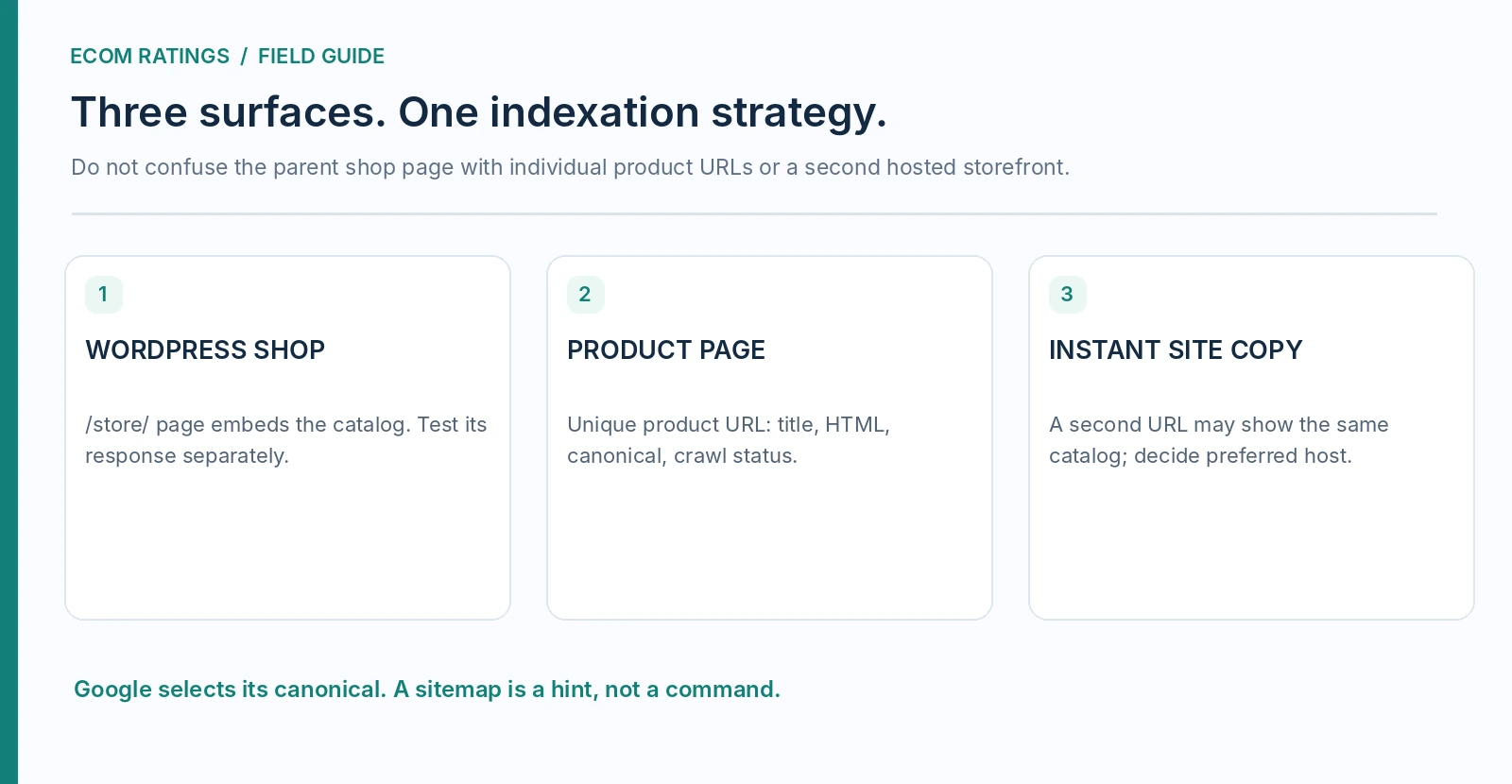
The first layer is the WordPress page that contains the Ecwid storefront. Ecwid says its official plugin can create a Store page and embed a store in other WordPress pages using blocks. The second layer is the product or category URL exposed through that integration, usually as a readable path when the integration and settings support SEO-friendly URLs. The third is any Ecwid Instant Site, which may be a separately accessible storefront for the same underlying catalog.
Do not equate the presence of one WordPress page in a sitemap with comprehensive product discovery. That page may show the main shop, while individual product URLs are the pages that answer specific product searches. Likewise, a separate Instant Site can have its own URLs, metadata and sitemap, creating parallel pages with substantially the same product description. Indexing strategy begins by writing down which host and URL family is intended to win in Google results.
For a hypothetical store, make a map of /store/, /store/ceramic-mug-p123/, /store/homeware-c456/, a WordPress blog article, and the Instant Site version of the same mug. These are illustrative routes, not guaranteed current Ecwid URL shapes. Test the live URL that your browser actually reaches and the server’s redirect behavior instead of assuming a specific suffix is always present.
What Ecwid says Google can receive
Ecwid documents search-friendly product and category URLs for its WordPress plugin and says it provides static HTML copies of product and category pages to search engines. This matters because the dynamic storefront visitors interact with may be assembled differently from the response a crawler receives. Ecwid also says it generates product structured data and metadata. Those features make content discoverable in principle; they do not promise that Google will index every SKU.
The static-copy claim is a vendor feature statement, not the result of testing your particular site. Hosting caches, security services, redirect rules and plugin combinations can alter delivery. The right verification is to inspect a representative canonical URL, its raw HTML, the rendered page and the Google Search Console URL Inspection report. A store with six thousand variants should not begin troubleshooting by requesting indexing for six thousand pages; first establish that one high-value product page works end to end.
A public browser test checks that the product opens. A source inspection checks whether meaningful product title, description and indexable metadata appear in the response. A Google live test checks whether the crawler can fetch it. The indexed URL Inspection report shows whether Google actually selected the page, chose another canonical or has not indexed it. Each stage answers a distinct question.
A URL inventory that catches hidden duplicates
Export a sample of product names, category names and product IDs. For at least ten representative records, capture the storefront’s visible URL, a URL reached from an internal category link, the URL used in product-sharing widgets, the canonical declared in the page source, and any matching Instant Site URL. Flag differences in host, path case, trailing slash, product-ID suffix and query parameters. Do not call every difference a duplicate until you verify that they serve substantially the same main content.
Suppose an old email points to a product’s former name, while the current catalog generates a new readable slug. A shopper might still reach the item through a redirect or internal route; Google may discover both. The task is to establish a stable preferred destination and a consistent signal, not simply to make the URL prettier. After changing product titles or custom slugs, retest old links from emails, newsletters and indexed results.
An inventory should have columns for HTTP status, final URL, self-declared canonical, selected Google canonical, WordPress sitemap presence, Instant Site equivalent and internal-link count. This is especially useful in WordPress because a general SEO plugin may manage canonical elements for WordPress pages while Ecwid manages its embedded store data. Their outputs need to agree rather than compete.
Clean URL slugs on the WordPress integration
Ecwid’s SEO guide states that WordPress users can activate custom URL slugs under WordPress admin → Ecwid → Storefront. This enables more deliberate product and category naming, but a slug is not a ranking guarantee. Use stable words that describe the product rather than stuffing repeated commercial keywords. An accurate product name, distinctive description and meaningful category context are more useful than changing the URL every time marketing language changes.
Before enabling or changing slugs, make a baseline export. Identify existing product links in advertising, email, Google Search Console, structured data and your navigation. Then change one low-risk product, follow the old URL, inspect the final HTTP response, and verify the new page’s canonical reference. If the old URL no longer resolves, a migration plan may be necessary. Do not assume that a redirect feature documented for the newer Ecwid Instant Site automatically applies to every WordPress storefront configuration.
Also be careful with WordPress permalink changes. Moving the entire shop from /store/ to /shop/ may affect all nested product paths. Test the effect on product URLs and old backlinks before saving a new global permalink structure. A neat parent path is not worth losing months of established discovery if the migration cannot be tracked.
Sitemaps: WordPress and Ecwid are not interchangeable
Modern WordPress installs expose a core sitemap at /wp-sitemap.xml, while SEO plugins commonly offer their own sitemap indexes. Ecwid’s WordPress integration guide also discusses sitemap support for store product and category URLs. The important question is not whether a sitemap file exists. It is whether the exact preferred product URLs appear in the sitemap you submit, and whether those URLs resolve as indexable pages.
Ecwid Instant Sites have their own sitemap support. That must not be confused with an automatic promise that every WordPress sitemap generator includes every product URL in every version and configuration. Open the generated XML and search for a test product. If it is absent, inspect Ecwid plugin integration settings and the sitemap plugin’s compatibility and filters. Do not manually paste hundreds of generated URLs into an XML file that will be overwritten by the next update.
Treat sitemap inclusion as a discovery and canonical-preference signal, not an indexing order. Google explicitly describes sitemap inclusion as a weaker canonicalization signal than redirects or rel="canonical". If an HTML page declares another URL as canonical, repeatedly submitting its URL in a sitemap is unlikely to solve the underlying conflict. Make the technical signals consistent first.
Canonical conflicts between the shop and Instant Site
A merchant often uses Ecwid’s hosted Instant Site during launch and later embeds the same store into WordPress. That leaves two possible homes for identical product descriptions. Ecwid documents a control to stop search engines from indexing the Instant Site if the store was embedded elsewhere. This is an important way to reduce duplication, but it should be used after confirming that the WordPress product pages are crawlable and have become the intended primary experience.
Google chooses canonical pages using several signals, including redirects, canonical link annotations, sitemap hints and overall page quality. A declared canonical is a strong hint rather than an instruction Google must obey. The first check is therefore the indexed URL Inspection report, which distinguishes the declared canonical from the Google-selected canonical. A page excluded as a duplicate may be functioning exactly as designed if Google picked the preferred WordPress version.
Do not use robots.txt to force Google to choose the preferred duplicate, and do not blindly set noindex on every nonpreferred page in place of canonicalization. Google’s canonical documentation cautions that robots blocking and noindex are not substitutes for a clear canonical signal. Disabling Instant Site indexing is a store-level decision; document it and confirm that no valuable hosted pages were depending on that site alone.
SEO plugin conflicts: the head tag audit
WordPress SEO plugins can generate page titles, descriptions, Open Graph tags and canonical links. Ecwid can generate product metadata and structured data of its own. The plugin stack may therefore produce overlapping signals when the shop shares a WordPress page shell. You need to examine the actual resulting HTML, not rely on a screenshot of SEO plugin settings.
Choose one individual product page and inspect the document’s head. Record how many canonical link elements exist, their destinations, the effective title and meta description, and whether any noindex directive appears. Then check the page’s visible product content and the product-related structured data. The exact fix depends on the conflicting source; do not blindly disable WordPress SEO globally to silence a product-specific issue.
A canonical to the generic /store/ page from every product would be especially harmful if the products are supposed to compete for their own long-tail searches. Conversely, an indexable filtered view that duplicates a category may not deserve a separate canonical target. The decision should follow whether the URL has independent content and search intent. When altering a plugin’s behavior, preserve a before-and-after HTML snapshot and clear all relevant caches before concluding that the change worked.
Product structured data: present does not mean eligible
Ecwid says it adds Schema.org product structured data and supplies JSON-LD plus microdata on WordPress stores. Google can use structured data to understand a page and assess eligibility for richer search results. However, structured data neither forces indexing nor guarantees a rich result. Product fields must reflect what the buyer can actually see: correct name, availability, price and currency, without unsupported ratings or invented reviews.
Use Google’s Rich Results Test on a product URL, then manually compare marked-up values with the storefront. Test an out-of-stock product and a variant with a different price, not only the bestselling default SKU. If the theme, SEO plugin and Ecwid each output related schema, inspect whether there are coherent entities or contradictory product objects. The fact that a validator finds multiple JSON-LD blocks is not alone an error; contradictions and missing required information matter.
For a site with hundreds of products, build a sample matrix by product type: physical item with variants, digital product if supported, temporarily unavailable SKU, sale-price item and product with customer reviews. The first test identifies systemic template issues; later spot checks can verify that individual catalog updates do not produce stale markup in the server response.
A repeatable Google Search Console test
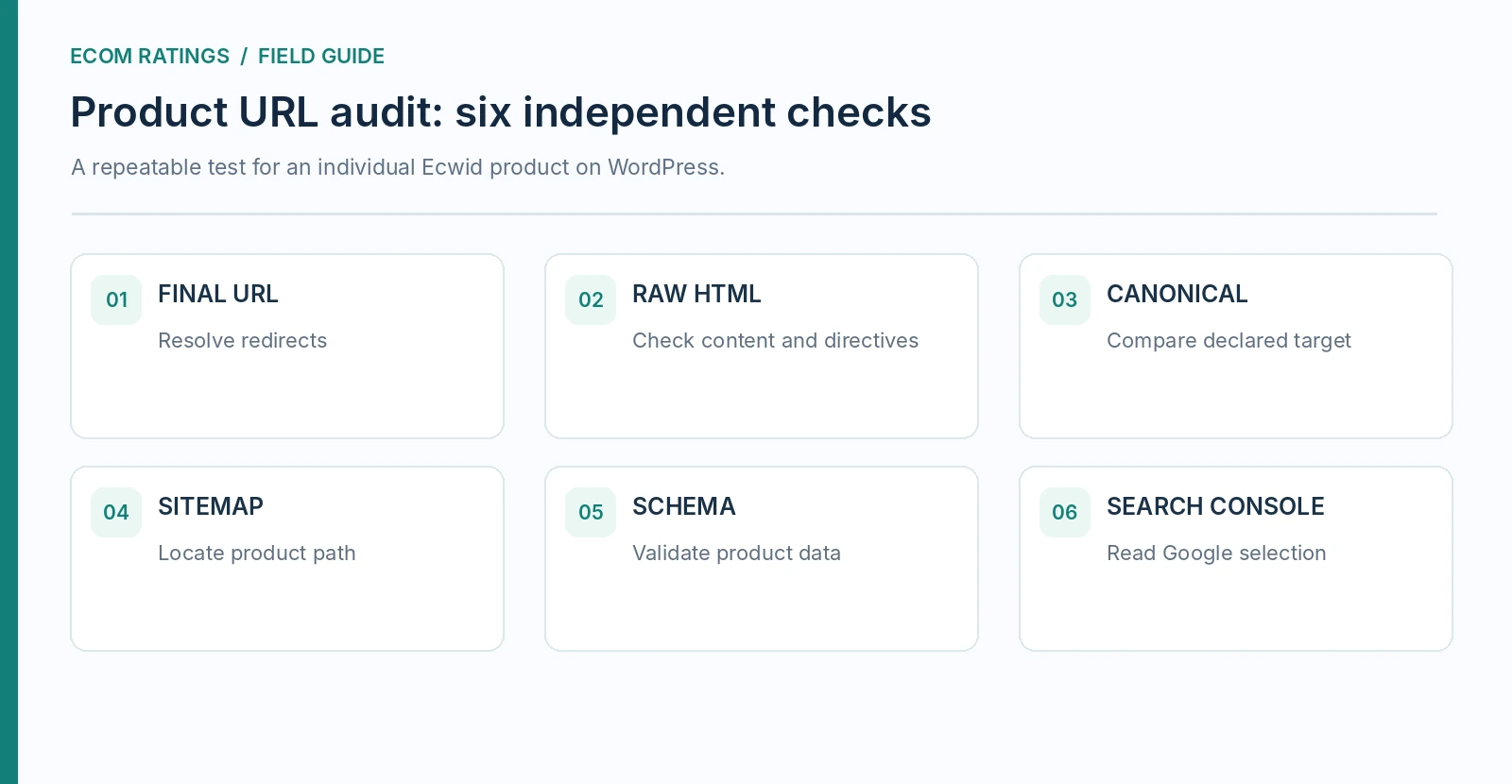
Start with three URLs: the shop landing page, a category page and an individual product page. In Search Console’s URL Inspection tool, compare the indexed result and the live test. Note whether crawling is allowed, whether indexing is permitted, the user-declared canonical, Google’s chosen canonical and the reason for any exclusion. A live test showing that a URL is accessible is not proof that Google will select it for indexing.
Then run a filtered Pages report for the shop path. Classify product URLs into indexed, discovered but not indexed, crawled but not indexed, redirected and duplicate categories. Do not count all “not indexed” states as failures. A redirected old URL should often be excluded, and a secondary duplicate may properly be consolidated. What matters is whether your commercially important canonical products are available, useful and represented in search results.
The site: search operator is a quick indication, not a complete or guaranteed URL inventory. Search Console is the primary diagnostic because it provides per-URL indexing information. If a product has unique content but remains unindexed, examine internal links and content usefulness as well as technical access; repeatedly requesting indexing will not compensate for pages that differ only by a color code and a line of duplicated copy.
WordPress navigation and internal links
A product URL may be technically crawlable but buried behind interactive filters or a script-dependent catalog view. Add ordinary descriptive links from relevant WordPress landing pages, buying guides and category descriptions to products that deserve organic traffic. This can be more effective than creating endless tag archives. An internal link should use the preferred final product URL and text that honestly names the page’s subject.
For example, a blog guide comparing ceramic materials can naturally link to the detailed product page of a relevant mug. An unrelated “best gifts” page should not link to every SKU simply to manufacture internal link volume. Link architecture helps users understand the catalog and helps crawlers discover priority items through meaningful paths. Avoid product pages that are accessible only after clicking a filter with no stable crawlable URL.
WordPress can also create thin duplicate archive pages through categories, tags, search results and automatically generated attachment pages. Audit these separately from Ecwid categories. Do not assume that WordPress tags automatically become Ecwid product categories or vice versa. Organize a deliberate editorial hierarchy linking commercial category pages, supporting informational guides and product-detail pages.
Three troubleshooting scenarios that look similar but are not
Scenario A: Product visible in Chrome, absent from Google’s index. Check HTTP status, robots directives, source HTML, live inspection and internal linking. A visually functioning JavaScript page is only the beginning. If the page is discoverable and eligible, Google may still decide it does not warrant indexing; improve differentiated content rather than treating the outcome as a plugin defect by default.
Scenario B: Google shows the Instant Site rather than WordPress. Check both versions’ canonical hints, indexability, sitemap presence, redirects and linking. Only after the WordPress URL is ready should you consider turning off Instant Site indexing according to Ecwid’s documented setting. Track the change in Search Console over time; indexing updates are not instantaneous.
Scenario C: The WordPress shop page indexes but products do not. Inspect one product URL directly, ensure the sitemap actually contains products and confirm that links resolve to unique destination URLs. A sitemap with only the WordPress shop page is not evidence that the product sitemap is functioning. Inspect plugin-specific integration and SEO plugin output separately.
A 30-minute product SEO acceptance test
Allocate five minutes to URL collection, five to raw HTML and canonical inspection, five to sitemap inspection, five to Rich Results Test, five to Search Console and five to documenting findings. The test sheet should store product ID, preferred host, requested URL, final URL, status, canonical, sitemap result, structured-data outcome and Google index status. If a step is unavailable because you lack Search Console access, mark it unverified rather than inventing an index verdict.
Repeat the protocol after plugin updates, WordPress permalink changes, migrations between hosting providers and major Ecwid theme or catalog changes. Compare outputs, not subjective page appearance. A clean technical pass still does not promise ranking; the next step is improving genuinely distinct product descriptions and helping searchers reach them through useful internal links.
For small stores, prioritize the ten products whose searches matter most. For large catalogs, stratify the sample across categories, statuses and product structures. Testing one homepage repeatedly is less useful than validating three distinct URL types once and then building a maintenance routine around them.
FAQ: common Ecwid indexing questions
Does the Ecwid WordPress plugin generate indexable product pages?
Ecwid documents SEO-friendly product and category URLs and static HTML copies for search engines. That means the integration is designed to support indexing, not that every product will appear in Google. Verify your specific URLs and their Google-selected canonicals.
Does a WordPress sitemap automatically contain all Ecwid products?
Do not assume so. Check the exact sitemap produced by your WordPress installation and SEO plugin. Ecwid documents sitemap integration, but output depends on the installed setup. A sitemap file containing only the shop’s parent WordPress page does not prove that individual products were included.
Should I disable the Ecwid Instant Site?
Only after deciding which storefront should be the primary indexed version and confirming that the WordPress pages are operational. Ecwid documents an indexing control for the Instant Site. Use it deliberately and verify the result rather than treating two sites as an automatic penalty.
Will changing a product slug improve rankings?
Not by itself. A descriptive, stable slug helps readability and navigation, but repeated URL changes introduce migration work. Preserve redirects where available and test old links before changing valuable product addresses.
Editorial conclusion
Ecwid’s WordPress plugin supports search-friendly product URLs and provides crawler-oriented HTML, metadata and structured data. The information gap is what happens between those features and Google’s real choice of a canonical page. Treat the shop homepage, individual product pages and any Instant Site copy as separate entities. Map their URLs, inspect technical signals and document what Google actually indexes. That process is more reliable than assuming a successful plugin installation is the same as successful search visibility.