
ECOMZY / DOMAIN & SEO / ECOM RATINGS
Ecomzy Domain Changes: Missing Redirects and a Search Traffic Recovery Plan
Editorial research · Primary sources reviewed November 4, 2026
The Ecomzy domain move is an account operation, not a generic SEO audit
A branded domain is often the first asset a merchant wants to customize after a turnkey store begins taking shape. The address appears in emails, social profiles, customer bookmarks, promotional materials, and receipts. On Ecomzy, moving to a personally owned domain can make the storefront feel more recognizably tied to the merchant's business. But the operational details of the move deserve much more attention than a typical article about indexing pages in Google.
Its terms describe an account-level request to switch from the domain selected during onboarding to a domain the merchant already owns. This is not a do-it-yourself hosting migration in which the user has full server access and can independently configure every system. It is a coordinated change involving the registrar, the merchant, and the Ecomzy support team.
The central complication is also explicit. Ecomzy says it does not configure redirects from the old Ecomzy domain to the new domain after a name change. That has consequences for previously shared product links and campaign destinations. A business can still benefit from a memorable new address, but the transition needs two separate plans: one for bringing the new storefront online and another for updating the channels that continue to point to the old address.
Check whether this is your first custom-domain change
Before paying for anything or changing DNS settings, establish which type of Ecomzy domain request you are making. The published Terms of Service describe a first switch to a personally owned domain as free, while subsequent changes incur a one-time fee stated as $29 in the version reviewed. That is a policy detail, not a guarantee about a future price: the live agreement and support response should be checked before authorizing a later move.
The procedure starts earlier than many customers expect. Ecomzy instructs users who want their own domain for a Free Turnkey Store to select an available free domain in the store survey first. After that, they contact support and request the personal-domain switch. The custom domain must already be purchased and active. A merchant who owns an attractive domain but has not established where it is registered or whether the account can change nameservers is not ready for the switch.
This makes domain ownership a practical checkpoint. Confirm the registrar name, the login owner, the renewal date, whether two-factor authentication is active, and who can edit the domain's authoritative DNS settings. If an agency or former contractor controls the registrar, resolve that access before the migration. Ecomzy can coordinate its managed side of the change, but it cannot replace the need for the merchant to control a domain that belongs to the merchant.
Understand what changing nameservers actually does
The current Ecomzy terms describe a nameserver, or NS-record, change for merchants using their own domains. Nameservers tell the internet which DNS service is authoritative for a domain. Changing them is more consequential than adding a single website record, because email delivery, subdomains, verification records, and external services may depend on the existing DNS zone.
Imagine a merchant who already uses the domain for a professional mailbox. The website may currently be hosted elsewhere, while the domain's DNS contains MX records for incoming mail, SPF and DKIM records for authentication, and TXT records for third-party tools. Pointing the domain at different nameservers does not automatically preserve those records. Unless the new authoritative DNS setup reproduces them, email or verification services may be interrupted even if the storefront becomes accessible.
The safe approach is to export or screenshot the current DNS zone before touching the registrar settings. Capture A and AAAA records, CNAMEs, MX records, SPF TXT strings, DKIM selectors, DMARC policy, any verification TXT records, and entries for shop or support subdomains. Do not blindly copy invalid or obsolete records, but preserve a record of every dependency that currently exists.
Build a merchant continuity sheet before requesting the switch
A domain change affects more than what a customer types into the browser. It can change the destination behind checkout links, marketing landing pages, order emails, QR codes, social-media bios, support replies, profile buttons, printed material, and customer bookmarks. A useful operational document should capture these touchpoints in plain language and assign an owner to each one.
Start with the store itself: homepage, key product landing pages, category pages, checkout entry points, help page, and contact page. Next list customer communications: welcome email, order confirmation template, digital-download instructions, refund or support instructions, and any autoresponder that includes a hard-coded store URL. A third group covers acquisition channels: ad destinations, link-in-bio pages, creator partnerships, QR codes, promotional PDFs, and third-party directory listings.
For each touchpoint, record the old destination, the intended new destination, the person responsible, the planned change date, and a way to test it. The purpose is not to create a technical SEO spreadsheet. It is to keep the customer's purchasing journey intact. If a customer sees the new domain in an advertisement but receives an email linking to the old one, the branding upgrade immediately feels inconsistent.
Use the published Ecomzy timetable as a planning range
Ecomzy's terms state that some registrars can take up to 48 hours for nameserver changes to apply. They also explain that moving the store to the new domain typically takes another one or two business days after the NS-record change is successful. These are service-side planning statements, not exact deadlines guaranteed for every registrar, region, or account.
For scheduling purposes, distinguish three clocks. The registrar clock covers the time needed to publish new authoritative nameservers. The Ecomzy operations clock covers the platform's work to configure the store on the new domain. The customer-facing verification clock begins when the merchant can test the finished site, emails, checkout, and the updated external links. A store may be technically reachable before every part of the customer journey has been checked.
This is why a migration should not be timed to begin at the same hour as a major advertisement or product launch. Ideally, give the team a low-traffic period in which to make the changes and a buffer before expensive campaigns restart. When there is an important product launch on the calendar, complete the domain move first or wait until the launch is finished. Mixing two major changes makes troubleshooting unnecessarily difficult.
Verify storefront behavior, not just a successful homepage load
Seeing the homepage on the new address is a good sign, but it is not a complete migration test. A digital store has several moving parts that can behave differently after a hostname change. The merchant should test the main navigation, at least two product detail pages, the entry point into checkout, support and policy pages, links in account emails, and the mobile presentation of the new site.
A useful practice is to conduct a controlled test using a genuine test facility or an authorized low-value transaction if the provider supports it. The goal is to verify the customer journey from product selection to payment confirmation and digital access, without fabricating revenue data or assuming there is a testing feature not documented for the merchant's account. If a paid real transaction is used, disclose its cost internally and avoid generating fake customer reviews or synthetic purchasing activity.
Next, inspect the trust signals. Does the browser display a valid HTTPS certificate for the new domain? Does the store use the correct business name? Do emails and support links identify the same domain buyers see in the address bar? Does a user arriving from a smartphone reach the intended product without an extra redirect loop? These checks build confidence in the storefront as a whole.
What the no-redirect clause changes for real customers
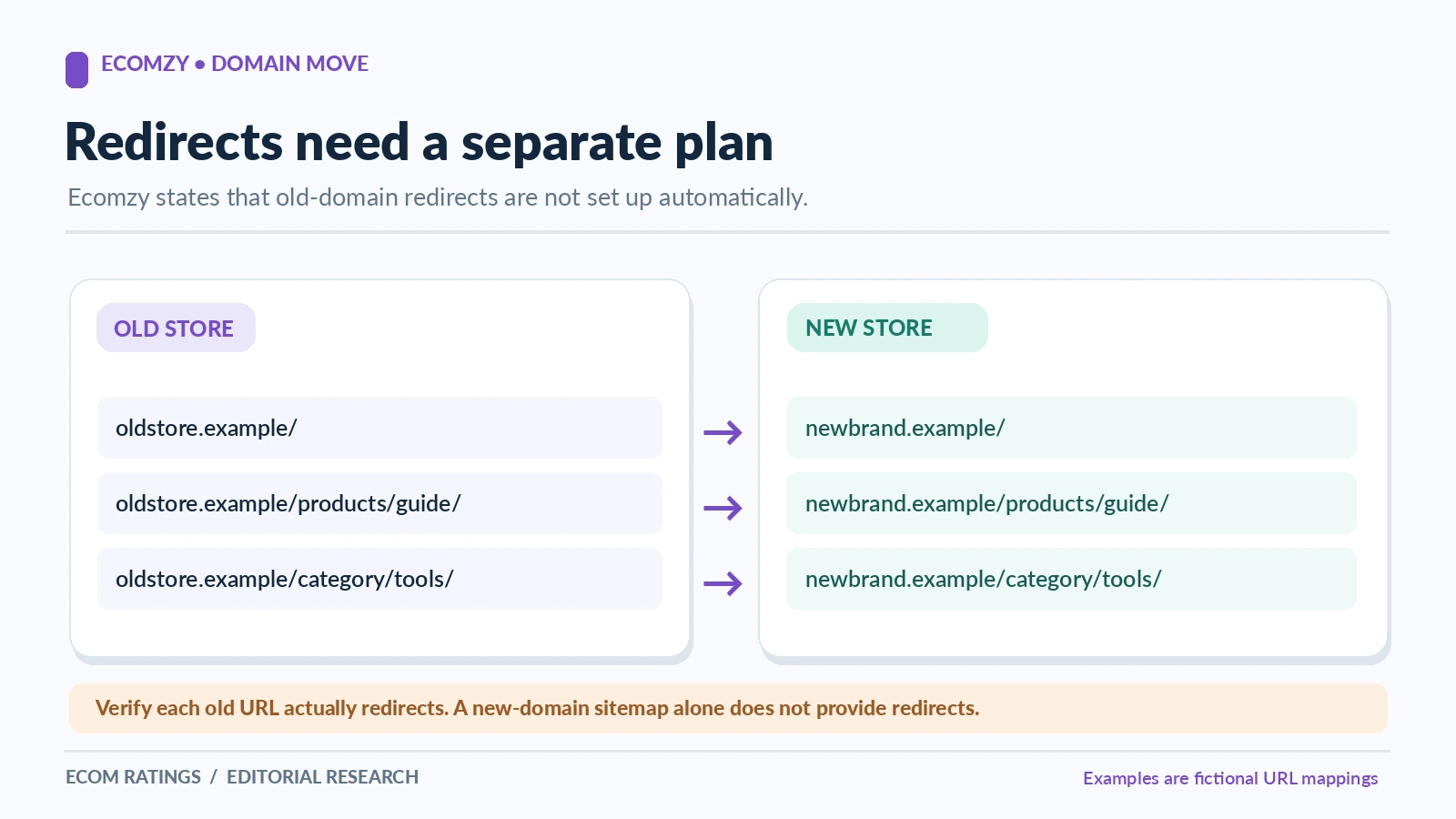
The most important limitation to understand is Ecomzy's explicit statement that it does not set up redirects from the old Ecomzy domain after a domain change. A 301 redirect is an HTTP response generated when someone visits the old address. If the merchant cannot control the old hostname, merely installing software on the new store will not make that old hostname send visitors to the new one.
A concrete example makes the issue clear. Suppose the merchant previously shared an offer at old-store.example/product/guide and the corresponding new page lives at new-brand.example/product/guide. Without an old-host redirect, a person who clicks the historical link may not arrive at the new product page automatically. This affects customers who saved links, newsletters sent months ago, and partners who link to a specific offer.
The positive solution is to plan around what the merchant does control. Update the store link in every owned social profile, resend corrected destinations to active partners, refresh paid advertising landing pages, replace old links in scheduled emails, and correct any QR codes that can still be changed. Prioritize channels by real customer use, not by the number of items in the spreadsheet. Five high-traffic links are more important than fifty unused draft posts.
A practical example: moving a store with an active launch calendar
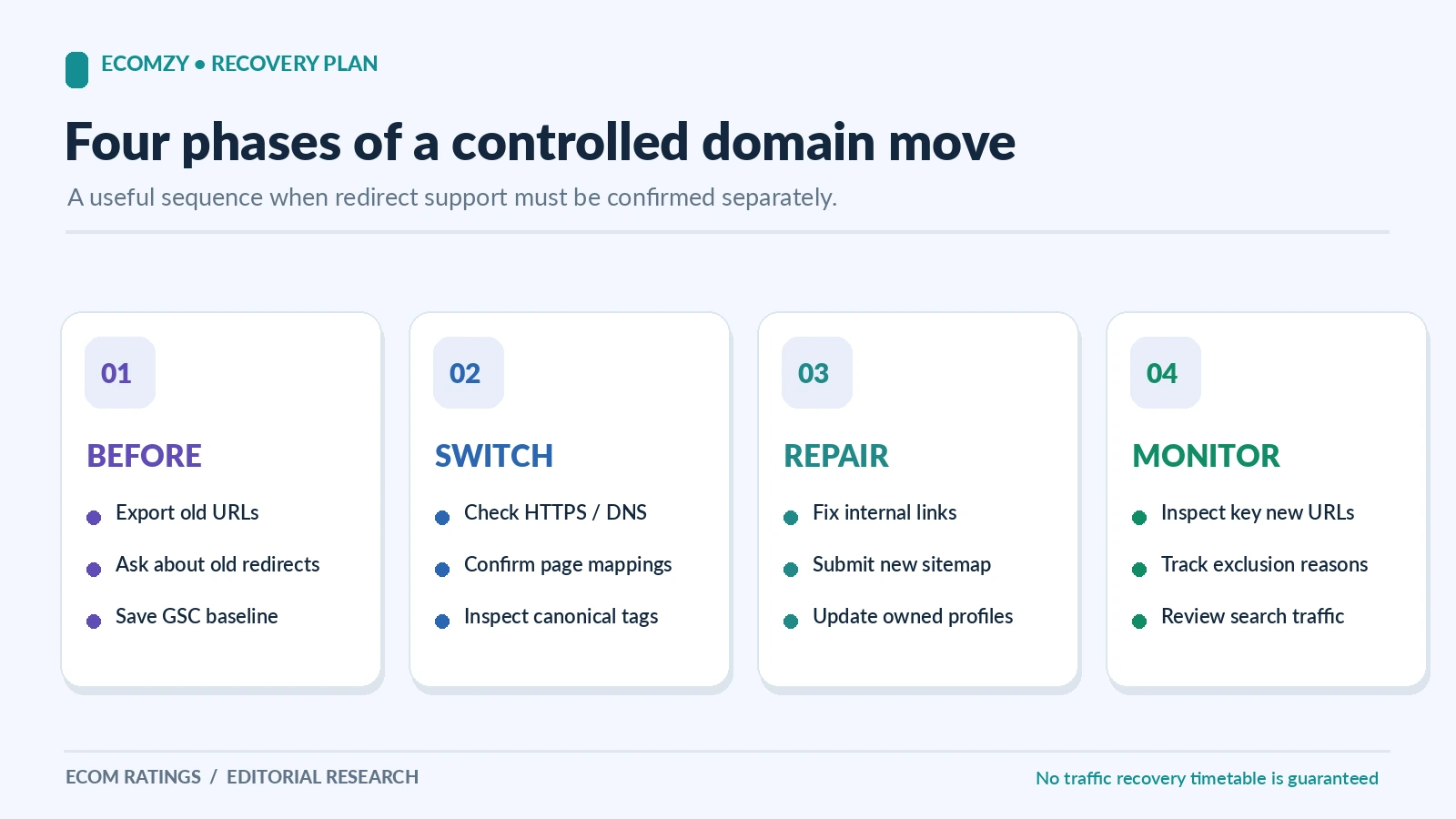
Consider an illustrative merchant with a modest digital catalog, a weekly email list, one social account, and two active ad campaigns. The goal is to move from a starter hostname to a memorable owned domain without breaking the buyer experience. The first day is devoted to preparation: verify registrar access, capture DNS records, ask Ecomzy for nameserver instructions, and record the live links currently used by buyers.
The merchant then pauses changes to advertising URLs while the switch is being coordinated. This is not necessarily a requirement imposed by Ecomzy; it is an editorial recommendation designed to reduce moving parts. Once the new site is accessible, the merchant tests the product catalog, checkout route, customer emails, and support contact details. Only after those checks pass are the social profile and ad destinations updated to the new domain.
During the first week after cutover, the merchant monitors customer messages for broken-link reports and asks active marketing partners to update old destinations. The newsletter footer and autoresponder templates are reviewed in a separate pass because they are easy places to leave hidden old-domain URLs. Any link that cannot be changed is recorded as a residual risk rather than silently assumed to work.
Keep email, branding and documents consistent
A domain is a trust cue. Customers may see it in the browser, in a branded sender address, on a receipt, and in a support reply. After a successful migration, those surfaces should tell the same story. If the store is now at a new domain but the sender address still shows an unrelated starter hostname, a buyer may hesitate or misfile a confirmation message as suspicious.
Not every merchant needs to change the email address immediately. Some businesses deliberately retain a stable support mailbox while migrating the website. The important point is consistency and authentication. If the sender address changes, confirm that the mailbox works and that SPF, DKIM, and DMARC settings remain appropriate for the sending service. If it does not change, make sure the sender identity still helps customers recognize the brand.
Business documents should be checked as well. Update downloadable product guides that include the old website, invoice templates where the merchant controls them, return instructions, social media media kits, and customer onboarding documents. Do not casually rewrite previously issued legal invoices; keep historical records intact and update future templates according to the relevant accounting rules.
Coordinate domain changes with Ecomzy marketing services
A less obvious dependency appears in Ecomzy's public Terms of Service for certain marketing and content visibility services. The document instructs customers planning a domain change to notify the relevant marketing team, support team, or Business Growth Manager before work begins. It also describes paid revision rules for some services when a domain changes after content preparation has started or after delivery.
That makes domain planning a commercial decision as well as a technical one. If the merchant has paid for an off-site article, branded visibility placement, or another marketing asset that contains the storefront URL, changing the address halfway through the workflow can create extra coordination and revision work. The exact fee depends on the service and current terms; the owner should not assume one universal price applies to every project.
Before submitting a new marketing order, finalize the domain intended to appear in the material. If a domain switch is already planned, tell the account or support team and ask when the URL becomes locked in. This is a low-cost way to avoid purchasing a deliverable that points at an address the merchant expects to retire immediately.
How to communicate the move to Ecomzy support
Good support requests are narrow enough to be answered accurately. Include the Ecomzy store identifier that support normally uses, the existing domain, the intended new owned domain, the registrar name, and the date when the change is desired. State whether the domain currently handles business email or other services. Ask for the exact nameserver settings, the expected operational sequence, and who will confirm that the site is ready for testing.
If the old hostname is important because it appears in advertising or product guides, raise that before the migration. Explain that the public terms say redirects are not configured automatically and ask whether any authorized preservation option exists for this account. Do not demand a feature the company has explicitly excluded from its standard service. Ask for the actual possibilities and record the answer.
For follow-up messages, use a concise timeline. For example: nameservers updated on a stated date; DNS record checked; new domain resolves but customer receipt still links to the former address; screenshots attached. This is much easier for a support specialist to investigate than a message saying 'SEO disappeared.' If the issue concerns email delivery, include the affected mailbox and a non-sensitive error description, not passwords or full customer payment details.
How to measure a successful transition without inventing rankings
A responsible post-move review tracks customer-facing results first: the new hostname loads securely, product navigation works, checkout completes, access emails are delivered, support contact details are correct, and owned promotion links point to the new address. Each check can have a date, test owner, and evidence record. If something fails, its cause is much easier to isolate than when the team looks only at one broad traffic graph.
Search is a second monitoring layer, not a substitute for operational testing. Google's official site-move guidance explains that visibility can fluctuate while search systems process a new domain. A merchant with verified properties can compare the old and new domains and submit a sitemap, but Google does not promise immediate transfer of rankings. Ecomzy's no-redirect clause may also limit the continuity signals normally available in a fully controlled migration.
Avoid announcing a percentage 'traffic recovery' unless the business has genuine analytics for both periods and a defensible comparison window. A chart showing a 60% improvement without a real data source is not an editorial finding. Likewise, a brand-new store with almost no historical traffic cannot meaningfully claim a 'recovery' outcome. Its goal is reliable setup and gradual discoverability.
Editorial verdict: a stronger brand address with an operational checklist
Ecomzy offers a convenient route for merchants who want to build a recognizable store around a domain they own. Its published procedure describes a managed switch, coordination through support, and clear timing expectations. The decision can be worthwhile for merchants planning to invest in a consistent brand, and the platform's turnkey model helps keep the work focused on the store rather than on infrastructure administration.
The key limitation is equally clear: Ecomzy does not promise to redirect the previous Ecomzy domain automatically. A prepared merchant addresses that fact before cutover by documenting old links, updating owned channels, protecting existing DNS-dependent services, and testing customer journeys on the new hostname. It is not necessary to treat the change as a failure just because the platform draws a boundary around old-host redirects.
For someone comparing this guide with a Sellvia Search Console indexing audit, the distinction should be unmistakable. Sellvia's article diagnoses why individual product pages are excluded from Google. This Ecomzy article explains how a store owner coordinates an authorized domain change and preserves operational continuity. The shared context is ecommerce; the actual task, evidence, and action owner are different.
Sources and verification
- Ecomzy Terms of Service – Own Domain and Marketing Services
- Google Search Central – Site Moves and Migrations