
PLATFORM RESEARCH / SAAS BILLING OPERATIONS · ECOM RATINGS
A practical guide to how Paddle calculates, bills, credits, and schedules plan changes that happen before the next renewal.
Editorial research · Sources verified October 26, 2026 · Practical implementation guide
THE ESSENTIAL RULE · Paddle needs a billing mode
When subscription items or the next billing date change, Paddle expects you to choose how the change should be billed. The biggest source of confusion is assuming that “upgrade” or “downgrade” has one default financial result. In Paddle, the result depends on the selected proration billing mode.
Verified against Paddle documentation: October 26, 2026. Paddle calculates subscription proration to the minute, but that technical precision is only half of the story. The more operationally important question is when the customer is billed or credited, whether the change applies immediately or later, and what will happen at the next renewal date. Those details affect support scripts, customer messaging, accounting expectations, and the design of your upgrade or downgrade flow.
This article exists because many public explanations stop at “Paddle supports proration.” That is true, but incomplete. Paddle actually gives you five proration billing modes, and those options create noticeably different business outcomes. Some collect now. Some push the difference to the next renewal. Some apply the plan change without billing for the delta at all. If you are designing pricing operations, the practical problem is not understanding the math in isolation. It is choosing the correct mode for a given customer journey and explaining the result clearly enough that neither finance nor support is surprised.

The core question: what happens when a customer changes plan mid-cycle?
In Paddle, customers do not “move between plans” in an abstract sense. Technically, subscription changes happen because the items on a subscription are replaced, added, removed, or repriced. When that occurs during the current billing period, Paddle can calculate the value of the remaining time on the old setup and compare it with the value of the new setup. The result is the prorated difference.
From a business point of view, that still leaves three operational questions. First, should the customer pay or receive the difference immediately, or should it be carried to the next renewal? Second, does the billing date stay where it is, or are you also changing the billing anchor? Third, what should happen if the payment for an immediate upgrade fails? Paddle addresses all three, but the answers come from specific fields and workflows, not from a single automatic “upgrade” rule.
The five billing modes are the real center of the story
| Billing mode | How Paddle treats the change | Typical use case |
|---|---|---|
prorated_immediately |
Calculates the prorated difference now and bills it now | Immediate upgrades where access should expand right away and finance wants the delta collected immediately |
prorated_next_billing_period |
Calculates the prorated difference now but bills it on the next renewal | Downgrades or gentle upgrades where you want access to change immediately but the accounting adjustment later |
full_immediately |
Skips proration and bills the full price immediately | Cases where you intentionally charge the full new amount at change time |
full_next_billing_period |
Skips proration and schedules the full new amount for next renewal | Rare cases where you want the new price later without a prorated calculation |
do_not_bill |
Applies the change without billing for the delta | Goodwill adjustments, internal migrations, or transitional cleanup |
That table is the quickest way to understand why mid-cycle changes generate support confusion. Two businesses can both say “we upgraded the customer today” and produce two different invoices. One might use prorated_immediately. Another might use prorated_next_billing_period. The access change may look similar in the product, but the customer sees a different timing of charges and credits.
How proration and credit work in practice
Proration means Paddle looks at the unused portion of the current cycle and values it. If the customer is moving to a more expensive subscription configuration, Paddle effectively compares the cost of the remaining time on the new arrangement with the remaining value of the old one. The customer is then charged the difference, either now or later depending on the selected mode. If the customer is moving to a lower-priced setup, that remaining value typically becomes a credit applied against a future bill when you choose a next-billing mode.
This is one reason teams should separate product access logic from billing logic in their explanations. A customer might receive the upgraded feature set immediately while not seeing an invoice until the next renewal. Another customer may see an immediate transaction but keep the same renewal date. When you document the flow, explicitly distinguish effective access date, charge date, and renewal date. Those three dates are often the difference between a clean experience and a complaint ticket.
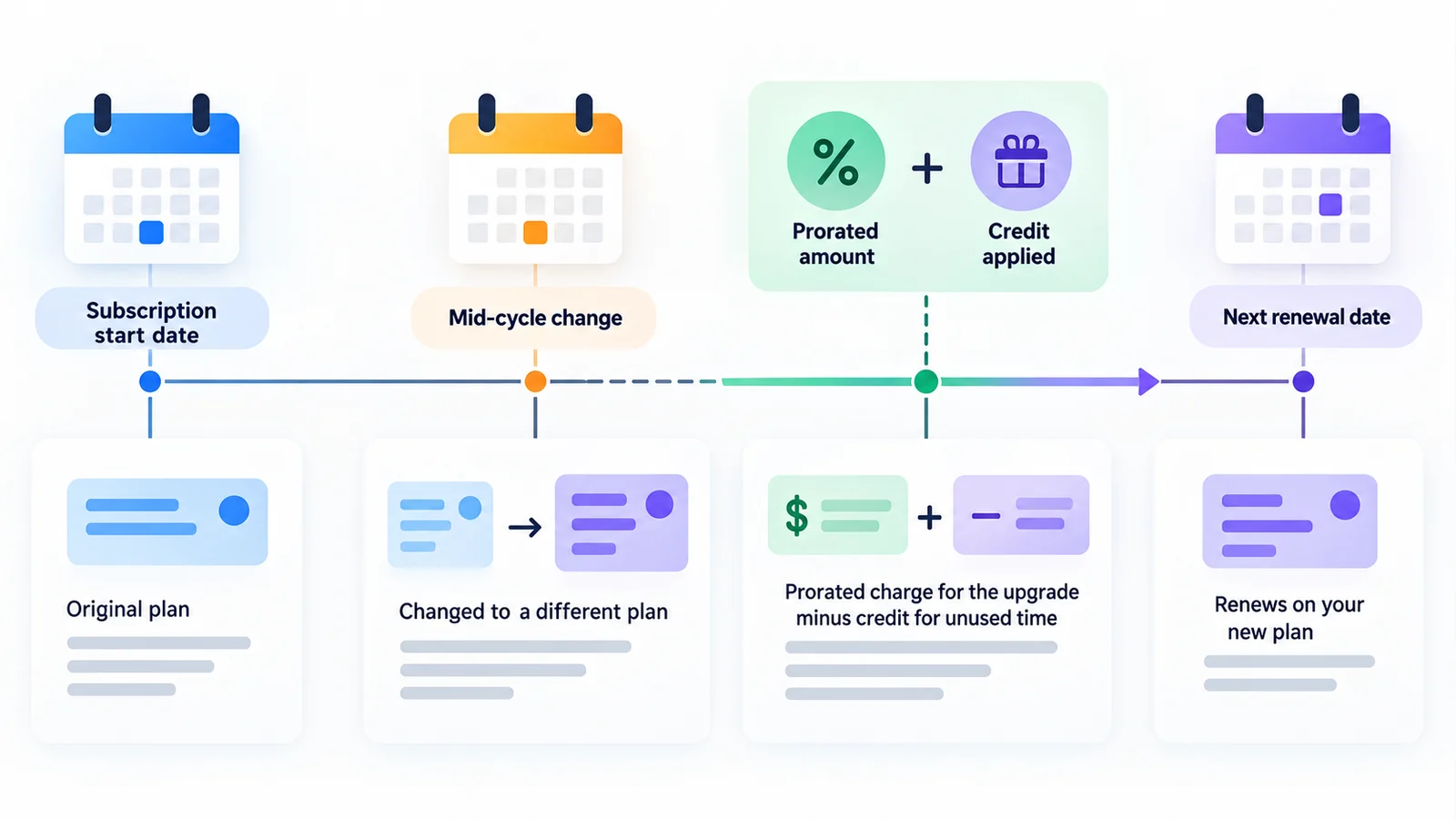
Worked example: upgrade halfway through the month
Assume a customer pays $30 per month for a base plan and upgrades on day 15 to a $50 plan. For simplicity, assume a 30-day billing period. Half of the old period remains. The unused value of the old plan is about $15. The cost of the remaining half-month on the new plan is about $25. The prorated difference is about $10.
If you update the subscription with prorated_immediately, Paddle calculates that $10 delta and creates a transaction now. The customer gets access to the upgraded plan immediately, keeps the original renewal date, and on the next renewal pays the normal full renewal price for the new plan. If you instead use prorated_next_billing_period, the customer still receives the higher plan immediately, but the $10 delta is added to the next renewal. The renewal invoice then includes both the scheduled renewal amount and the stored prorated adjustment.
If you choose full_immediately, you are making a different commercial choice. Paddle does not calculate the time-based difference; it bills the full amount immediately. This can be reasonable in narrow cases, but it is not the behavior most customers expect when the messaging says “we prorate upgrades.” Make sure product copy, support answers, and billing configuration all tell the same story.
Worked example: downgrade and next-billing credit
Now assume a customer is on a $100 plan and downgrades halfway through the period to a $60 plan. Again, 15 of 30 days remain. The unused portion of the old plan is worth about $50. The cost of the remaining time on the lower plan is about $30. The difference is about $20 in the customer’s favor.
If the downgrade uses prorated_next_billing_period, the new lower plan can become effective immediately while the customer receives a $20 adjustment on the next renewal. This is one reason that mode is attractive for downgrades: the customer sees the product change today, but the financial reconciliation stays attached to the next invoice. If you used do_not_bill, the customer might get the downgraded access immediately and simply not receive a credit at all, which may be appropriate only when the commercial policy clearly says so.
An editorially important point is that “credit” does not always mean a cash refund. In these mid-cycle examples it generally means a value offset against future billing. Teams should avoid promising refund behavior unless they have separately defined refund policy and know how that interacts with Paddle transactions.
Renewal dates: what changes and what does not
Changing subscription items and changing billing dates are related but separate operations. If you update the products or prices on a subscription, the next renewal date does not automatically become “today plus one full period.” In normal plan changes, the subscription keeps its billing anchor and renews on the existing future date. That is why prorated math matters in the first place: Paddle is valuing a partial remainder of the current cycle.
If you want to move the renewal date itself – for example, to align billing to the first of the month – Paddle offers a separate billing date change flow using next_billed_at. That action can itself create a prorated charge or credit. Move the date later and the customer may owe for the longer partial period. Move it sooner and a credit may be created because they are giving up part of a period they already paid for. In other words, item changes answer “what is the customer subscribed to?” while billing-date changes answer “when does that subscription renew?”

What you must send in the API
The update-subscription API expects the complete desired list of subscription items, not just the changed item. That means if a subscription currently includes a base plan and an add-on, and you only send the new base plan, Paddle will treat omitted items as removed. Operationally, this is one of the most important implementation details. It means your application must know the intended final state, not merely the delta the customer clicked in the UI.
When the change affects billing, you must also send proration_billing_mode. Paddle documents another useful field, on_payment_failure, which determines whether a failed immediate payment should prevent the subscription change or allow the change to apply anyway. Those fields belong in the same design conversation as customer messaging, because a silent mismatch between commercial policy and API defaults often surfaces later as a support issue.
Payment failure behavior is part of the decision
Suppose a customer upgrades and you use prorated_immediately. Paddle attempts to collect the prorated amount right away. If the payment fails, do you want the upgrade blocked, or should the subscription still move to the higher plan while finance follows up later? Paddle allows both ideas through the on_payment_failure setting, with prevent_change as the documented default.
This matters because a “failed payment” is not just a billing event. It affects feature entitlements, customer trust, and revenue leakage. For self-serve SaaS, prevent_change is often the safer default. For enterprise scenarios where sales has approved a manual follow-up, an operator may decide that access should change even if the immediate payment does not succeed. Whatever you choose, make it explicit.
Customer portal defaults: what Paddle does by default
Paddle’s customer portal creates another subtle but useful distinction. Documentation says that upgrades in the customer portal are applied immediately and prorated immediately. Downgrades are applied immediately but prorated on the next billing period. That default matches a common product expectation: upgrades create an immediate charge because the customer is asking for more now, while downgrades take effect in access terms right away but the financial adjustment is folded into the next invoice.
For operators, the lesson is simple: if you build your own in-app flow, decide whether you want it to mirror the portal defaults or intentionally differ. If it differs, explain why. Inconsistent plan-change behavior across your app, billing emails, and the customer portal is an avoidable source of confusion.
Special case: usage-based billing
Paddle’s documentation includes an important early-access limitation for subscriptions that include usage allowances. For those cases, prorated billing modes are not allowed in the same way as standard subscriptions. Instead, the allowed options are full billing modes or do_not_bill. Paddle also notes that when such a subscription changes, unused allowance from the old price expires and the new allowance is granted immediately, while overage carries forward until renewal.
This matters because usage-based billing makes support explanations more complex. A customer may hear “you were credited for unused time” and incorrectly assume unused quota also rolled over. In Paddle’s documented model, those are separate ideas. Money and usage balance are not interchangeable. If you sell metered or allowance-based plans, your customer education should address both.
A decision framework for choosing a billing mode
| Situation | Recommended starting point | Why |
|---|---|---|
| Self-serve upgrade to a clearly better plan | prorated_immediately |
The customer receives more value now, and the incremental charge is collected now. |
| Self-serve downgrade where you want a clean next invoice | prorated_next_billing_period |
Access can change immediately while the credit appears on the next bill. |
| Internal migration or courtesy plan swap | do_not_bill |
Useful when the business intentionally waives the delta. |
| A commercial flow that deliberately bills a whole new term immediately | full_immediately |
Appropriate only if the policy and messaging explicitly justify it. |
| Billing date alignment project | Use a billing date change flow plus an explicit billing mode | Changing the anchor and changing items are separate problems. |
No table can decide for every business, but the framework helps narrow the choice. Ask five questions: When should access change? When should money move? Should the next renewal date stay the same? What happens if payment fails? Will the customer portal and in-app flow behave consistently? If those five answers are clear, the billing mode usually becomes obvious.
Common support questions to answer before launch
Before a billing flow goes live, write short answers to the support questions customers will ask first: “Why was I charged today if my renewal date stayed the same?” “Why did my plan change today, but the adjustment only appears on my next invoice?” “If I downgrade, will I get a refund or a future credit?” These questions are predictable because proration logic is financially precise but emotionally unintuitive. A two-sentence explanation prepared in advance is often more valuable than a longer internal spec.
Support teams also need examples. Give them one upgrade example and one downgrade example with real numbers, a timeline, and the chosen billing mode. If your product uses both self-serve changes and operator-assisted changes, document whether the same mode is used in both places. If it is not, make that distinction explicit. Otherwise, support agents will assume every plan change behaves like the customer portal and will accidentally overpromise or misread invoice timing.
A QA checklist for mid-cycle billing
| Test | Why it matters |
|---|---|
| Upgrade with immediate proration | Confirms transaction creation, entitlement timing, and invoice messaging. |
| Downgrade billed next period | Confirms that access changes immediately while the financial adjustment is deferred. |
| Failed immediate payment | Verifies your chosen on_payment_failure behavior and customer communication. |
| Billing-date change with and without item changes | Confirms your system distinguishes renewal-anchor changes from ordinary plan changes. |
A brief QA checklist like this prevents the most common implementation mistake: validating the math but not the customer experience. The invoice can be numerically correct and still create avoidable confusion if your email copy, portal screens, or entitlement timing tell a different story.
Bottom line
Paddle’s strength is not simply that it supports proration. It is that it makes the timing of billing decisions explicit. That power helps operators design clean upgrade and downgrade experiences, but only if they treat proration as an operational policy rather than a background math function. In practice, the most useful mental model is simple: plan changes modify subscription items, billing modes decide when financial adjustments happen, and billing-date changes are a separate tool for moving the renewal anchor.
For broader provider context, see the Ecom Ratings Paddle review and related payment and SaaS billing comparisons. This article focuses only on mid-cycle change behavior and the logic teams need before automating it.
Primary sources and verification
- Paddle: Proration
- Paddle: Upgrade or downgrade subscriptions
- Paddle: Change billing dates
- Paddle API: Update a subscription
- Paddle: Customer portal upgrades and downgrades
Ecom Ratings editorial disclosure: This guide is based on current vendor documentation and original worked examples. Product behavior, dashboards, APIs, and plan matrices can change. Re-test in your own account before applying changes to a live store.