
COURSE PLATFORMS / BILLING & ACCESS · ECOM RATINGS
Teachable Subscription Cancellation: Exactly When Does Student Access End?
Independent editorial guide · Source review: November 2, 2026
The answer depends on which event happened
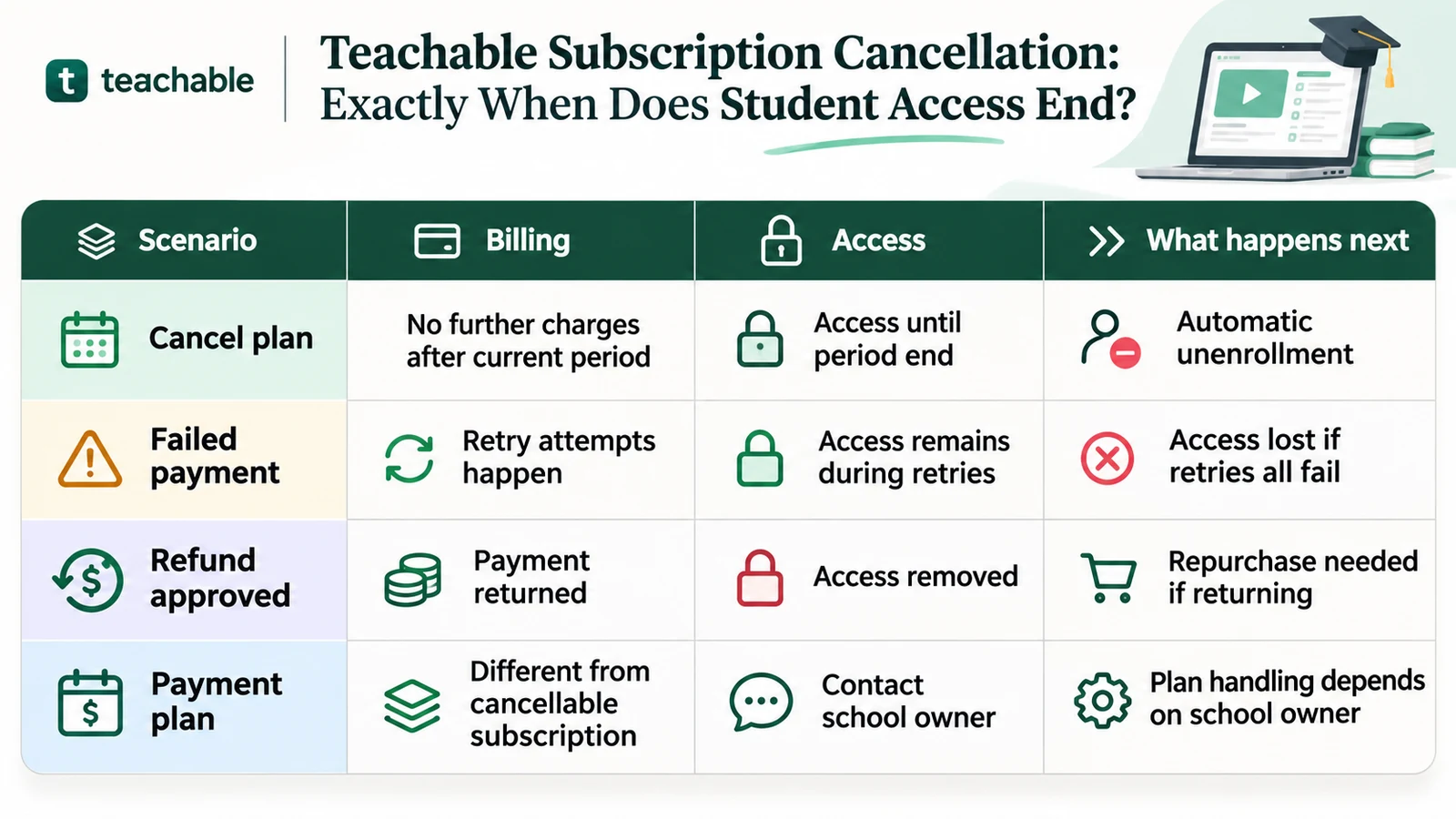
A student asking when Teachable access ends usually wants one date, but several different events can produce similar-looking billing messages. A normal subscription cancellation is not the same as a payment failure, a refund, the completion of a fixed installment plan, or a school’s decision to take the entire school offline. The main practical rule in Teachable’s current subscription guidance is that canceling a recurring student plan stops future renewals while access continues through the current paid billing period. The product is then automatically removed from the student’s enrollment at the end of that period.
That answer is useful but incomplete without checking the enrollment’s context. A student who cancels halfway through a month may still have lessons available for the rest of the month. Someone whose recurring payment failed may remain enrolled while payment retries are pending, then lose access after those attempts fail. A refunded subscription payment can result in access removal even if the original paid period would not otherwise have ended. A student purchasing installments rather than a recurring membership may have a different cancellation process entirely.
The clearest approach is to identify the plan, confirm the current billing-period end date, find out whether a payment is pending or refunded, and check whether the school uses the newer Teachable Payments experience. The school owner controls enrollment and content policies, while Teachable supplies the platform. A student should not infer permanent access from a course completion screen or assume that pressing Cancel means the account will be deleted immediately.
A normal cancellation: paid access continues until period end
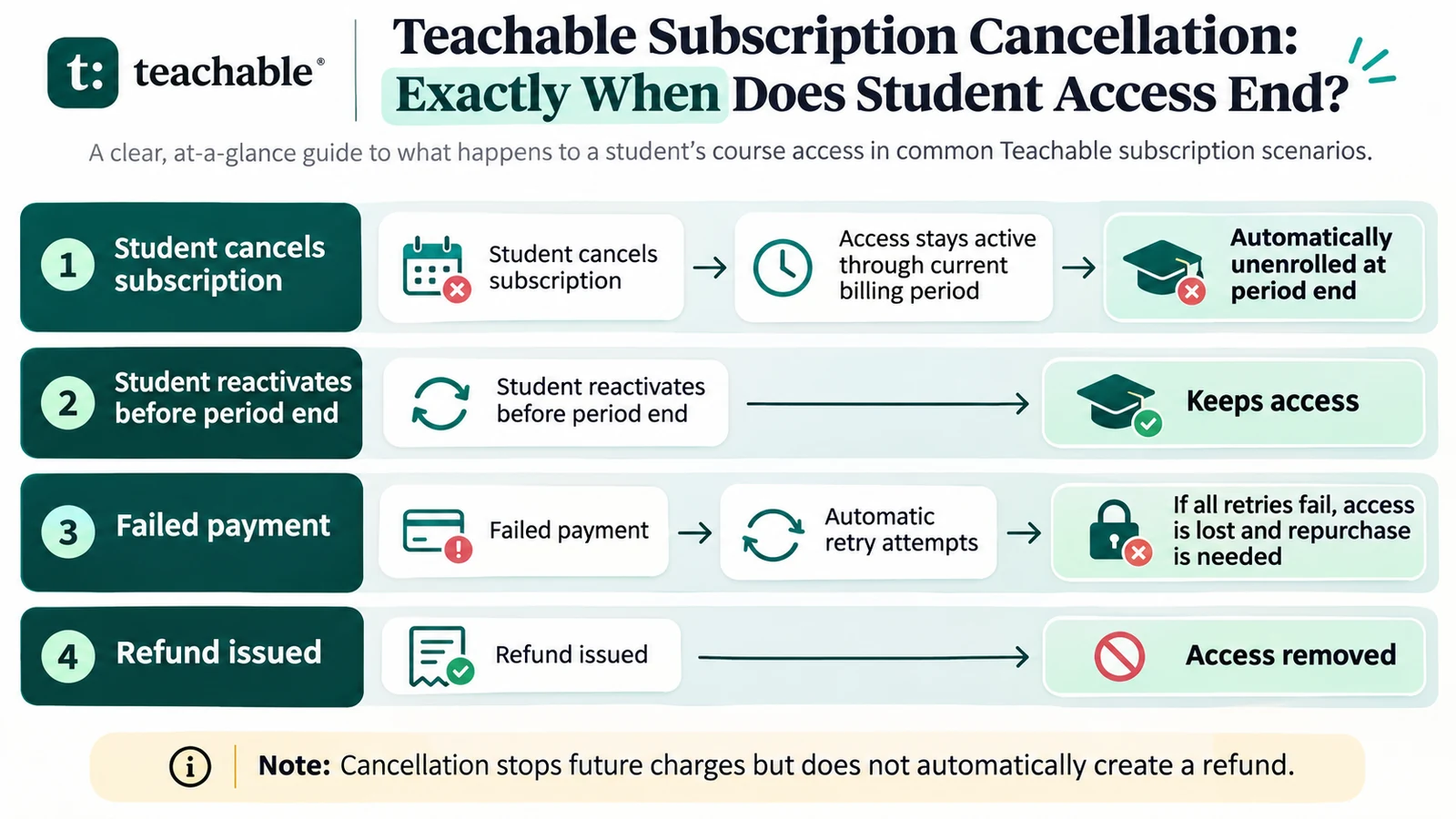
Teachable’s current Manage Your Subscription documentation says that a student who cancels through the Stripe Customer Portal remains active until the end of the current billing period and is then automatically unenrolled. Imagine an illustrative monthly plan billed on January 1, with the next billing date on February 1. The student cancels on January 15. Canceling should stop the February charge, but the student normally keeps access through the existing paid term. The cancellation is not a request to reimburse the unused days of January.
A student should confirm the ending date in the Customer Portal instead of relying on an estimated thirty-day count. Real monthly periods can have different lengths, and the actual anniversary of a subscription matters more than a hand-drawn example. If the plan was upgraded, paused, migrated, or changed by the school, the portal’s displayed date is the relevant operational reference. The student’s enrollment may end when the paid interval expires, even if the cancellation request was made much earlier.
Teachable also documents the option to reactivate a canceled subscription before the current paid period ends, where the school and payment configuration support that action. After enrollment has ended, the student generally needs to repurchase the product to regain access. A separate account login may still exist even though a particular course is no longer available. Distinguish account access, course enrollment, and the right to download previously purchased materials; these are different states.
Where the student checks and confirms the subscription
In the current experience, a student can locate the relevant billing controls from their profile under Subscriptions & Payment Plans, then open the Stripe Customer Portal for the school. The portal displays billing information, invoice history, and any subscription actions offered by that school. Students should verify that the cancellation action was completed rather than merely opening a cancellation page or closing the browser during the confirmation sequence.
After confirming cancellation, save the confirmation message or email and note the displayed paid-through date. This simple record is particularly helpful when a course has live workshops, limited-time assignments, or certificates that require final submissions. Students should make a personal checklist of unfinished lessons and any content permitted for download before access expires. Where downloads are allowed, save them through the school’s authorized mechanisms instead of looking for ways to bypass access controls.
Each Teachable school is independently operated, and a student with purchases at several schools may have separate billing arrangements or portals. Canceling a plan at School A does not cancel a plan at School B. Older PayPal subscriptions or subscriptions created before a school migrated to the newer payments system may need help from the school owner rather than following exactly the same portal path. This distinction prevents someone from treating one successful cancellation as proof that every related charge has stopped.
Failed payment: a retry window is not a new paid term
When a recurring charge fails, Teachable’s newer pricing documentation describes Stripe Smart Retries, which can attempt collection multiple times over roughly a two-week period. The student receives payment notifications and can update the payment method. Access may remain during those attempts; if all retries fail, the subscription is canceled and the student is automatically unenrolled. At that point the product generally must be repurchased to regain access. The retry window is therefore a conditional recovery period rather than permission to use the course indefinitely without successful payment.
An important documentation distinction is that older Teachable pricing articles describe different retry schedules: for certain weekly subscriptions, two additional attempts on days 3 and 7; for monthly and longer cycles, three additional attempts on days 3, 7, and 14. The newer Teachable Payments documentation instead describes up to eight attempts over two weeks. These should not be flattened into one universal promise. The actual schedule depends on the payments experience and purchase setup governing the student’s subscription.
Consider a student whose payment due on March 1 fails because a card expired. The system may send a notice and attempt collection again. If the student updates the card and payment succeeds, they may retain the product without interruption. If no attempt succeeds, enrollment can be removed after the retry process ends. The exact point should be checked in the subscription record and applicable documentation. Schools should communicate clearly that a failed charge is not equivalent to a voluntary cancellation at the next normal renewal.
Refunds: different from simply stopping renewal
Teachable’s current refund guidance says that cancellation stops future charges but does not automatically refund the current paid period. A refund is a separate transaction and access decision. Once a refund is issued for the relevant product, the student may be removed from the product and need to repurchase if they wish to return. A school should not tell a student that their already paid access is guaranteed through the original date after processing a refund, because the refund may terminate the entitlement sooner.
This distinction is easier to understand through two examples. Student A cancels on April 10 but receives no refund. Their paid term still runs to the date shown in the portal, and they ordinarily keep access until then. Student B requests and receives a refund for the same subscription payment. The financial reversal changes the access position: the refunded enrollment can be removed immediately. Both students may say they are “leaving the subscription,” but the platform events and consequences are different.
Refund eligibility also depends on the applicable Teachable terms, the product category, the school’s arrangements, and the date of purchase. Teachable’s current legal materials describe a fourteen-day period for certain initial subscription purchases; particular purchase circumstances may differ. Do not promise that every payment within a subscription’s lifetime is refundable. Students should use the school contact process and retain purchase records, while creators should explain the refund policy on the sales page in language that matches their actual payment and enrollment setup.
Subscription versus installment plan
A recurring subscription continues from period to period until canceled or otherwise terminated. A payment plan typically spreads a defined purchase over a fixed number of installments. The user may receive full course access after the first payment under the payment-plan rules, even though future installments are due. This makes the billing model different from a monthly membership where each successful renewal purchases another interval of access.
Teachable’s current subscription-management article explicitly notes that payment plans cannot be canceled through the same self-serve subscription cancellation process. Students needing to change or end an installment arrangement must contact the school owner. A student should never assume a plan labeled “monthly” is automatically a cancelable membership; some offers are a fixed-price product paid in installments. Check the original offer, receipt, and portal description before making decisions about access or future financial obligations.
Creators can reduce confusion by displaying the product’s pricing model in plain language: “monthly recurring subscription, cancel anytime” or “six required monthly installments,” for example. The second is an illustration, not a claim that a specific school offers six installments. Buyers need to know whether they are subscribing to ongoing access or financing a fixed purchase. That distinction determines which cancellation controls apply and whether the school must intervene.
What about a student who finishes the course early?
Completion of all lessons does not automatically convert a recurring subscription into perpetual access. Some students finish a course in the first week and expect to revisit it months later without remaining subscribed. Whether that is possible depends on the product’s access model and the school owner’s rules. If the entitlement is subscription-based and the student is automatically unenrolled at period end, lesson completion by itself does not override the enrollment state.
The student may have a certificate, notes, or permitted downloads from their time in the course. Those materials should be distinguished from the right to access hosted course videos, discussion areas, assessments, or a community. If a student needs proof of completion for an employer, they should ask the school how to retain their certificate or completion record before canceling. A certificate already issued is not the same as a guarantee that the school’s course interface stays open afterward.
For instructors, a short post-cancellation email can answer common questions: the final access date, whether submitted work remains saved, which downloadable resources may be retained, and whom to contact for certificates or billing matters. Schools should only promise what their actual setup supports. A consistent message is preferable to making exceptions on an ad hoc basis after a student discovers that their login works but the course page does not.
School cancellation is a separate and often overlooked risk
A student can also lose course access because the school owner cancels the school’s own Teachable plan. This is different from an individual student’s subscription ending. Teachable’s published guidance for school owners warns that a school may go offline after the owner’s paid platform plan ends, affecting students’ ability to access hosted material. Owners are told to export student and sales records and save content before closing a school.
The documentation contains a further nuance: if a school has active student subscriptions, those subscriptions may continue for up to thirty days after the school plan ends, and students may still be charged unless the owner manages them. That is a serious reason for school operators to review subscriptions and notify learners before closing the platform account. It does not mean that every student gets thirty extra days of guaranteed learning access; school shutdown and student billing are distinct processes that must be coordinated.
For students, this illustrates why school communication matters. If a school announces closure, ask for the shutdown date, status of recurring charges, the location of authorized downloads, and the procedure for any remaining support request. For creators, the operational lesson is to cancel or transition student billing deliberately rather than assume closing a platform subscription automatically resolves obligations to enrolled learners.
The access timeline in four real-world scenarios
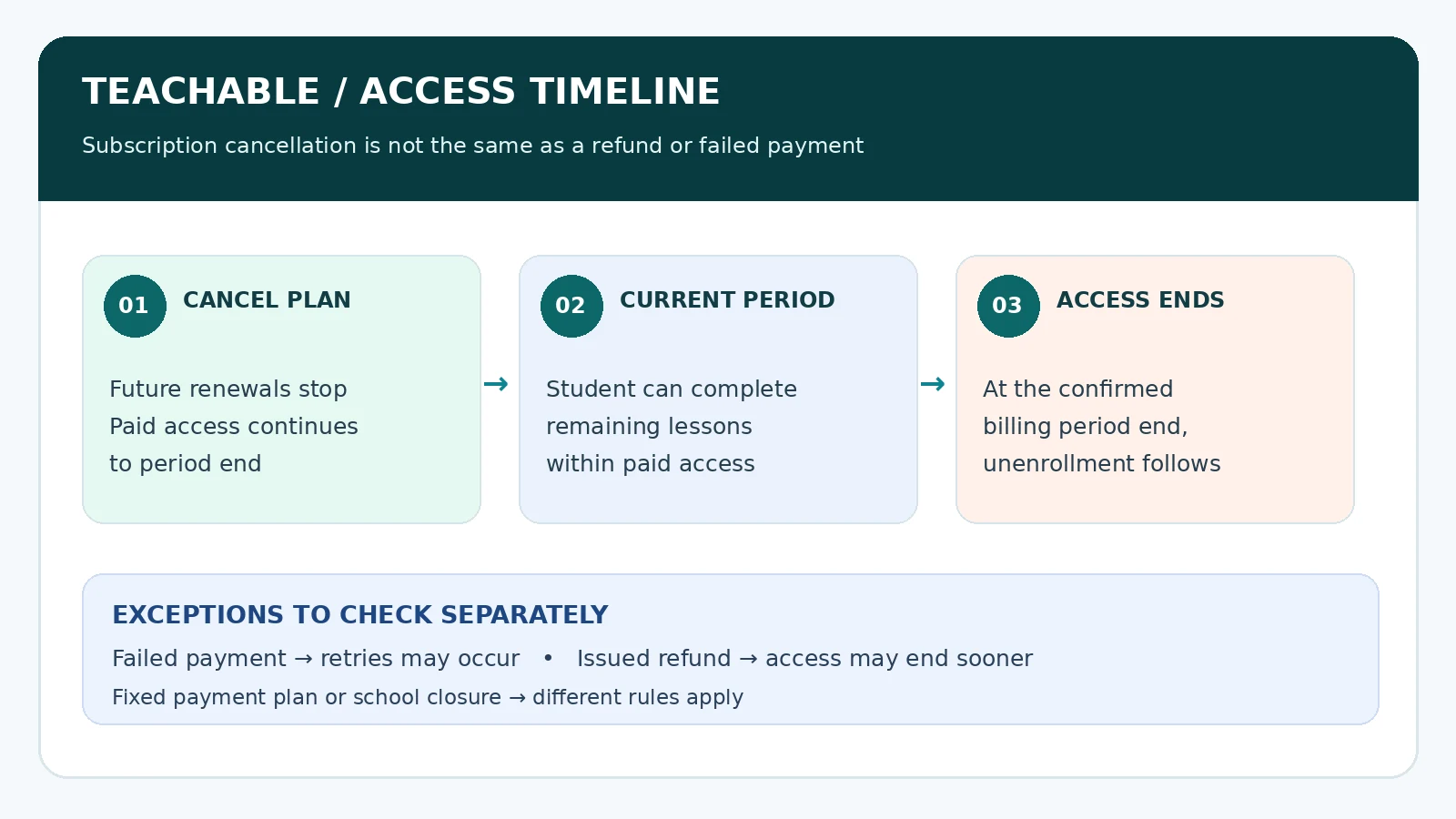
Scenario one is a voluntary cancellation with a paid month remaining. The student presses Cancel, the next renewal is stopped, and access continues through the current paid-through date. Scenario two is a failed recurring payment. The payment system retries under the configuration applicable to the school. Successful recovery preserves the subscription; exhausted retries can lead to automatic removal. Scenario three is an approved refund for the relevant payment. Access can be removed when the refund is issued, rather than when the original term would have ended.
Scenario four is a fixed payment plan or a school shutdown. These cases cannot safely be described by the simple “access until the next renewal” phrase. The installment terms, creator action, and school platform status need to be examined separately. A fifth operational variation is a subscription restored before the cancellation date; reactivation may prevent the scheduled end, but only if the action is completed in the relevant portal while the subscription remains eligible.
Students and administrators should document each scenario through the same evidence set: purchase receipt, billing interval, payment status, cancellation or refund confirmation, and the current product-enrollment status. That provides a more reliable explanation than screenshots of a generic Teachable dashboard. The goal is not to memorize platform buttons but to understand the relationship among payment, renewal, and course entitlement.
A checklist for school owners and support teams
Before responding to an access complaint, identify the student’s email, exact product, pricing plan, and school. Confirm whether the transaction was a recurring subscription, a payment plan, or a one-time purchase with a fixed access duration. Review the most recent successful payment and current billing date. Check for an explicit cancellation, failed payment attempts, a refund, a chargeback, or a manual enrollment change. These are separate conditions and may require different remedies.
Then verify the learner’s actual access state. Is the student still enrolled in the product? Do they have an account but no course entitlement? Is the school itself online? Can the learner see their enrollment but not a particular lesson? Some access problems come from content settings or login confusion rather than payment logic. A useful support reply tells the learner which event changed the entitlement and, where appropriate, the exact date at which it changed.
Finally, offer a supported next step. This may be updating a payment method during retries, reactivating before period end, repurchasing after unenrollment, or contacting the owner about payment-plan obligations or special school policies. Avoid promising a refund, an extra billing cycle, or continued lifetime access unless the records support that outcome. Clear communication is more useful than a fast but unverified answer.
Frequently asked questions
Does Teachable remove access the moment a student clicks Cancel? For a normal current recurring subscription, no. Access continues until the paid billing period ends. Is cancellation a refund? No. It stops future renewals, while a refund is a separate financial event. What happens if the card fails? Stripe may retry the payment. The student can lose access if the attempts fail and the subscription is canceled. The detailed retry schedule depends on the applicable payments experience.
Can students return after cancellation? If their paid period has not ended, they may be able to reactivate through the customer portal. After automatic unenrollment, a new purchase is generally needed. Can a payment plan be canceled with the same button? The newer documentation says no; students should contact the school owner. Does course completion guarantee permanent hosting access? No. Hosted access is controlled by enrollment and the product’s conditions, not simply by whether lessons have been marked complete.
What if the school itself closes? The owner must manage the school plan, active subscriptions, content, and student communication. School closure can interrupt hosted content separately from individual cancellation dates. Students should seek clear written confirmation from the creator about their specific purchase and access.
Bottom line
The clearest Teachable answer is also the most useful: a normal recurring subscription cancellation prevents the next charge but usually preserves student access to the end of the already paid billing period. After that, the student is automatically unenrolled. Failed payments, refunds, fixed installment plans, and school closure have different consequences and should be described separately.
For students, confirm the billing date, save the cancellation evidence, and download only resources the school authorizes before access ends. For creators, review the exact payment and enrollment records before answering access questions, and make the end-of-access policy visible at purchase and cancellation. Accurate dates and clear distinctions reduce avoidable disputes without requiring students to understand the payment platform’s internal machinery.
Primary sources and verification
- Teachable: Manage your subscription
- Teachable: Price your products (current)
- Teachable: Older price your products documentation
- Teachable: Request a refund
- Teachable: Cancel your paid school plan
- Related independent coverage: Teachable review