
A practical technical SEO audit for Sellvia digital-product pages: how to check `Product` and `Offer` markup, confirm that the page matches the data, test Google's eligibility rules, and monitor the outcome without promising rankings or rich snippets.
Documentation-based research · Verified November 2, 2026
The opportunity: make a clear digital listing understandable to Google
A well-organized digital storefront already gives search engines useful signals: a product name, a description, visible price, cover image and a route to purchase. Structured data adds a machine-readable layer that can help Google interpret those same facts. For Sellvia store owners, this creates a practical SEO opportunity. Rather than adding more generic marketing copy to every product, the owner can audit whether the existing page content is represented accurately by a suitable Product schema object with a corresponding Offer.
The key word is accurately. A product page should not claim a discount, rating, availability state or item type in structured data that visitors cannot verify from the page. Google’s documentation says rich-result eligibility depends on meeting the relevant requirements, and it clearly warns that valid markup does not guarantee any particular search appearance. The best result of an SEO audit is therefore not a promise of stars or an instant ranking jump. It is a clean, consistent product-data implementation that Google can crawl and evaluate.
This guide focuses on a narrower search question than a general Sellvia SEO overview. It shows how to distinguish a product detail page from a category page, how to verify the offer values for a digital product, and how to interpret the difference between a successful Rich Results Test and actual visibility in Google Search Console. The methodology is grounded in Google’s product structured-data requirements; it does not assume that every Sellvia template exposes identical code or a built-in schema editor.
Which Google product result are you testing for?
Google describes two broad families of Product structured-data experiences. Product snippets can add product information to a text search result and are relevant to pages that discuss or review a product, including editorial contexts. Merchant listing experiences are intended for pages where the customer can purchase the product directly from the merchant. The requirements overlap, but they are not interchangeable. A Sellvia storefront product page with an active purchase path should generally be evaluated against merchant-listing requirements first, while a separate review article has a different purpose.
This distinction matters because a store owner may run a test, see an eligible Product snippet, and conclude that every merchant enhancement is available. That is not necessarily true. Merchant listings have their own conditions around the Offer, price, currency and the ability to buy the product on that page. Google explicitly says that pages that merely link elsewhere for a purchase are not eligible for merchant-listing experiences in the same way as a direct merchant product page.
Start by classifying the page, not by pasting code
Before testing markup, select three representative Sellvia URLs. Use an ordinary single-product page, another with a promotion or variant if your store supports it, and a non-product page such as a category for contrast. Open each page without being signed in. Confirm that search engines and ordinary visitors can access the visible content, and make a note of title, main product name, canonical URL, image, price and purchase action.
Then inspect what the actual HTML or rendered page exposes. Search for application/ld+json scripts, microdata attributes, and any Product objects added by the current theme, ecommerce engine or third-party integration. Do not assume that no structured data exists simply because no visible JSON-LD appears in the original page source; JavaScript can inject markup later, although Google recommends initial HTML for merchants concerned about reliability and fast-changing pricing.
It is also possible to find several schema objects, some of which describe the organization, navigation, website or breadcrumbs rather than the actual product. That is normal. The task is to identify whether a Product object matches the current URL and whether it has a coherent Offer. Duplicate Product objects created by competing plugins or template fragments deserve investigation because they can disagree on price, currency or product identifiers.
Product, Offer, name and image: the core facts
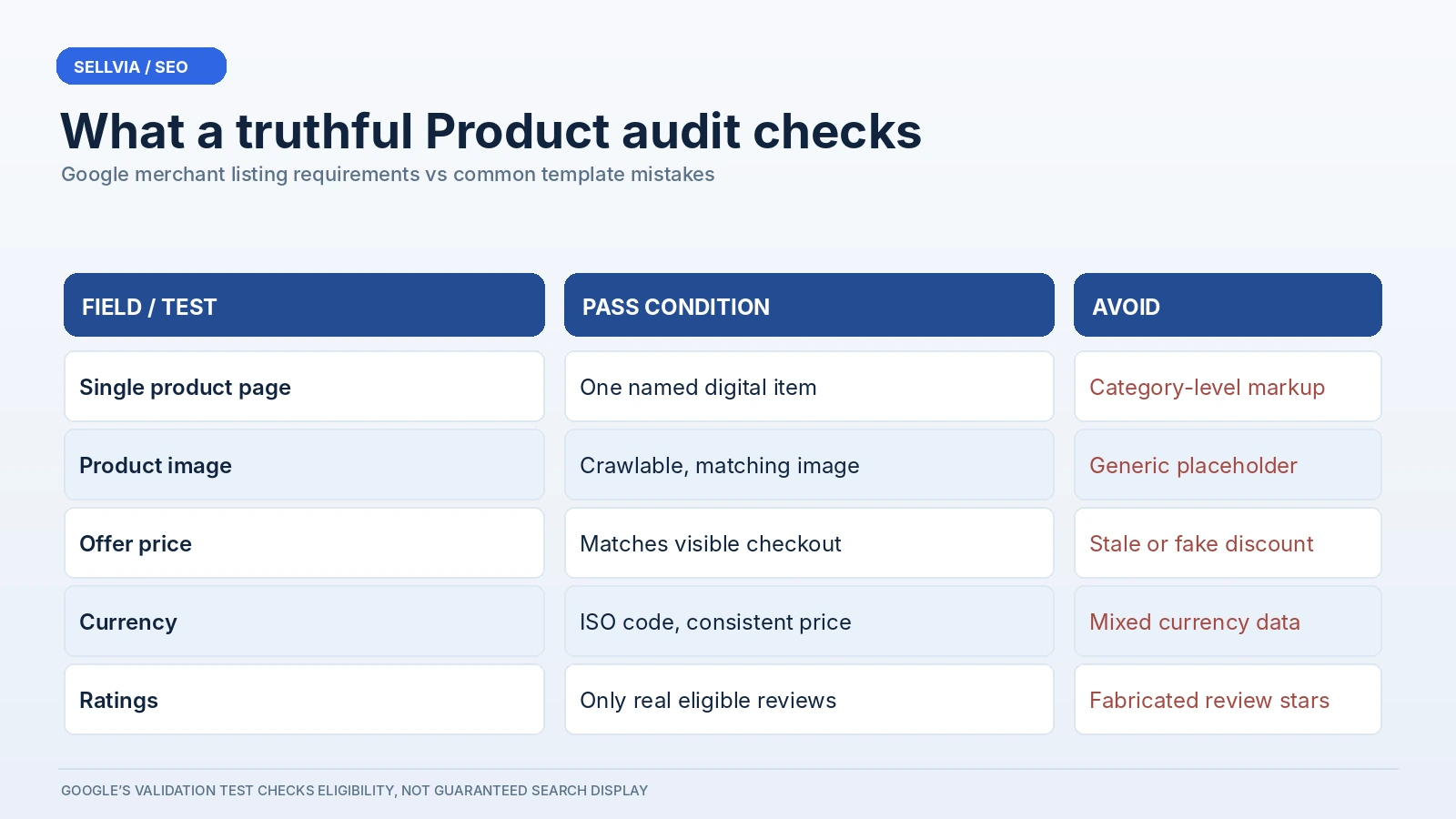
| Field | Audit requirement |
|---|---|
| Product name | Matches the named digital item |
| Image | Represents the product and is crawlable |
| Offer | Current price and currency match checkout |
| Rating | Use only genuine eligible review data |
Google’s merchant-listing documentation identifies the Product name, a suitable image, and a nested Offer as core requirements. The offer must communicate a price and currency in a supported form. These are especially relevant to digital products because the on-page presentation can change faster than an old hard-coded schema template. If the owner edits a product price, a stale JSON-LD price should not keep advertising the previous amount.
The Product name should match the actual item being sold. Avoid stuffing extra keyword phrases into the schema that are not part of the visible product name. A realistic product image should represent the relevant digital item: for instance, the genuine course cover, software screenshot, template preview or other accessible visual that helps a buyer understand the product. Google asks that product images be crawlable and indexable, and its documentation recommends multiple useful aspect ratios where available.
A digital product might not have conventional warehouse stock, and the seller should not fabricate a physical inventory claim to satisfy a test. Availability, where applicable, should reflect the service’s actual ability to fulfill the purchase; the owner should understand the supported schema vocabulary before setting a value. Some optional information enhances presentation, but it is never a reason to insert facts that the storefront does not genuinely display or support.
A conceptual JSON-LD example for a digital-product offer
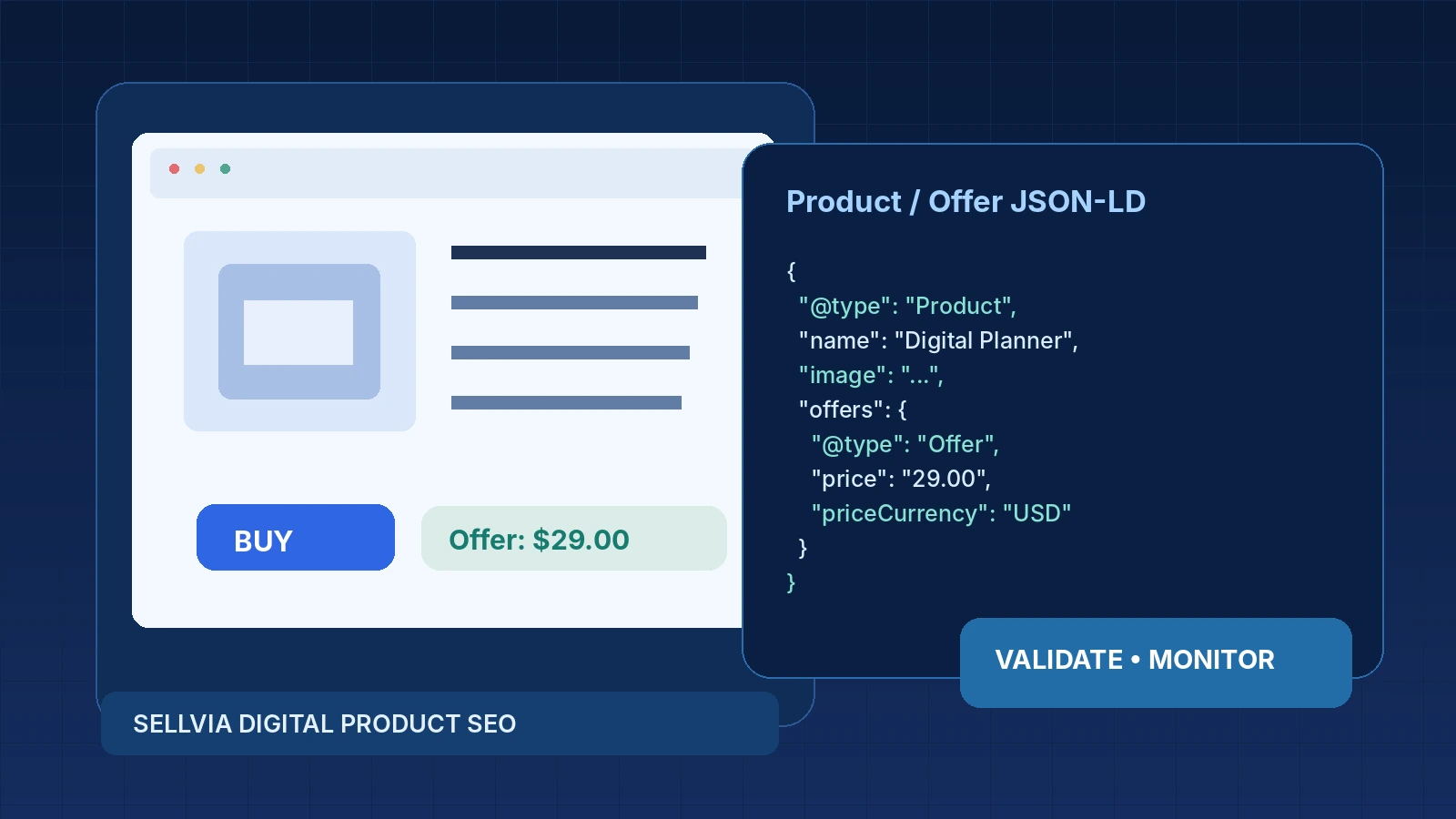
Consider a fictional Sellvia store page for a digital planner bundle priced at $29. The conceptual Product data would identify a single product name, a real product cover URL and an Offer with the page URL, price 29.00 and priceCurrency USD. The code fragment below is a learning template, not a live Sellvia API response or an instruction to paste static values into every page. The domain and image URL must be replaced with actual crawlable store URLs and must match the visible listing.
{
  "@context": "https://schema.org",
  "@type": "Product",
  "name": "Digital Planner Bundle",
  "image": "https://example.com/cover.webp",
  "offers": {
    "@type": "Offer",
    "url": "https://example.com/planner/",
    "price": "29.00",
    "priceCurrency": "USD"
  }
}
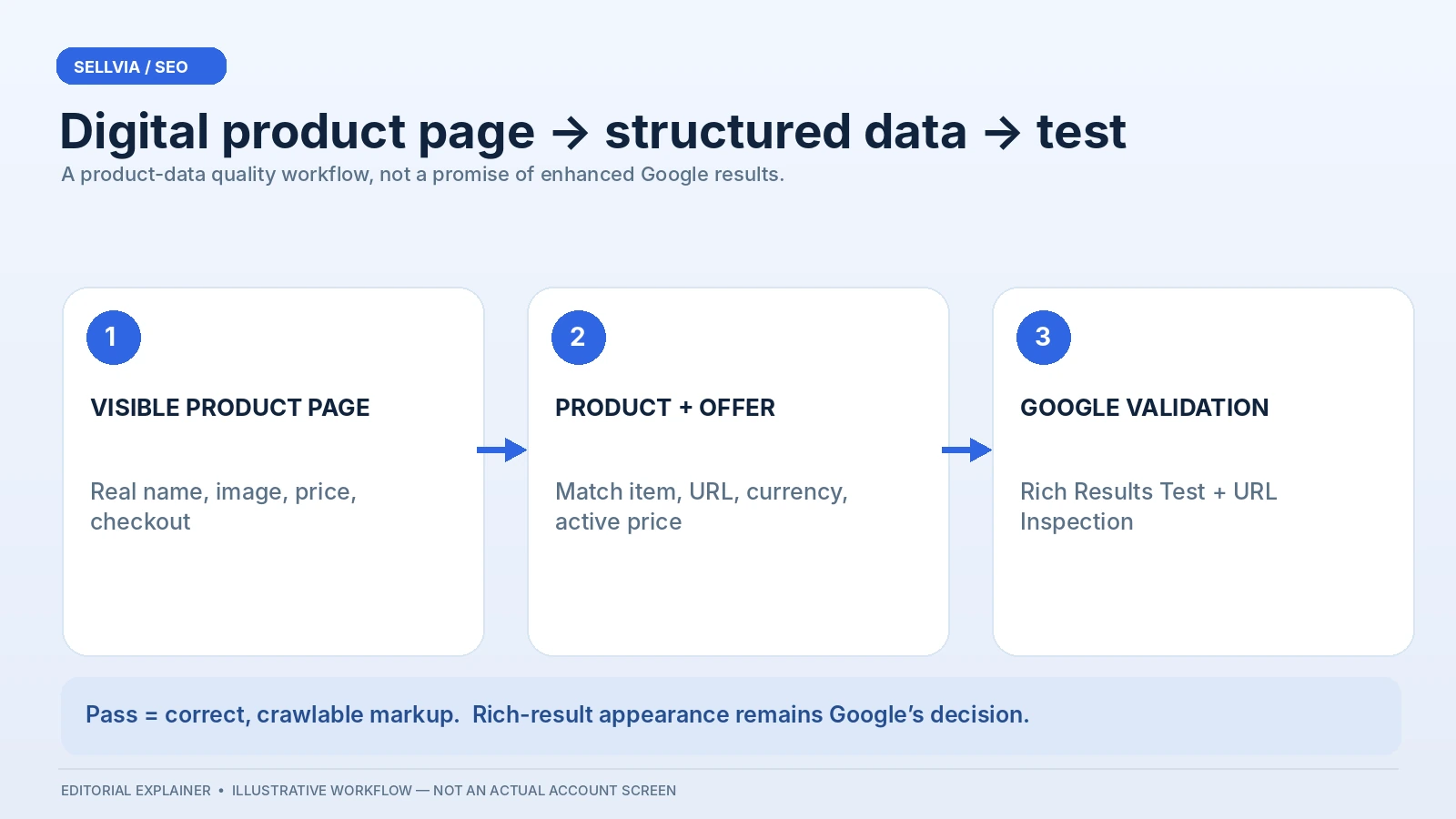
The important fields form a coherent chain: the main page describes one named digital product; the Product object describes the same product; the image belongs to that product; and the Offer represents the actual purchase available from the page. If the buyer sees a different live price, currency or product title than the JSON-LD supplies, the markup is not ready for publication even if its syntax is valid.
Digital products and shipping-related fields
Google’s merchant-listing documentation contains many examples involving shipping rates, delivery times and physical inventory. A Sellvia digital product is not automatically required to behave like a physical item for every optional enhancement. A buyer may receive access through a download, account entry or a digital service flow rather than a parcel. The page should describe that actual access path clearly and use only relevant structured data.
Do not invent a shipping weight, carrier, destination or transit time for a digital download. If a validation tool reports a recommendation concerning shipping or merchant policies, first determine whether the field is required for the specific rich-result feature and whether the product type makes it applicable. Optional recommendations and critical errors are different. Google explicitly tells site owners to fix required-property errors while understanding that some warnings concern nonessential enhancements.
For a digital-product audit, clarity about access can be more valuable than forcing unrelated fields into the schema. Make sure the page explains what a customer receives, the price, the checkout process and any relevant licensing or refund conditions. Those visible details support trust, user experience and the structured data’s consistency. They are also harder for a search engine to misunderstand than a schema block that makes claims the page itself never substantiates.
Why fake review stars are a poor SEO shortcut
A frequent temptation is to add aggregateRating with an attractive score even when the store has no eligible, verifiable customer-review data for that product. This is exactly the wrong way to approach Product schema. Google’s structured-data guidelines prohibit misleading representations, and the relevant review rules limit how ratings can be used. A product page should not invent reviews, aggregate unrelated company ratings into a product score, or copy testimonial figures from another listing without a valid basis.
The absence of ratings does not automatically prevent merchant-listing eligibility. A real offer price and other required fields can still make a product useful to Google. That is good news for a new Sellvia store: the owner can start with truthful product details rather than being pressured to manufacture social proof before the catalog has attracted genuine reviews. If authentic product-level feedback becomes available later, its eligibility can be evaluated separately.
Think of schema as a fidelity test. The question is not “what can we add to force a bigger snippet?” but “what real information is already on this page and can be represented clearly?” That mindset is more sustainable and protects against changes in Google’s enforcement of structured-data policies.
Test the page with Google’s Rich Results Test
The next step is practical. Open Google’s Rich Results Test, enter a public product-page URL and select the appropriate testing option. Review the detected Product items and any merchant-listing or product-snippet results. A clean test tells you that the tool can parse the markup and identify eligible structured-data features, subject to the broader guidelines. It does not verify that the page ranks or that Google has actually selected that appearance for a search result.
Read every issue in context. A missing required field is different from a recommended field that would enrich an optional visual feature. Check whether the tool sees the same product name, price and currency the shopper sees. Look at the rendered HTML where possible, particularly if the store uses JavaScript to show or update price information. If the tool finds an invalid image URL, verify that the asset is accessible to Google’s crawler and not hidden behind an authentication token or temporary session URL.
Repeat the test across representative page types. A single success on one product does not prove that every product in the catalog is correct. Templates sometimes render differently for free versus paid products, sold-out listings, bundles or discontinued items. A small three-to-five-page sample can reveal the classes of errors before a site-wide rollout.
Search Console: separate valid markup from indexed URLs
After syntax validation, use Google Search Console’s URL Inspection tool on the canonical product URL. Verify indexing status, selected canonical and whether the page is crawlable. If Search Console identifies a different canonical URL than the one intended, structured data on the noncanonical version may never become the result you expected. This is why Product schema should be audited alongside ordinary technical SEO rather than treated as a disconnected plugin setting.
Google also provides Product snippets and Merchant listings enhancement reporting for applicable properties. These reports can indicate valid items, invalid items, warnings and changes after updates. Watch the trend rather than reacting to every individual warning. A sudden jump in invalid products after a template edit deserves investigation; a single optional warning on a digital item may be less urgent than a missing active offer price across the entire catalog.
Use the Performance report to assess whether eligible product pages receive impressions and clicks over time. The structured-data test alone is not a traffic report. Search performance can be affected by content quality, demand, competition, indexing and page experience. A store may have perfect markup but little traffic if its pages do not answer specific search needs or Google considers competing sources more useful.
Common implementation mistakes on digital storefronts
Currency is another source of error. Google advises distinct URLs when products are sold in multiple currencies. If a page displays one currency to a particular user but the structured data advertises another, investigate the store’s localization and canonical behavior. Do not hard-code USD or another currency into an international template without confirming how the page actually renders and what the current offer means.
A launch and maintenance checklist for Sellvia owners
Before launch, select several representative digital-product URLs and confirm that each has a clear page title, visible product name, genuine image, price, checkout action and self-referencing or otherwise appropriate canonical. Inspect the Product and Offer objects, eliminate conflicting duplicates if you control the templates, and validate the public URLs in Google’s Rich Results Test. Record the issue count and screenshots so that a later code update can be compared objectively.
After launch, use URL Inspection to check whether the canonical pages are indexed. Watch Merchant listings or Product snippets reports for changes in valid and invalid items. Recheck a sample after a price edit, new product release, domain switch or template update. If something changes unexpectedly, compare a known-working product with an affected page before making a blanket site-wide modification. That controlled comparison often reveals a specific variation in price, image or availability output.
This workflow suits Sellvia’s digital-store model because the page already centers on a defined product and purchase path. Structured-data review can build on that clear foundation without demanding a separate storefront redesign. The owner still needs to keep the information accurate, but the work becomes a focused product-data quality exercise rather than a vague promise that one SEO tweak will solve search visibility.
What success looks like – and what it does not
A successful schema audit produces an evidence trail: each tested URL, detected Product item, price and currency, errors or warnings, canonical outcome, indexing status and follow-up date. It is useful even if Google chooses a standard blue-link result rather than a merchant feature. The data improves confidence that the page communicates its actual content correctly and that later issues can be diagnosed systematically.
Success does not mean all search results immediately display a price or star rating. Google makes rich-result decisions algorithmically and explicitly declines to guarantee enhanced appearances. Nor does the presence of structured data excuse misleading prices, thin product pages, unusable checkout buttons or inaccessible digital content. Those are separate elements of product quality and user experience, and some are likely more important to the buyer than any visual enhancement in search.
For a Sellvia owner, the practical advantage is a repeatable process. A clear product page plus accurate schema plus Search Console monitoring is a stronger foundation than scattering unverified scripts throughout the site. As the digital catalog grows, a consistent audit method can help new listings inherit quality standards from earlier ones.
Bottom line: test eligibility, not imagined rankings
Sellvia product schema should be treated as a quality-control layer for real digital offers. Determine whether the page is an appropriate single-product candidate, identify any existing Product and Offer markup, check the price and image against what buyers can see, and run Google’s tools on public canonical URLs. Avoid fabricated ratings, invented shipping data and contradictory prices. Then monitor actual Search Console indexing and enhancement results instead of treating a parser success message as proof of traffic growth.
The most useful SEO outcome is not a manufactured promise. It is clarity: each digital product is described consistently to customers and search engines, and each error can be investigated with evidence. That makes this a practical, positive improvement pathway for an existing Sellvia digital storefront rather than another generic checklist of unrelated search tricks.
Primary sources and editorial method
- Google Search Central: Merchant listing Product structured data
- Google Search Central: Product snippet structured data
- Google Search Central: Product structured data overview
- Google Search Central: General structured data guidelines
- Sellvia product-page overview and customer-facing fields
This guide derives structured-data requirements from Google and product-page context from a published Sellvia store guide. The proposed implementation and audit procedure are editorial recommendations, not a claim that every Sellvia account exposes the same schema controls. No live Sellvia store was modified or tested for this article; all fictional product prices and page examples are illustrative.
For a broader platform profile, see the Ecom Ratings company review.