
ECOMMERCE RESEARCH / DIGITAL PRODUCTS · ECOM RATINGS
A ready-made digital catalog removes the blank-store problem. Here is how to turn its 50 starting product pages into a clear, useful search experience.
Editorial guide · Source check: October 28, 2026 · Practical SEO launch workflow

The practical advantage: Ecomzy provides a starting catalog of 50 digital products and a storefront structure. That gives an owner real pages and categories to improve from day one, while visibility in Google still depends on content quality, technical accessibility and search demand.
The advantage of beginning with a populated digital catalog
A blank store offers complete freedom, but it also requires an enormous number of small decisions before there is anything to evaluate: what to sell, how to group products, which pages to build, and what a customer should see on arrival. Ecomzy takes a different approach. Its current site describes a store that starts with 50 digital AI-powered products across ten categories. The merchant therefore begins with an actual catalog structure rather than an empty design canvas. That is a practical advantage for anyone who wants to learn by improving a working store instead of building every product page before launch.
For search visibility, the most important benefit is not that fifty pages guarantee fifty Google rankings. They do not. The benefit is that the store owner can begin making editorial decisions immediately. There are products to group, descriptions to improve, related tools to connect and customer questions to answer. Instead of inventing an information architecture from nothing, the owner can examine which categories make sense together and which product pages deserve additional attention.
Ecomzy’s public materials also describe a custom store URL, mobile-friendly design and basic on-site SEO metadata as parts of the store setup. Those foundations matter because an SEO program cannot begin in earnest until a site has stable URLs, crawlable pages and a navigable product structure. The platform supplies a starting framework; the merchant supplies the positioning, useful content and ongoing measurement that turn the framework into a recognisable online business.
What the 50-product starting point actually means
The number fifty is useful because it is large enough to reveal meaningful categories and small enough to review carefully. Ecomzy’s current landing page presents its starter offering as fifty digital tools spread across ten categories, with additional products added over time. The published terms also describe fifty randomly selected items included in the initial turnkey-store setup. Those statements should not be interpreted as a promise that every new account receives an identical list or that every page is instantly indexed by Google.
A more productive way to think about the offer is as a starting inventory that can be assessed after the store is provisioned. The first task is to record the actual products visible in that particular store. Note each URL, product name, category, price presentation, description length and whether the page can be reached from the main navigation. This inventory turns a marketing feature into an operational asset that can be improved systematically.
Because the catalog centres on digital tools and resources, the editorial opportunities differ from those of a conventional physical-goods store. A good product description can explain the problem the tool addresses, the inputs a customer needs to provide, the type of output it creates and the practical limits of that output. Useful examples might concern a résumé assistant, a budgeting worksheet or a planning guide. The customer is buying a digital experience or resource, not evaluating packaging or delivery logistics.
A first-day SEO inventory that takes less time than rebuilding a store
Once the store is live, open a simple worksheet with one row for each product URL. Add columns for the category, main customer question, intended page title, key benefit, visible call to action, related resource and audit status. A sheet this simple is enough to organise a full first pass. It avoids the common pattern of editing pages one by one without remembering what has already been checked.
Work through the website as a visitor before opening technical diagnostics. Can you understand what each category is for? Are product titles specific enough to distinguish one digital tool from another? Does the navigation help someone move from a broad need, such as planning or career development, to a relevant individual resource? If the answer is yes, record it. Good SEO starts with a useful browsing experience, not with inserting keywords into otherwise confusing text.
Then run a technical pass. Confirm that priority URLs load successfully, have one visible main heading, show meaningful title tags and descriptions, and appear in the store’s sitemap where appropriate. Inspect a representative page in Google Search Console after verification is available. A page that looks fine in the browser but carries an unexpected noindex directive or points its canonical to a different URL deserves investigation before any rewriting work begins.
This quick review creates two separate to-do lists: page-experience improvements and technical-indexing checks. Keeping them separate is an advantage. It prevents the merchant from rewriting useful text when the real problem is a missing internal link or an incorrect canonical setting.
| Audit field | What to record | Why it helps |
|---|---|---|
| Product URL | Actual public address and category | Creates a traceable 50-page inventory |
| Page purpose | The question the digital tool answers | Makes copy specific and useful |
| Search presentation | Title tag, main heading and meta description | Aligns snippets with the page |
| Indexing checks | HTTP status, canonical target and sitemap inclusion | Confirms search-facing technical basics |
| Priority | Now / next / later | Keeps effort focused on high-fit products |
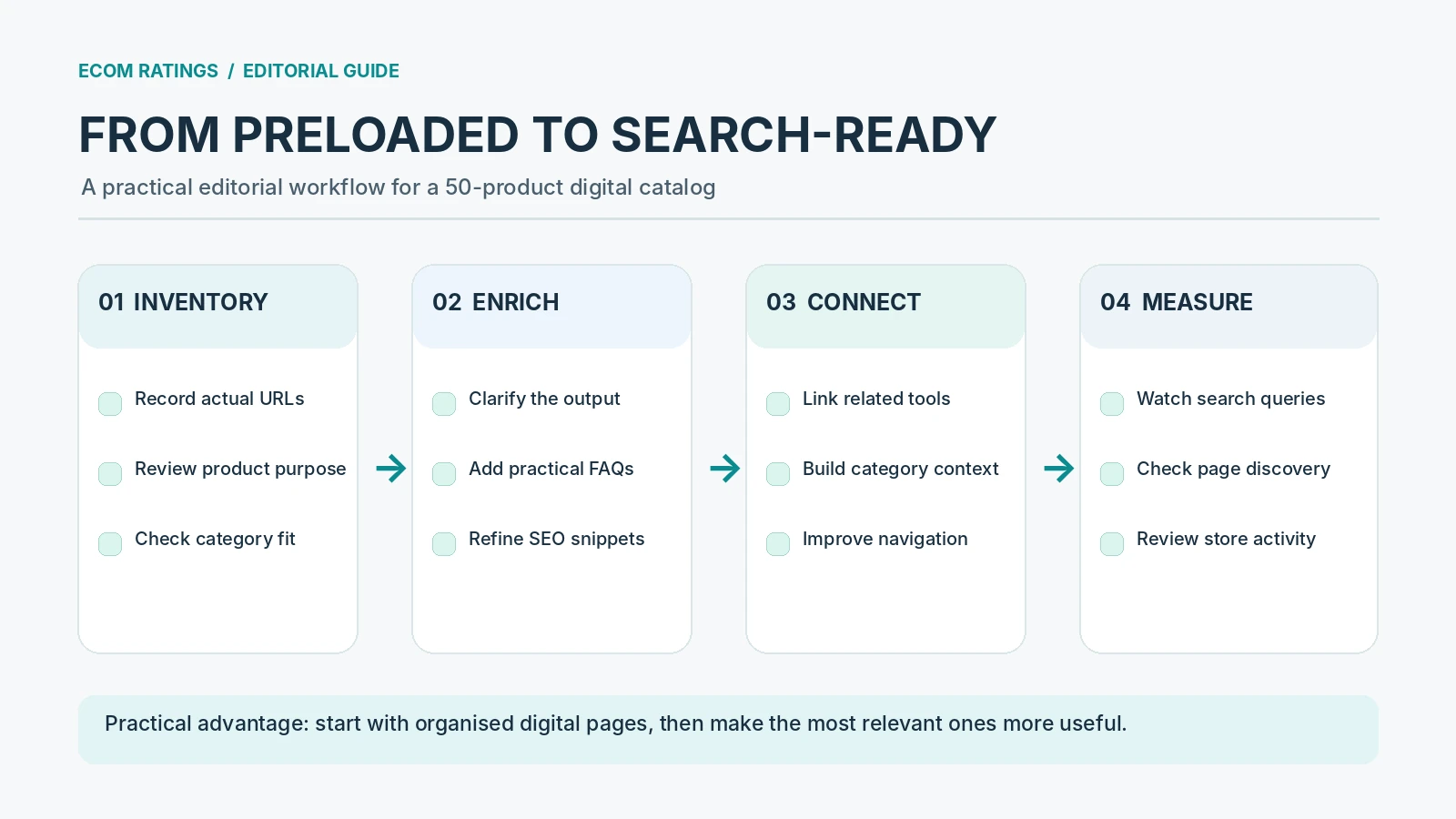
Make each digital product page answer a clear customer question
A search-ready product page should answer more than ‘What is this called?’ For a digital tool, the visitor usually wants to know what it does, who it helps, what information they must provide and what they can expect to receive. Those four questions form a useful editorial template. They also produce genuinely helpful copy without relying on repetitive adjectives such as ‘powerful’, ‘revolutionary’ or ‘all-in-one’.
For example, a résumé-related tool can explain which career situations it is suitable for, how users should prepare their background information and how to review an output before submitting it to an employer. A financial planning resource can explain the type of budget entries it organises, which assumptions the user should check and why a personalised calculation is not professional financial advice. In both cases, practical instructions make the page more useful than a short product teaser.
Keep technical feature claims accurate. If a tool creates a draft, say it creates a draft; do not imply it guarantees a result. If an AI-powered output depends on user-provided information, describe that dependency. For Ecomzy, credible expectations are particularly valuable because the catalog includes different kinds of digital tools and guides, and customers need to understand the difference between information, automation and finished work.
Use the ten categories as a discoverability framework
The stated ten-category structure gives Ecomzy merchants a natural way to organise content around needs. A category page should not merely display thumbnails; it can introduce a problem area and explain the types of tools a visitor can find there. For example, a career category could group résumé, interview and professional-development resources. A budgeting category could explain how planning templates differ from personalised AI-assisted analysis.
Do not assume that every category needs a lengthy essay. An effective category page might have one clear introduction, a small set of featured products, concise explanations of common use cases and links to the most helpful individual pages. The aim is to create an understandable route through the catalog. Search engines benefit from that clarity because the same internal structure helps communicate how topics relate.
The ten categories are also an opportunity for restraint. If a merchant’s intended audience is narrow, there is no need to promote every category equally. A business focused on career tools may prioritise the most relevant category pages while leaving other areas accessible through normal navigation. This avoids the unfocused impression that every product must become the centrepiece of the SEO program at once.
Three practical on-page upgrades with strong user value
The first upgrade is a better product summary. Lead with the concrete task the digital product helps with, then explain the workflow in plain language. That is more useful than describing an AI tool only as an innovative solution. The page should say whether the experience involves a downloadable template, an interactive questionnaire, generated text, or a combination. The clearer the output type, the easier it is for users to choose the right product.
The second upgrade is contextual linking. A product about CV preparation can link to an interview-preparation resource; a planning guide can link to a related checklist. These links should be genuine next steps, not random cross-promotion. A related-products module is valuable when it helps shoppers complete a task rather than simply increasing the number of clickable thumbnails.
The third upgrade is a trust layer: explain access, prerequisites and reasonable limitations. If the tool uses AI, users benefit from knowing how to review the result. If the resource is educational rather than legal, medical or financial advice, say so where that distinction matters. Trust-oriented copy may not sound like an SEO trick, but it makes the site more useful and reduces ambiguity at the moment of purchase.
How titles, descriptions and canonicals support a polished launch
A professional product page needs a clear search title and a clear on-page title. They can be similar, but both should identify the actual digital tool rather than overloading the heading with vague promotional language. A concise description should summarise what someone can do with the tool and why that matters. These are editorial improvements first and keyword decisions second.
Google’s guidance on canonicalisation is important but frequently misunderstood. Duplicate or similar pages are not automatically a spam-policy violation. Search engines choose a representative URL when similar content is reachable through multiple addresses. A merchant can help by keeping stable product URLs, using consistent internal links and avoiding accidental copies created by filters or temporary campaign parameters. The presence of a ready-made catalog does not itself establish that there is a penalty or a technical problem. Google explains canonicalisation here.
For Ecomzy stores, check the actual rendered page before prescribing changes. A canonical tag may already be set correctly. A sitemap may already include the important products. Basic SEO metadata may already have been provided during setup, as described in the Ecomzy terms. The productive action is to confirm what is already working, improve weak metadata where needed and leave correct infrastructure alone.
A realistic two-week publishing sequence for a new store
During the first three days, inventory the fifty pages, review category navigation and identify the ten to fifteen products most relevant to the intended audience. Confirm title tags, headings, page access and sitemap coverage. Keep screenshots or a simple audit log so the work can be checked later. This is a better use of the first days than rewriting fifty descriptions blindly.
During days four through seven, improve the first five priority product pages. Add precise customer questions, more useful introductions, relevant internal links and short expectations-setting FAQs. Update one or two category introductions at the same time. By the end of the week, the merchant should have a small set of notably stronger pages and a repeatable editorial pattern that can be applied to the next group.
In the second week, review another five priority pages, publish a helpful guide that connects several related products, and test the product journey on mobile. Use Search Console to look for any obvious crawling or indexing issues after the property has collected data. Monitor which pages Google discovers, but avoid interpreting a few days of incomplete data as a verdict on long-term search demand.
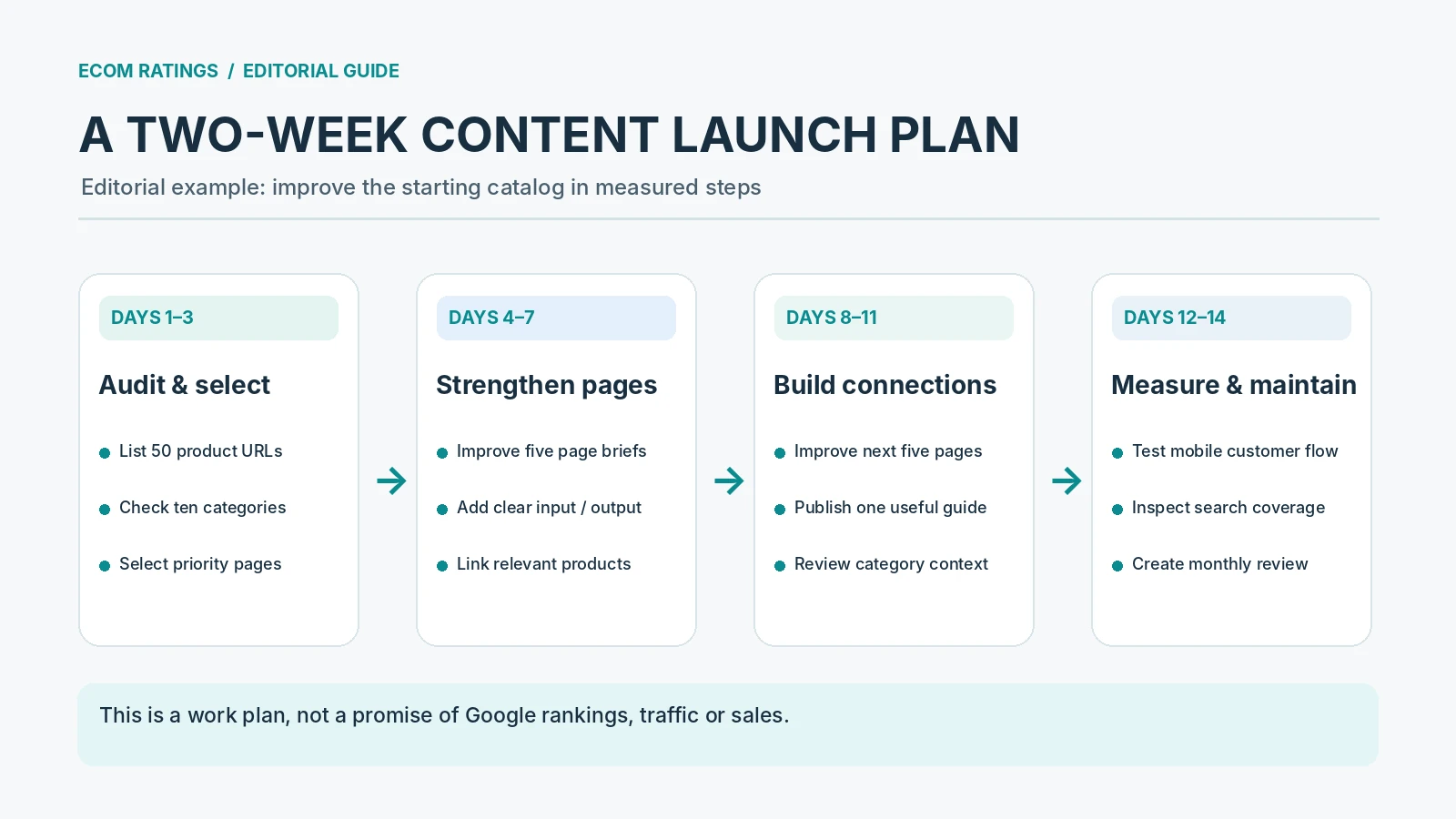
| When | Focus | Deliverable |
|---|---|---|
| Days 1–3 | Review actual URLs and categories | Prioritised product inventory |
| Days 4–7 | Improve five priority pages | Clearer copy, links and FAQs |
| Days 8–11 | Improve five more products and a guide | Deeper topical connections |
| Days 12–14 | Check mobile journeys and initial indexing data | A repeatable monthly maintenance routine |
Measurement: distinguish search discovery from sales activity
Ecomzy’s public Reports page describes order counts, revenue, visitor analytics and related performance indicators. Those operational reports are useful for understanding how the store is being used, but they should not be mistaken for a complete organic-search diagnostic system. A store may receive traffic from multiple channels, while Search Console is specifically designed to show how pages appear in Google’s search ecosystem.
Use the two perspectives together. In Search Console, look at impressions, clicks, indexed pages and queries once the property has enough data. In the store’s reporting dashboard, examine the activity that follows visits, such as orders or sales trends. Keeping these views separate helps answer a precise question: are pages gaining search visibility, and are visitors finding the products useful enough to explore or purchase?
Do not assign every order to SEO simply because the page is indexable. Some visitors arrive from direct links, referrals or paid promotion. Attribution should use the available evidence, not assumptions. Even small stores benefit from being careful here because early volumes can make individual orders appear disproportionately significant.
What the preloaded model saves—and where owner judgment still matters
The principal time saving is obvious: the owner is not starting with zero categories, zero product pages and zero browsing paths. Ecomzy offers a populated digital catalog, a ready-made storefront and initial metadata as part of its described setup. That provides a tangible foundation for testing page clarity and customer navigation from the beginning. It also helps owners learn which product categories fit their audience before commissioning extensive custom content.
Owner judgment remains essential. A preloaded product can be useful without becoming the business’s main organic-search landing page. A category may be relevant to the general catalog but less important to the store’s chosen audience. An AI-generated output may be helpful yet still require user review. These decisions are not failures of the platform. They are the normal editorial and commercial choices involved in operating a digital store.
The most efficient strategy is to protect the initial convenience while improving only what matters. Keep strong page structures. Reuse consistent formatting where it helps readers. Refine titles and descriptions that do not yet answer real customer questions. Build topic depth around the products that have the clearest audience fit. That is how the initial catalog becomes more valuable over time.
The launch checklist: what to verify before promoting priority pages
Before directing traffic to a product page, confirm that a visitor can understand the tool’s purpose without reading the whole catalog. Check the headline, first paragraph, product access explanation, call to action and mobile layout. Make sure any claims about what an AI product can do match the actual product behaviour. A clear page can still be persuasive without promising a specific financial, professional or personal outcome.
Next confirm that the SEO basics are consistent. The priority URL should load over HTTPS, return the expected status, expose a sensible canonical target and be linked from at least one relevant category or guide. Check whether its title and description accurately summarise the page, and whether images add information instead of merely decoration. These steps are measurable; they are not slogans.
Finally, decide who owns maintenance. As products change or new items are added, someone should confirm that category placement, descriptions, availability and relevant links remain current. This is especially useful when the catalog grows beyond the original fifty items. A small recurring audit is easier than a large emergency cleanup months later.
Bottom line: a useful starting catalog creates room for better content
Ecomzy’s 50 preloaded digital products are best understood as an operational head start. Instead of building a catalog before learning anything about audience needs, a merchant gets a structured starting point and can begin improving product explanations, category journeys and search presentation immediately. The benefit is the time and clarity that a populated catalog provides—not an automatic promise of organic traffic.
A practical SEO plan builds on those strengths. Inventory the actual fifty product pages, focus on the most relevant categories, add genuinely helpful explanations, preserve correct technical settings and measure search visibility separately from sales. The result is a more deliberate and useful storefront built on the convenience Ecomzy already provides.
Primary sources and methodology
- Ecomzy: current storefront and 50-product catalog description
- Ecomzy: Terms of Service and turnkey-store setup
- Ecomzy: Built-in store reports
- Google Search Central: How canonical URLs work
- Google Search Central: SEO Starter Guide
Editorial method: Product counts, initial SEO configuration and reporting functions are attributed to the official Ecomzy pages linked above. The review framework, two-week work plan and illustrative examples are independent editorial recommendations; they do not imply that a particular live store has been crawled or that search results are guaranteed.