
SELLVIA / TECHNICAL SEO / ECOM RATINGS
Sellvia Google Search Console Audit: Diagnosing Excluded Digital Product URLs
Editorial research · Primary sources reviewed November 4, 2026
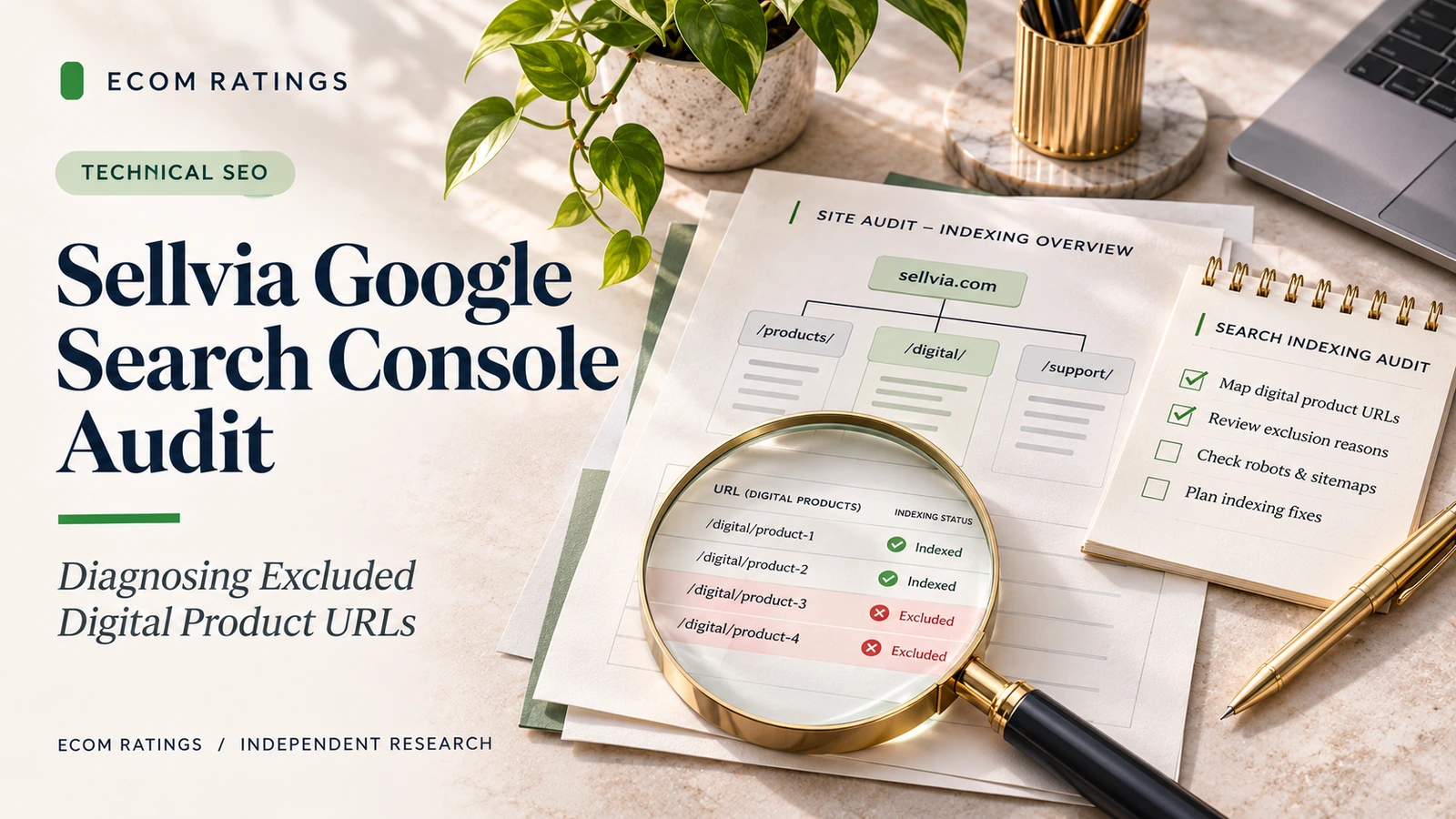
Separate crawl errors, canonical signals, and editorial indexing decisions before changing product pages.
A Sellvia digital store can be ready for customers long before every product URL appears in Google Search. That distinction matters because the absence of a product from search results does not automatically mean that Sellvia has a delivery, payment, or storefront problem. Google’s crawl and indexing systems make separate decisions about discoverability, canonicalization, and the value of an individual page. The productive response is a documented audit, not a series of random SEO changes.
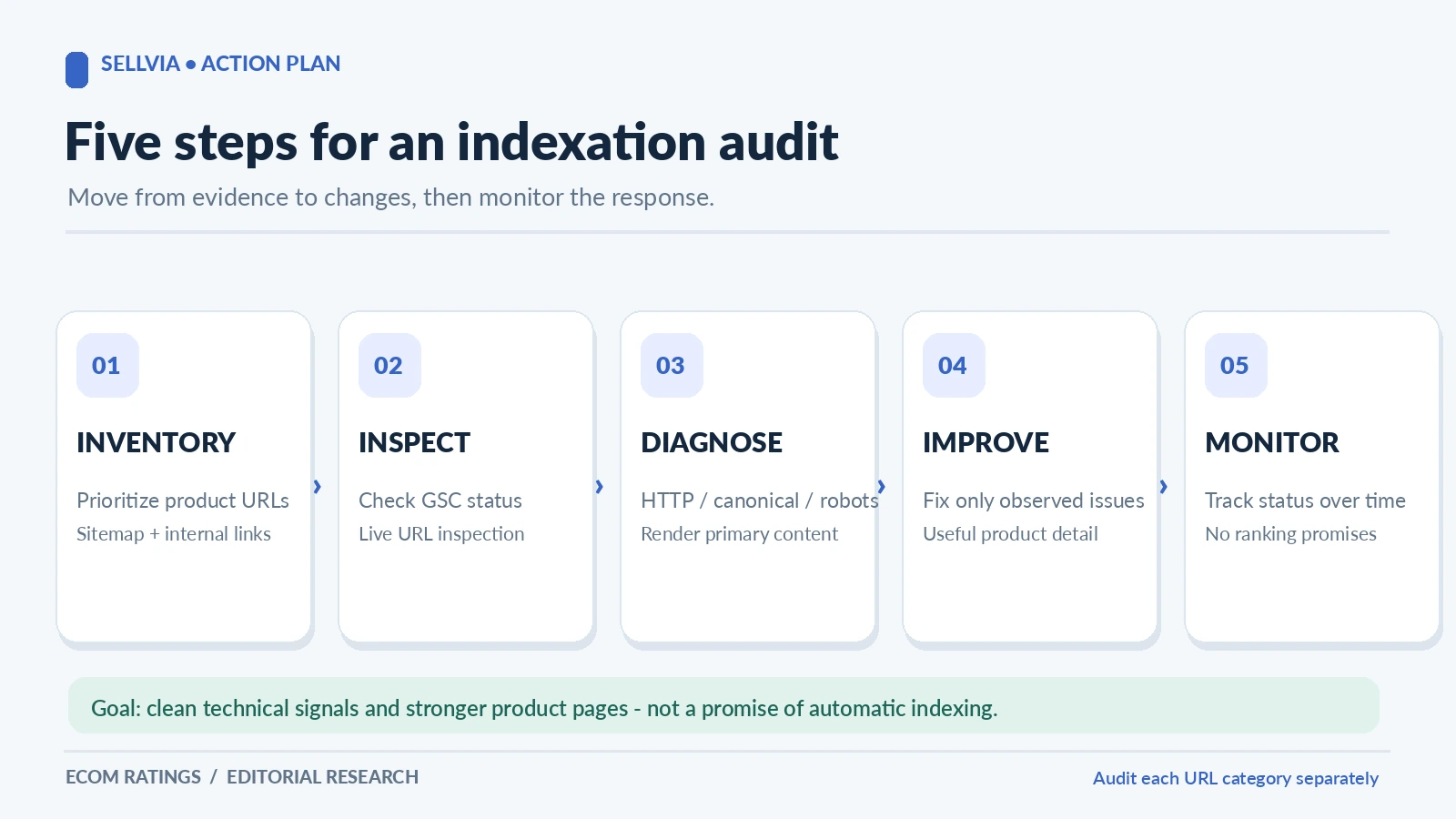
This guide is for store owners who want to investigate excluded digital-product pages using evidence from their own Google Search Console property. It is not a claim that we inspected a particular Sellvia account. The objective is to make diagnosis repeatable: identify the relevant URL, establish what Google reports about it, test the live page, understand the difference between technical exclusion and editorial selection, and decide what is worth improving.
First distinguish discovery, crawling, indexing, and search visibility
Four different stages can produce a page that does not seem to rank. Discovery means Google knows that a URL may exist, perhaps from a link or sitemap. Crawling means Googlebot requested a page and could attempt to process it. Indexing means Google selected the page for inclusion in its index. Visibility means an indexed page is actually shown for searches where Google judges it useful. These stages are related, but none guarantees the next one.
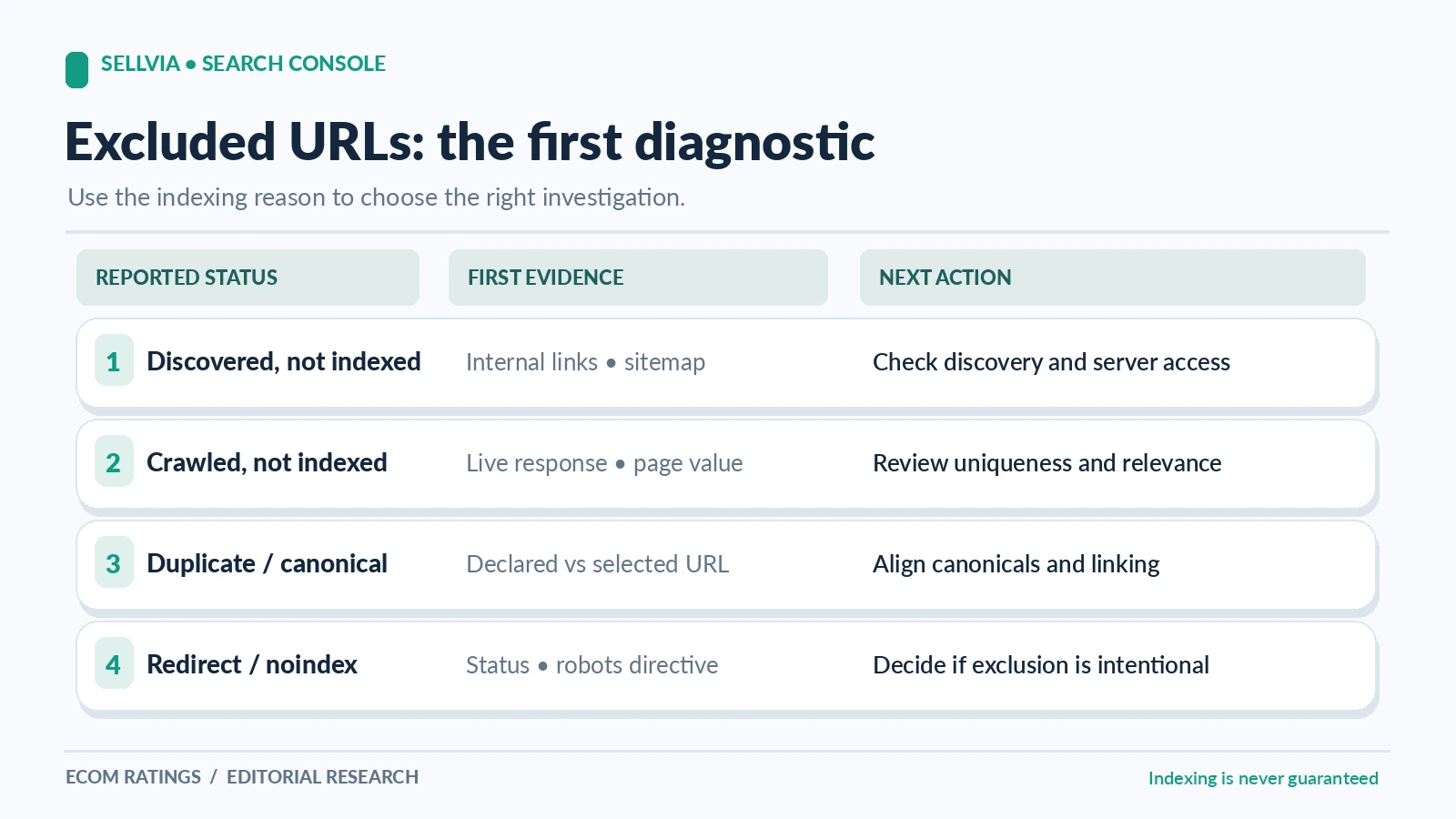
An owner who opens Search Console and sees “Discovered – currently not indexed” is not seeing the same issue as someone whose URL reports “Crawled – currently not indexed.” In the first case, Google has identified the address but has not necessarily completed a crawl. In the second, Google has already processed the URL and decided not to include it for now. A page marked “Duplicate, Google chose different canonical” belongs to a third category: Google’s chosen representative URL may differ from the store owner’s preferred address.
Digital-product storefronts add a useful dimension to this distinction. Product pages can share layout modules, navigation, feature headings, and related-product blocks while describing different offerings. That common structure is perfectly normal. The auditing question is whether each indexable URL represents a genuinely distinct search intent and whether technical signals point consistently at the preferred page.
The first action is therefore classification, not rewriting. Collect the excluded URLs and group them by their reported state. Compare only like with like. A redirect issue is not fixed through extra copy, and a thin near-duplicate page is not made compelling simply by submitting it to the index again.
Build a trustworthy URL inventory before editing anything
Start with three lists: the URLs shown in Search Console’s Page indexing report, the digital-product URLs in the current XML sitemap, and a crawl or export of product links accessible from the live storefront. The lists serve different purposes. Search Console reflects Google’s reporting, the sitemap reflects your intended discovery surface, and the site crawl reveals what users and ordinary link-following bots can actually reach.
Create a working sheet with columns for URL, product name, product type, intended canonical, sitemap membership, HTTP status, current index state, last check date, and the action owner. Add a final column for evidence links or screenshots. This simple structure prevents the common problem of revisiting the same URL several times without recording whether anything actually changed.
Normalize URLs carefully. https://store.example/product and https://store.example/product/ may resolve to the same content or to different responses depending on the site configuration. Tracking parameters, case differences, category paths, and alternative product routes can also cause confusion. Do not assume that removing query strings is always appropriate; document what the server actually does and which version the page identifies as canonical.
Prioritize high-value pages instead of auditing every auto-generated or filtered URL at equal depth. A category page that already attracts clicks, an important digital-product detail page, or a newly published landing page linked from the home page deserves more immediate attention than a low-value sort parameter. A focused sample of ten to twenty representative URLs often reveals the underlying pattern faster than a large unstructured export.
Read the Page indexing reason without treating it as a verdict
Search Console provides diagnostic labels, not a personalized instruction manual. “Crawled – currently not indexed” is particularly easy to misinterpret. It does not prove that a product is duplicate, low quality, or technically broken. It says Google has crawled the address and has not indexed it at this point. The next step is to examine the page and the wider site evidence rather than declare an automatic cause.
“Discovered – currently not indexed” calls for a different investigation. Check whether the URL is actually linked from crawlable site pages, whether it appears in a relevant sitemap, and whether the server is stable. A newly published product may simply not have been crawled yet. A deep page with no meaningful internal links may take longer to be discovered and prioritized. Google documents that sitemaps help discovery but do not guarantee indexing.
Redirect labels deserve special care because a redirecting old address is usually not supposed to be indexed as a separate content page. If an obsolete product URL correctly redirects to the active destination, exclusion of the old URL is expected behavior. The issue becomes important when the destination is wrong, loops, chains through multiple URLs, or lands on an unrelated category page. Fix the destination, not the reporting label.
For “Duplicate, Google chose different canonical,” use URL Inspection to check both the user-declared canonical and the canonical Google selected. Ask whether the selected address truly represents the same product. A variant URL, printer-friendly route, tracking URL, or duplicate catalog path may reasonably consolidate into one preferred page. The problem is genuine when Google picks an irrelevant or outdated address despite clear on-page and linking signals.
Inspect a representative page from both Google’s view and the live site
The URL Inspection tool has two complementary jobs. Its indexed information shows how Google currently understands a URL, while the live test helps detect conditions affecting access now. They are not interchangeable. A recent improvement may appear in the live test before the indexed record changes, because Google needs time to recrawl and process the updated page.
For each representative Sellvia product URL, record the indexing state, selected canonical, crawlability clues, last crawl where available, and sitemap or referring information. Then compare with a normal browser visit and, when feasible, a fetch showing the HTTP status and HTML. A page that looks fine in the browser can still include noindex, a contradictory canonical, or script-dependent content that behaves differently when rendered by a bot.
The technical checklist is short: the preferred URL should respond successfully, render the product’s actual primary content, avoid unintended noindex, permit crawling of important resources, and signal a consistent canonical. It should also be reachable from meaningful internal links. Where the store uses dynamic components, confirm that Google can see the essential product title, description, and purchase context rather than an empty application shell.
Do not use a successful live test as a guarantee that Google will index the page. It demonstrates current accessibility and certain technical conditions, not the final editorial decision. That distinction is central to a credible Search Console audit.
Canonicals and duplicate product routes require a separate review
Canonicalization is often the decisive issue when product URLs multiply. A page can be duplicated through campaign parameters, alternate product slugs, category-based routes, and protocol or hostname variants. Google compares signals and may select the URL it considers most representative, even when the site’s markup suggests a different preference. Its documentation explicitly says a declared canonical is a signal, not a command.
For each flagged cluster, map the URLs that show materially the same content. Decide which URL best represents the product to customers and search engines. Then check consistency: internal links should prefer it, the sitemap should list it, and the page’s rel="canonical" should point to it. If an old route is no longer needed, a permanent redirect may be more useful than keeping multiple competing public versions.
A self-referencing canonical is not a magic repair when the page is essentially interchangeable with another page. If two digital products are genuinely different, the page copy and use cases should make those differences understandable. If they are only the same asset exposed through two paths, consolidation is often more sensible. The right answer depends on actual product identity, not a universal rule to index every URL.
Pay special attention after domain, theme, or product-navigation changes. A canonical copied from an old hostname can quietly point product pages away from the current store. A sitemap that lists new URLs while the pages themselves canonicalize to old ones creates contradictory signals. These conflicts are practical and fixable, which makes them high-value audit findings.
Product page usefulness is different from technical validity
Once the technical path is sound, ask whether the page helps a searcher make a decision. A Sellvia digital-product page can have excellent operational value yet limited organic potential if it tells Google and buyers almost nothing beyond the product name. Search traffic is earned through relevance and usefulness, not through a promise that every inventory record will be indexed.
| Signal | What to verify | Expected work |
|---|---|---|
| Discovery | Sitemap and crawlable internal links | Make important URLs discoverable |
| Crawled, not indexed | Live page and uniqueness | Improve only evidenced issues |
| Canonicalized elsewhere | Selected and declared canonical | Align preferred URL signals |
For a digital guide or AI-assisted tool, useful additions can include the intended audience, the practical problem addressed, the format and deliverables, prerequisites, realistic examples of use, key limitations, and answers to common questions. These additions should reflect real product information; do not invent customer outcomes or technical capabilities. A page describing an interview-preparation kit should explain the actual worksheets or exercises included, not just repeat generic claims about career growth.
Differentiation is especially important across closely related items. If five store pages all claim to solve the same problem with nearly identical copy, search engines may have little reason to index them independently. The solution is not to shuffle adjectives. Clarify the audience, use case, and deliverables of each offering. Where multiple pages genuinely serve the same intent, consider improving one primary destination rather than competing with yourself.
Better content also improves the user experience even if indexing takes time. A clearer product page can reduce pre-purchase uncertainty, help customers compare options, and make internal recommendations more relevant. That commercial benefit is an important reason to approach the audit as store improvement rather than as a chase for a green badge in Search Console.
Do not confuse Product rich-result validation with indexation
Google distinguishes ordinary indexing from eligibility for product-rich experiences. Product structured data may help Google understand a sellable item and can make a product eligible for certain enhanced displays. But a valid Rich Results Test does not guarantee that the page will be indexed, ranked, or shown with special presentation. Google says those outcomes remain subject to its search systems and guidelines.
For product detail pages, review whether the actual visible product information matches any structured data: name, image, offer price and availability where applicable. The marked-up object should correspond to the product a user sees and can purchase. Do not add invented ratings, review counts, or offers to make a test tool look more impressive. Google separately distinguishes merchant-listing guidance for pages where customers can buy from product-snippet guidance for other product-related pages.
If Search Console reports both page-indexing exclusions and Product markup issues, keep two workstreams. Fixing malformed JSON-LD is worthwhile, but it may not change a canonical conflict or a crawled-not-indexed decision. Conversely, a page can enter Google’s ordinary index without qualifying for merchant enhancements. Treat these as different quality-control systems.
The most useful test sequence is: confirm indexability of the actual page, confirm the primary content renders, validate relevant structured data, and monitor both the Page indexing and applicable enhancement reports. This order avoids treating a decorative markup issue as the root cause of a fundamental crawl or canonical problem.
An example triage sheet for a digital catalog
Consider a fictional store with twelve important digital-product URLs. Three are newly discovered but not crawled, four were crawled but not indexed, two redirect from obsolete campaign paths, one has a different Google-selected canonical, and two are indexed normally. These numbers are illustrative, not actual Sellvia performance data. The right action is not to resubmit all twelve indiscriminately.
First, confirm that the three new addresses are linked and present in the intended sitemap. Next, review the four crawled pages for technical signals and whether their descriptions distinguish the products clearly. Check that the two redirects lead directly to valid replacement pages. Inspect the canonical cluster to decide whether Google’s preferred page is correct or whether the store is sending mixed signals. Leave the two indexed pages alone unless there is a genuine change to make.
A useful progress report does not say simply “ten problems fixed.” It says something more precise: four URLs had contradictory canonical declarations and were corrected; three newly published pages gained crawlable links; two old routes were intentionally redirected; one product page needs content improvement. That reporting style separates verified technical changes from future indexing outcomes.
The timeline should also be realistic. Google may need days or weeks to revisit changed pages, and some pages may still be left out. Watch the relevant status groups over time, not only the immediate number of indexed pages after a manual request.
Build a weekly monitoring loop instead of repeating index requests
A weekly review is often enough for a small catalog, especially after the initial cleanup. Track how many priority URLs are indexed, how many remain in each excluded state, and whether impressions for key product queries are changing. Keep a changelog of edits so that a later improvement or decline can be connected to an actual event. Avoid declaring a page “recovered” just because a live inspection passes.
Use URL-level observation when important pages are affected. An aggregate chart can improve while one valuable product disappears. Conversely, the overall number of excluded URLs can rise harmlessly when new parameters or temporary campaign routes are discovered. Interpret the trend through the URL inventory rather than the dashboard total alone.
Internal links should be part of maintenance. New guides, category explanations, and related-product recommendations can help customers discover relevant pages and help Google understand the store’s topic structure. Links should lead to useful destinations, not be manufactured only to manipulate indexing. Keep the navigation accessible from mobile views and test that the links render as ordinary crawlable anchors.
When a change genuinely affects many product pages, audit a representative sample before rolling it across the whole site. A template-level fix can be efficient, but a mistaken template-level canonical or noindex rule can also remove many pages from consideration at once. Controlled rollout is safer than a sweeping change whose effect is not measured.
What to ask support and what remains your decision
If the audit reveals an issue outside the settings you can control, prepare a specific support request. Include affected URLs, expected behavior, actual HTTP or rendered behavior, the Google-reported status, and screenshots showing the mismatch. Ask whether the relevant theme, hosting, or canonical behavior can be adjusted for the storefront. This is far more effective than saying that “Google removed my store” without evidence.
For merchant-controlled issues, prioritize clarity. A product’s description, internal linking, and strategic importance are editorial decisions that store owners can normally influence. Redirect implementation, server rules, or platform-level templates may require support depending on the environment. Do not promise yourself technical access you have not verified in the current Sellvia setup.
The strongest audit combines both sides: store-owner decisions about content and search intent, plus a precise technical escalation when settings or rendering behave incorrectly. This makes the work useful even if Google does not index every product URL.
Final assessment
Sellvia’s digital-store model creates a practical foundation for publishing and delivering products, but Google’s indexing process remains independent. The goal of a Search Console audit is not to force every URL into search results. It is to make the priority pages accessible, canonicalized consistently, distinct in meaning, and easy to discover through the store’s own structure.
Begin with the indexing reason, not an assumption. Inspect the live page and Google’s selected canonical. Distinguish technical mistakes from the normal choice not to index a near-duplicate or limited-value page. Improve the pages with genuine customer value, document every fix, and monitor the outcome without promising a ranking deadline. That is a credible, repeatable approach to diagnosing excluded Sellvia digital-product URLs.
For general information about the platform and its ecommerce features, see the Sellvia review on Ecom Ratings.
Primary sources and editorial method
- Google: How Search works
- Google: Crawling and indexing FAQ
- Google: Canonicalization troubleshooting
- Google: Product structured data
- Google: Merchant listings
- Sellvia: Official website
This is documentation-based editorial research, not a claim of access to the platform’s private account data. Illustrative examples use fictional records. Platform interfaces, terms, and indexing outcomes may change.