
SELLVIA / DIGITAL DELIVERY · ECOM RATINGS
Sellvia Digital Product Delivery Problems: Who Resolves Missing Buyer Access?
Independent editorial guide · Primary sources reviewed November 4, 2026
A major benefit of Sellvia’s digital-product model is that a completed purchase normally leads to electronic access without packing, shipping or warehouse coordination. Sellvia describes its catalog as ready-made digital guides, courses and related materials, with delivery handled automatically. That simplifies the store owner’s day-to-day work. When a buyer says the file has not arrived, however, the fastest resolution still requires a clear distinction between payment, order approval, digital entitlement and buyer access.
This guide provides a practical support workflow for Sellvia store owners. It is deliberately narrower than a general article about order processing or refunds: the only question is how to handle an exception after someone believes they purchased a digital product. The steps combine confirmed Sellvia documentation with an editorial diagnostic framework. They do not assume that every account displays identical buttons, that an order was paid simply because it appears in a list, or that every order channel uses the same checkout arrangement.
Why digital delivery usually works well
Electronic fulfillment removes several physical sources of friction. There is no parcel to track, carrier delay to investigate or inventory count to reconcile. Sellvia’s public materials describe a ready-to-sell digital catalog and automated access after a qualifying purchase. For a store owner, that means the central operational task is maintaining a reliable buying experience, rather than coordinating storage and shipment for each sale. This is a strong practical advantage of the model.
The remaining exceptions are different from physical delivery problems. A buyer may have used another email address, overlooked an account-based download, followed an expired or malformed message link, or encountered a genuine entitlement problem. A payment might be authorized but not completed. An order can also be awaiting a required internal approval stage. These possibilities should not be treated as equivalent. Each calls for different evidence and a different escalation path.
The important mindset is that “the customer cannot see the file” is a symptom, not a root cause. The store owner should first establish what the buyer sees, then connect that observation to the relevant order and payment state. This method helps the buyer faster while avoiding unnecessary duplicate charges, incorrect refunds or repeated support conversations.
Define the four checkpoints before investigating
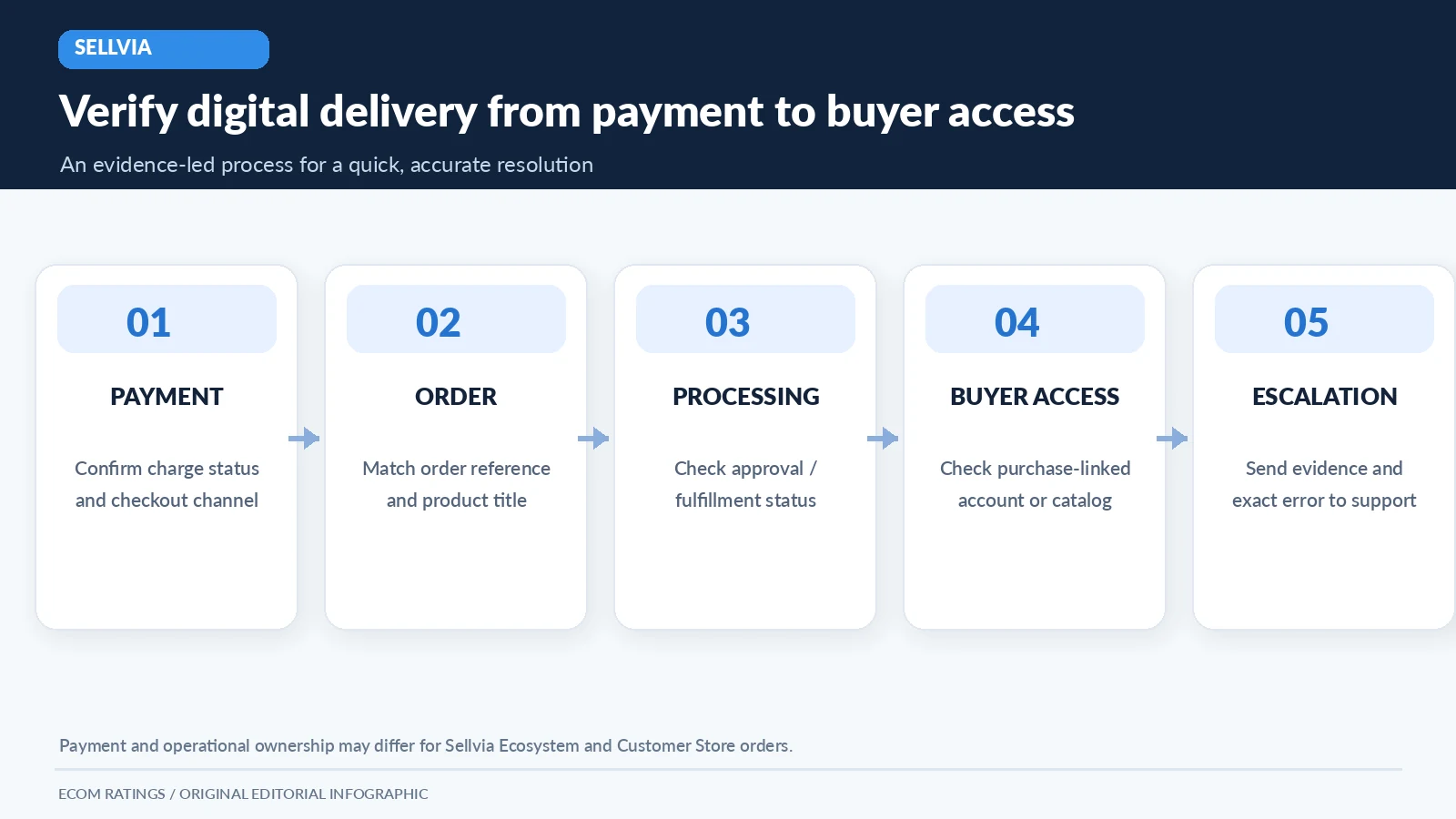
Checkpoint one is payment. Did the relevant payment channel record a successful charge rather than only an attempted checkout, authorization or pending status? Checkpoint two is order creation. Does the order record exist, with the correct product and an identifying reference? Checkpoint three is processing or fulfillment eligibility. Has the order reached the stage required for access to be issued? Checkpoint four is access. Can the intended buyer locate and open the item through the permitted account or download channel?
These checkpoints are intentionally independent. A buyer can have a bank notification without a completed order, and a completed order can exist even when a confirmation email is filtered out. Likewise, the presence of a product inside a seller-facing catalog does not automatically prove that the specific buyer has access to it. Conflating these signals is a common reason support threads go in circles.
Sellvia’s terms add an important contractual layer: order approval and payment of applicable amounts are distinct from the buyer’s purchase. Those order-processing provisions are relevant when an owner examines a case that has not progressed. They should not be misrepresented as a blanket statement that every digital purchase always waits for manual approval. The correct action is to read the status of the actual order and determine which operational path applies.
Start with the buyer’s exact experience
Ask the buyer to describe what happened immediately after checkout, without requesting sensitive payment credentials. Did they see an order-confirmation screen? Did the checkout redirect to a different page? Was an email received, but its link does not work? Can they sign in but see an empty product area? Did they receive an error on a particular device? These answers divide a vague “missing product” complaint into specific cases that a support representative can test.
Collect only the information needed to identify the sale: order number if available, approximate purchase time, product name, email used at checkout and a redacted receipt or transaction reference. A screenshot can help when it shows a technical error, but request that the customer hide full card numbers, authentication codes and other unrelated private information. A customer-support workflow should not increase data exposure while trying to solve access.
Before escalating, invite the customer to check the relevant mailbox folders and whether a different purchase email was used. Treat this as a general email troubleshooting step, not proof that Sellvia uses a particular subject line or a single universal delivery-email template. The official Sellvia terms also describe availability of digital products after purchase through the customer’s Sellvia Dashboard or catalog; checking that purchase-linked access is more decisive than searching inboxes alone.
Distinguish Seller Account, Partner Account and buyer access
Sellvia’s ecosystem includes multiple order sources. Its terms distinguish orders attributed through the Sellvia ecosystem, storefront orders and orders placed through a customer’s own store. The roles of the platform, the store owner and the payment system are not identical in all those cases. This distinction matters whenever an access question is accompanied by a billing question, because the person who can verify a payment may differ by checkout arrangement.
If the sale used a channel operated by Sellvia, the platform’s records and support process may be the relevant starting point for validating the transaction and access. If it was a Customer Store Order through the owner’s connected payment system, payment verification may need to begin with that processor’s records. A store owner should not tell the buyer that Sellvia collected the payment without checking which flow was actually used. Likewise, the owner’s partner account records and the buyer’s content-access view are not interchangeable.
This is not a reason to make support complicated. It is a reason to route the case accurately on the first attempt. An effective ticket identifies the channel, the order reference and what the buyer tried. The owner stays the buyer’s point of contact when appropriate while the responsible team investigates the technical fulfillment or account-access issue. Accurate routing supports the positive experience that automated digital delivery is designed to provide.
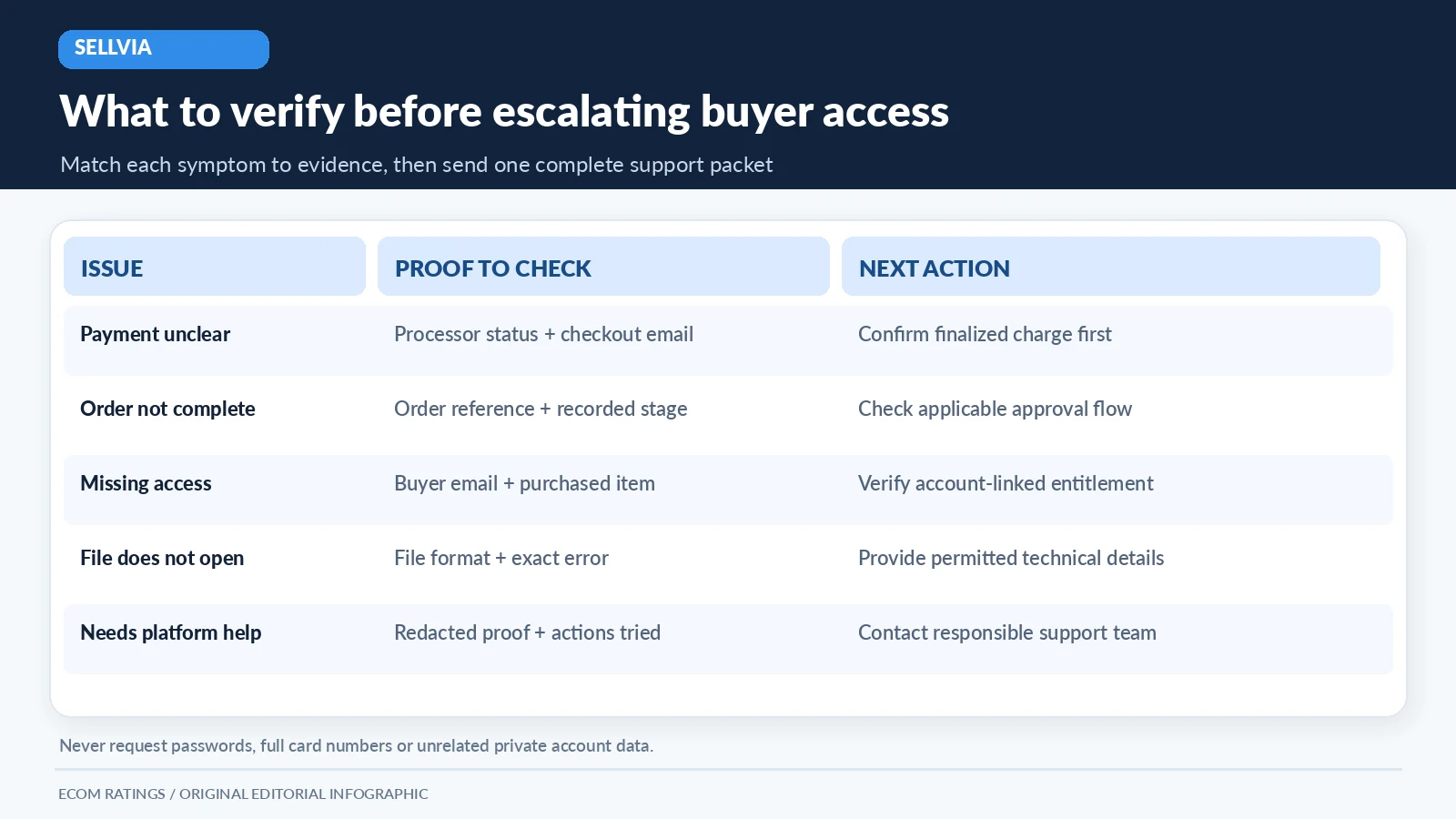
| Observed symptom | First evidence to check | Appropriate next step |
|---|---|---|
| Buyer has a receipt but cannot find the item | Order reference, buyer email and product title | Check account-linked access; request platform support if absent |
| Bank shows an authorization but no completed order | Processor or relevant payment-channel status | Verify settlement or final payment state before promising delivery |
| Download link gives an error | Error text, affected device, approximate time | Try permitted access route; include error in support case |
| Seller sees the order but status is incomplete | Order stage and any required approval | Resolve order-processing state or escalate if inconsistent |
| Buyer used two email addresses | Checkout email versus login email | Confirm the correct account without exposing credentials |
Email issues are not automatically fulfillment failures
Email deliverability and digital entitlement are related but separate. A confirmation message may land in spam or promotions, be blocked by a corporate filter, or be sent to a misspelled address. That can create the appearance of missing delivery even when the product is accessible through the correct account. The first test is whether the buyer can find the purchased item using the permitted login or catalog-access method documented for their order.
If access works after the buyer signs in, the problem may be notification rather than fulfillment. Confirm that the correct email address was used and that future service messages can be received. Avoid advising buyers to disable spam protection or share a password. If the product still cannot be found, capture the exact message or screen, and escalate as an entitlement issue instead of repeatedly resending a general receipt.
The merchant should also avoid inventing account controls. A support article can reasonably say “review the purchase-linked account area” without naming a button such as “Regenerate Access Token” unless that button has been observed in the relevant version. Clear, version-neutral instructions age better and are less likely to frustrate customers when the dashboard design changes.
When order approval changes the diagnosis
Sellvia’s terms define order processing as an approval and payment procedure with rules that depend on the order type. The terms also explain that orders not approved within a defined period may be canceled under operational procedures. These contractual stages are relevant if a digital-product order is visible but has not moved to the state needed for its intended fulfillment path. A store owner should inspect the actual recorded order state before drawing conclusions about a missing download.
In a support case, distinguish purchase timestamp, approval timestamp and access timestamp, where those data points are available. If there is no order-approval record and approval is required for that transaction, that may be the blocking step. If the order appears fully processed but the buyer still cannot access the file, the evidence points to a different kind of problem. This distinction avoids wasting time troubleshooting email when the underlying order has not been released.
Do not quote a universal delivery deadline from these provisions without checking that they cover the buyer’s specific transaction. Sellvia’s general marketing emphasizes fast, automatic digital delivery, while the legal terms address operational order categories and approval. A responsible guide reports both in their proper context. The customer’s concrete order record decides what must be investigated next.
File access issues: separate the link from the file
A broken link and an unusable file are two different failure modes. A link can expire, lead to the wrong account or be malformed by an email application. The file itself can be corrupted, unsupported by the buyer’s software or incomplete. The owner should ask which error occurs and at what stage: opening the link, authenticating, downloading or reading the downloaded item. Each stage narrows the likely fault.
If a buyer can reach the product but cannot open the file, verify the advertised format, recommended application and whether a complete download occurred. If the item is a PDF, for example, a modern browser can often open it directly; but do not assume every digital product is a PDF or promise that all tools function offline. Sellvia’s catalog includes different digital formats and educational materials, so the item’s own product description is the proper reference.
When a genuine defective or inaccessible file is suspected, preserve the filename and error text, not the entire customer’s device contents. Avoid emailing a replacement product file from an unverified personal mailbox or uploading it to an unrelated public file-sharing service. A legitimate support path protects both product licensing and buyer security while the fault is addressed.
The correct escalation packet for Sellvia support
A good support ticket is short enough to process quickly but specific enough to reproduce the problem. Include the product title, order identifier, relevant order source if known, buyer email used for purchase, transaction date, current recorded order state and the exact access failure. Add a redacted screenshot only when it demonstrates an error. Describe which basic checks have already been completed so the support team does not repeat them unnecessarily.
State what outcome is needed: confirm that a purchase record exists, restore the correct account entitlement, provide a working authorized access route, or clarify payment status. Avoid demanding an immediate refund when the objective is access restoration and the issue may be solvable. Conversely, do not promise the buyer an automatic refund merely because the file did not appear immediately. Refund eligibility depends on applicable terms, transaction type and the facts.
Sellvia publishes [email protected] in its official terms for platform service matters. A store owner may also have an assigned contact or support pathway, but those should be used only if they are actually available to that account. When writing the ticket, do not disclose passwords or full payment-card details. Keep a local record of the submission time and eventual resolution, particularly if the buyer has already contacted the store multiple times.
A buyer-facing message that reduces friction
The tone of the first reply matters. A good message acknowledges the purchase concern, explains that digital products are normally delivered electronically and asks for two or three specific facts needed to trace the purchase. It should not blame the buyer’s email settings or imply that the customer failed to understand the platform. It should also not promise that a technical team has already corrected something that has not been checked.
For example, a store owner can say that they are verifying the purchase and its linked access, then ask for the order number and checkout email. They can point the buyer to the account or purchase-access route appropriate for the transaction and invite them to share the exact error if access still fails. This approach is courteous, operationally precise and consistent with the automated-delivery promise without claiming guaranteed resolution times.
Follow-up should be based on status changes, not generic reassurance. When the record has been located, tell the buyer what has been verified; when an access route is confirmed, provide the correct approved method. If the case has been escalated, make clear which part remains under investigation. The aim is a reliable record of actions, not a long sequence of apologetic messages without useful progress.
Prevent the next missing-access complaint
A proactive digital-store audit can catch many access problems before customers encounter them. Review product pages for clear descriptions of what is delivered, file format, device requirements and the expected access route. Check that checkout text, receipt language and any post-purchase instructions agree. A buyer should not be promised an email attachment if the normal experience is account-linked access, or told to expect a physical delivery for a digital item.
Sellvia’s own educational material recommends testing the purchase journey as a buyer: select a product, complete a controlled purchase where appropriate, confirm the payment and locate the item. For an active store, the same principle works as a periodic quality check after a site change. Document the result and avoid repeated paid test transactions that are not needed for validation. A clean test should verify what a new customer actually sees, not only what the owner sees in the administrative dashboard.
Store owners also benefit from a compact internal playbook: where order references live, which payment flow applies, what information is safe to request, how to contact the responsible support channel and when to follow up. This turns a potentially stressful case into a predictable workflow. The automated digital delivery model remains a substantial advantage; reliable exception handling simply completes that experience.
A practical resolution checklist
Before closing a case, confirm five facts: the customer paid through the identified channel; the correct order and product were located; any required order-processing state is satisfied; the buyer can access or receive the purchased content using an authorized route; and the final outcome has been communicated clearly. If any of those facts remains unverified, keep that field marked as open rather than declaring the problem solved.
If the case cannot be resolved through account and email checks, escalate with the evidence packet. If the file is defective, identify the exact product and failure rather than treating the issue as a payment dispute by default. If the payment has not completed, verify with the responsible processor before attempting to issue a replacement. A disciplined approach avoids unnecessary disputes and makes effective use of Sellvia’s existing digital-fulfillment infrastructure.
Final assessment
Sellvia’s automatic digital-product delivery removes much of the logistical complexity of physical ecommerce and gives store owners a straightforward fulfillment model. The occasional missing-access complaint does not erase that advantage. It does reveal why a merchant still needs a clear process for tracing payment, order state, entitlement and customer access.
The most effective support response is neither “check your spam” nor “contact the platform” in isolation. It is a short, documented sequence that identifies the order channel, gathers minimum necessary evidence and routes the issue to the team responsible for the failing stage. That is how a store owner can preserve trust in a largely automated system while solving the exceptions professionally.
For a wider view of the service, read the Sellvia platform review on Ecom Ratings.
Primary sources and verification
- Sellvia official terms of use, including order processing and digital products
- Sellvia: Order fulfillment explained
- Sellvia: Digital products store launch guide
- Sellvia Academy: Test purchases and buyer journey