
ECOM RATINGS / EDITORIAL RESEARCH
A store owner can have a profitable month and still be surprised by a plan upgrade. BigCommerce bases plan eligibility on a defined measure of sales, not on the amount deposited by a payment provider. Its 2026 pricing changes also make it essential to use current plan names and the company's documented GMV adjustment. This guide explains which transactions belong in the calculation and how to reconcile the official figure.
Source review: October 28, 2026 · Independent editorial guidance · Category: Editorial

Why a bank deposit is not the right number
The first and most important distinction is between gross merchandise value, net revenue, and merchant cash. BigCommerce describes its 2026 plan thresholds using GMV, calculated from eligible gross order value with a 10% reduction for threshold evaluation. Its pricing FAQ says eligible order value includes product amounts after discounts plus taxes and shipping. That means the amount used for a pricing threshold is not the total of your processor deposits and not necessarily the same number shown in a sales-report summary.
A payment processor may send a merchant a deposit net of fees. A merchant might separately account for refunded sales, taxes payable, shipping costs, or marketplace commissions. Those accounting presentations are useful, but they answer different questions. To audit plan eligibility, start from the order values and the BigCommerce eligibility rules. Only afterward compare the result to the dashboard number.
The benefit of this approach is predictability. Once a store owner understands that an annual sales threshold is a billing metric rather than a financial statement, plan changes stop appearing arbitrary. The figure can be reproduced at least approximately from order exports and checked against the official account display.
The 2026 plan structure and its measurement window
BigCommerce's current public pricing matrix uses Core, Growth, Scale, and Performance. It shows Core at a $30,000 trailing-twelve-month GMV threshold and Growth at $100,000. Scale is presented with a monthly GMV cap and an overage model, while Performance uses custom contracted terms. Because these details can change, this article does not treat a plan sheet copied from a past year as authoritative for a current account.
The key concept is trailing twelve months, frequently abbreviated TTM. Each month the platform evaluates the sales volume of the most recent twelve-month period rather than summing a fixed January-to-December calendar year. A store operating for only four months has those four months of data; after a full year, the oldest month rolls out as the newest one arrives. That rolling window reduces the distortion caused by seasonal peaks and is different from a current-month revenue chart.
If the TTM figure exceeds the applicable threshold, BigCommerce says it will notify the merchant and move the store to the relevant plan according to billing-cycle rules. Its FAQ says monthly plans transition at the start of the next service period and annual plans at the start of the next annual service period. A one-month spike therefore can matter even when the store has not reached a calendar-year milestone.
| Order category | Published GMV guidance |
|---|---|
| Storefront, manual, API | Eligible orders can count |
| Cancelled, Refunded, Disputed | Listed as included statuses |
| Declined or Incomplete | Listed as excluded |
| Test Payment Gateway | Excluded |
The threshold formula, explained with transparent numbers
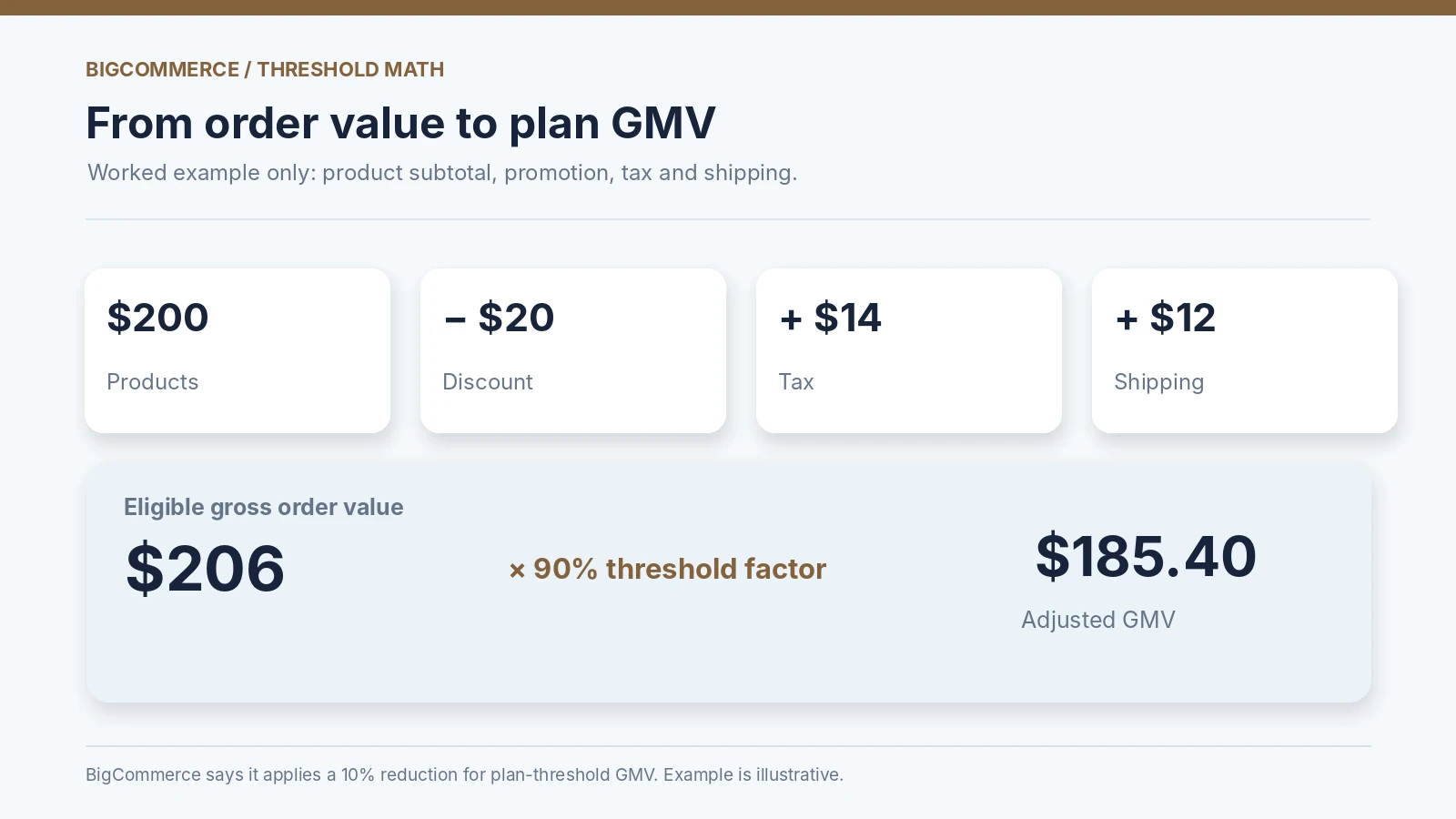
Take a fictional order with $200 of listed products, a $20 promotion applied to those products, $14 tax, and $12 shipping. The product component after the promotion is $180. Add tax and shipping and the eligible gross order value becomes $206. Under BigCommerce's stated 10% threshold reduction, the illustrative contribution to the plan threshold is $185.40. This is not a quote from a customer's bill and is not a claim that the order has exactly that accounting revenue.
The broader formula is: eligible gross order value = discounted product value + applicable taxes + shipping; adjusted GMV for the threshold = eligible gross order value multiplied by 0.90. Apply it only to transactions that meet the platform's order eligibility criteria. A quick calculation on all rows before classifying the orders can produce a confidently wrong result.
The 10% adjustment also does not mean BigCommerce is waiving 10% of the merchant's actual order or processing a 10% refund. It is a plan-eligibility convention described in current pricing. The customer still paid whatever amount the checkout charged, and the merchant's payment settlement remains governed by its processor.
Which order sources are included?
BigCommerce's pricing documentation says sales can count across multiple channels. Storefront orders are obvious, but orders processed manually in the control panel and orders created through the API may also contribute. Offline payment methods are not automatically exempt. Social commerce and supported native marketplace integrations, including eBay and Amazon in BigCommerce's published FAQ examples, can also be part of the sales/order volume.
This means a merchant cannot assume that only credit-card orders through the main website count. Consider a wholesale team that enters a phone order manually, an app that imports a valid sale, and a marketplace integration that syncs an external order. If those records are recognized as eligible sales within BigCommerce, they should not be discarded merely because the buyer never visited the public storefront checkout.
For an audit, every exported order needs a source or channel field if one is available. Group the transactions by storefront, manual, API or application, marketplace, and any other configured channel. Reconcile these groups separately before calculating a grand total. If the official account number remains different, that source breakdown makes it much easier to locate the discrepancy.
Why an unpaid or cancelled order may still affect the metric
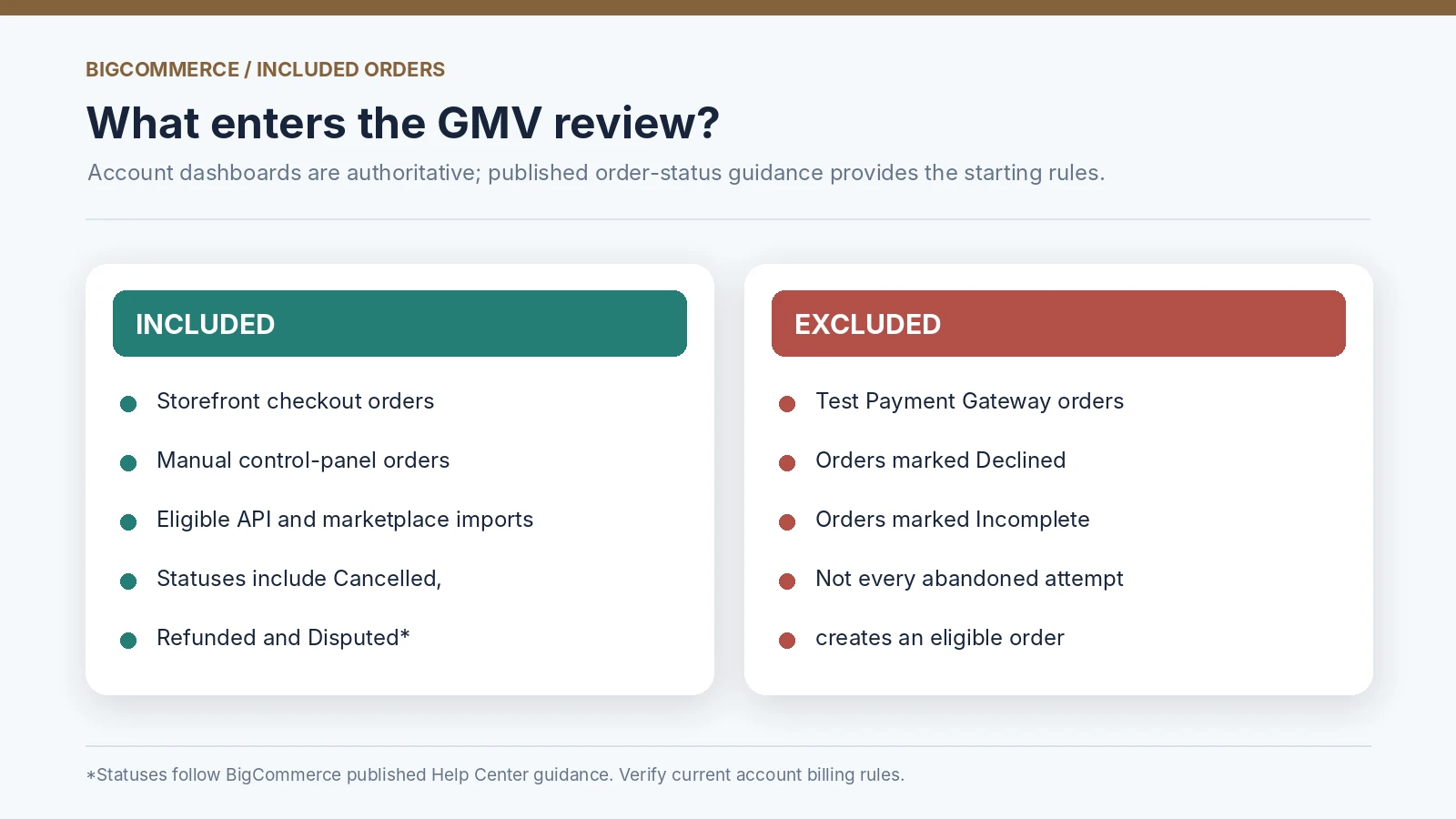
One of the counterintuitive points in BigCommerce's published Help Center pricing guidance is that its included order-status list contains more than successful, settled transactions. The list includes statuses such as Awaiting Payment, Cancelled, Disputed, Partially Refunded, and Refunded as well as Completed and Shipped. Declined and Incomplete are listed as excluded; orders run through the Test Payment Gateway are also excluded. This status list is a documented rule, not a guarantee that every possible third-party workflow behaves identically.
A merchant looking only at net paid sales would normally exclude a cancelled order. For platform billing, however, it is a mistake to assume a cancellation removes every trace of the order from GMV. The documented status treatment means the official calculation may differ from a merchant's intuitive net-sales spreadsheet. That difference is exactly why the account dashboard's own Inclusive GMV display is the reconciliation target.
Where an order changes status during a period, record both its original creation date and its current state. Do not manufacture a rule about when the platform recalculates that individual order unless the current BigCommerce billing view or support confirms it. An account-specific audit should treat disputed edge cases as exceptions to investigate, not as automatic reasons to remove values.
Refunds, partial refunds, and disputes: audit them separately
A partial refund illustrates why accounting and billing classifications can diverge. Suppose a buyer completes a $300 order and later receives $50 back. The finance team will probably track $250 of retained revenue before further fees. But BigCommerce's published included-status list names Partially Refunded, so the merchant should not assume the full refund event subtracts $50 from threshold GMV in the same way the bookkeeping report does.
The correct operational method is to keep two lines of analysis. One records the order and its eligible value for the BigCommerce calculation. The other records refunds, credit memos, cancellations, and payment settlement for the merchant's financial reports. Those layers should be compared, but not collapsed. When an account's Inclusive GMV figure differs from the reconstructed order total, examine refunded and disputed orders early in the investigation.
The same caution applies to chargebacks. A card dispute may reverse cash movement and generate payment-processor fees without causing the order to vanish from the source system. BigCommerce lists Disputed among included statuses in its Help Center guidance. That is a billing definition, not a judgment that the merchant earned or retained the disputed amount.
What does not count and how to spot it
The documented exclusions are just as important as inclusions. BigCommerce's pricing Help Center excludes orders processed through the Test Payment Gateway and orders with Declined or Incomplete status. That exclusion matters for stores that frequently test checkout flows, run migration rehearsals, or leave abandoned order records behind during implementation.
Do not confuse a test payment with every purchase placed by an employee. A manually placed order or an order using a non-test payment method does not automatically become exempt because the team considers it a test. For audit purposes, identify which payment gateway and status the order actually used. A test order that looks real to the system can create reporting noise if it is created carelessly.
If you suspect test traffic is distorting GMV, maintain a testing standard: use supported sandbox or test gateway modes, document internal test order IDs, and inspect the resulting order statuses. The objective is not to hide sales from the plan threshold. It is to prevent development activity from being mistaken for legitimate production commerce.
Multi-currency orders need a second reconciliation layer
BigCommerce states that non-USD sales are converted into US dollars using the exchange rate effective at the time of each order. That makes a simple spreadsheet that converts all past sales at today's rate unsuitable for a precise historical audit. The difference can be material for a store with several storefront currencies or international marketing campaigns.
An effective ledger preserves the original transaction amount and currency, the order date, the converted USD amount used for billing where visible, and any exchange-rate reference available through the platform. If the merchant's own financial system uses daily settlement rates rather than order-time rates, two legitimate reports may disagree without either being fraudulent or broken.
The practical takeaway is to reconcile currency conversions at the order level when the official total is close to a threshold. Small differences may accumulate across many transactions, especially when foreign-exchange volatility is high. Avoid comparing only the bank's USD payout total to the BigCommerce TTM GMV figure.
A monthly audit worksheet that can be repeated
A useful worksheet has one row per eligible candidate order and columns for order ID, creation timestamp, original currency, source/channel, status, discounted product value, tax, shipping, candidate gross order value, and converted USD value. Include a separate flag for test gateway, Declined, or Incomplete exclusions. Then retain an adjusted-GMV column calculated using BigCommerce's published threshold formula where applicable.
Group the order dates into a rolling twelve-month window. As the calendar advances, remove the oldest month and add the newest one. Keep a separate note of any large cancelled, refunded, disputed, or manually entered transactions that might explain a difference. The worksheet should not rewrite the platform's official total; it should provide a reproducible estimate and a list of exceptions to resolve.
Make the final comparison against the official billing area. BigCommerce's pricing FAQ directs the store owner to Billing and Purchase History in the control panel to review trailing-twelve-month sales and orders. The Help Center also describes an Account Dashboard view containing Inclusive GMV, order count, previous-month volume, and surchargeable sales. Those labels can differ by interface version, so follow the current account display rather than guessing what an older screenshot represents.
A worked twelve-month example near an upgrade threshold
Imagine a Growth-plan store that had $94,000 of adjusted TTM GMV before the latest month. Over the following month, several new eligible orders add $8,000 of adjusted GMV, while the oldest month contributes $3,000 and rolls out of the window. The new TTM figure is $99,000: $94,000 plus $8,000 minus $3,000. That remains below the currently stated Growth-to-Scale $100,000 threshold.
Now imagine an additional eligible order contributes $1,800 in adjusted GMV, taking the total to $100,800. The fact that the processor deposits for that month were lower due to fees, refunds, or delayed settlement does not independently decide the plan. The relevant question is whether the eligible TTM GMV used by BigCommerce has exceeded the applicable cap. Once it does, billing-cycle rules and advance notices determine the subsequent plan transition.
This example is intentionally illustrative. It does not incorporate every historical edge case, and it should not be taken as an invoice simulation. Its value is demonstrating that a rolling period must both add new sales and remove expired months. Simply appending each new month to a lifetime cumulative figure would overstate TTM volume.
What changes at Scale, and why the distinction matters
BigCommerce's current 2026 pricing describes Scale differently from Core and Growth. Scale includes a monthly GMV allowance, presently listed as $33,333, with a continuous 0.9% overage rate applied only to eligible revenue above that cap. This structure is separate from the lower plans' TTM threshold triggers. Merchants should not reuse a simple Core-to-Growth worksheet as if it covered every possible Scale charge.
The practical distinction is between qualifying for a plan and calculating a charge associated with a plan. Core and Growth threshold discussions focus on TTM GMV. Scale's monthly overage description is about excess monthly activity under that tier. BigCommerce also separately describes open payment-provider fees in its current pricing material. Neither should be blended into the TTM threshold formula.
A financially useful dashboard therefore needs distinct columns: adjusted TTM GMV for plan eligibility, current-month eligible GMV for any applicable tier overage, and payment-provider fee basis where relevant. Using one generic sales number for all three creates avoidable confusion.
How to question a surprising invoice without guessing
If the plan changes earlier than expected, export the official billing statement and capture the account's TTM figure for the relevant date. Rebuild the rolling window from order data. Check manual and API orders, marketplace integrations, unpaid statuses, cancelled orders, and currency conversions. Then document the exact residual difference before contacting billing support. An unexplained variance of $600 is a useful support question; “my sales were lower” is not.
If the account is annual, check the plan's effective date against the next annual service period, not merely the date a threshold was crossed. If the account is monthly, verify when the next service period begins. Keep the notices BigCommerce sent in advance. The goal is to distinguish an eligible threshold crossing from a billing timing question.
This process is also a good reason to monitor GMV monthly instead of waiting for a plan change. Predictable measurement supports pricing forecasts, budget planning, and clearer decisions about channels and integrations.
A monthly change log for merchants near the threshold
A spreadsheet becomes far more useful when it explains changes rather than merely storing totals. At the end of each month, preserve the previous official TTM GMV, the newly entering month's eligible value, the oldest month leaving the window, and any exception adjustments being investigated. Write the expected new TTM total next to the value visible in BigCommerce Billing. If the two differ, record the variance in dollars and the likely source rather than editing the underlying order values until the numbers match.
For a high-volume multi-channel store, group exceptions by the reason they might differ: manual orders, API imports, marketplace records, refunded or disputed statuses, foreign-currency conversion, and test transactions. Each group can then be checked by the person who owns that workflow. This creates an auditable explanation for plan forecasts even before the final billing number is reconciled.
Avoid building a script that automatically downgrades or cancels orders just to keep a calculated threshold below a particular number. Plan eligibility is based on BigCommerce's definitions, and attempts to distort legitimate orders can damage operational records. The correct objective is forecasting and accuracy, not manufacturing a lower GMV figure.
Bottom line: audit order eligibility before totals
BigCommerce GMV billing is not simply “all money received this year.” It is a platform-defined measure of eligible order activity across a rolling twelve-month window, using the current 10% GMV adjustment for plan threshold evaluation. The included sources extend beyond website checkout, and the published included statuses may surprise merchants accustomed to net-revenue reporting. Test-gateway orders and orders marked Declined or Incomplete are documented exclusions.
A reliable audit starts with the order-level dataset and ends with the current BigCommerce account billing display. Keep product amounts, discounts, taxes, shipping, status, channel, and currency conversion visible. Do that consistently and a future plan change becomes a calculation you can inspect rather than a bill you must simply accept on faith.
Sources and editorial method
BigCommerce official Pricing FAQ
BigCommerce Pricing and 2026 plan matrix
BigCommerce Help Center, About BigCommerce Pricing
Examples are fictional and explicitly illustrate the documented logic. The Help Center status list should be checked against the current account's billing implementation. Current information reviewed October 28, 2026.