
SAAS ECONOMICS / MARKETING CONTACTS · ECOM RATINGS
How the size of the full contacts database changes capacity planning, billing options, and admin access.
Editorial research · Sources checked October 26, 2026 · Documentation-based guide

The practical rule: A Kajabi contact limit is not the same as the number of people who currently receive marketing emails. Your site can contain customers, subscribers, people who never opted in, and people who unsubscribed. Kajabi’s current plan matrix lists 2,500 contacts on Basic, 25,000 on Growth, and 100,000 on Pro. When your database approaches those limits, the business problem is capacity management, not merely email frequency.
A free guide, webinar, or imported audience can make contact growth a financial question. The owner sees thousands of Contacts entries, but only some opened a recent email. Do former buyers count? Should the team remove old records, add capacity, or upgrade? What happens at the limit during a launch?
Kajabi distinguishes contacts from marketing subscribers, sends notices at 90% and 100% of usage, and describes a 30-day grace period before restricting administration. This guide turns those rules into a practical capacity plan.
What counts as a contact is broader than a mailing-list subscriber
The Kajabi Contacts interface includes multiple overlapping groups. According to its help center, All Contacts contains customers, subscribers, and people who have unsubscribed or never subscribed. A Customer is someone who purchased or was granted an Offer. A Subscriber has given permission to receive marketing messages. One person can be both, but the categories are not interchangeable. Someone who bought a course without accepting marketing email still remains a customer record, and a newsletter subscriber may never have made a purchase.
This distinction matters when forecasting capacity. A report of 4,000 marketing subscribers is not a reliable stand-in for the total site contact count if the database includes 1,200 customers who do not subscribe, 800 historical leads who unsubscribed, and several hundred manually imported records. Teams should compare the actual all-contacts total and plan usage display rather than infer it from the size of the latest campaign recipient segment.
Kajabi also identifies inactive and hard-bounced contacts in its interface. These categories help with deliverability and cleanup, but they do not mean that every such person is safe to delete. A bounced or unsubscribed buyer may still need access to purchased materials or may have a payment history the business must preserve. Contact-list hygiene and record-retention obligations are related but separate problems.
The current Kajabi plan limits and capacity options
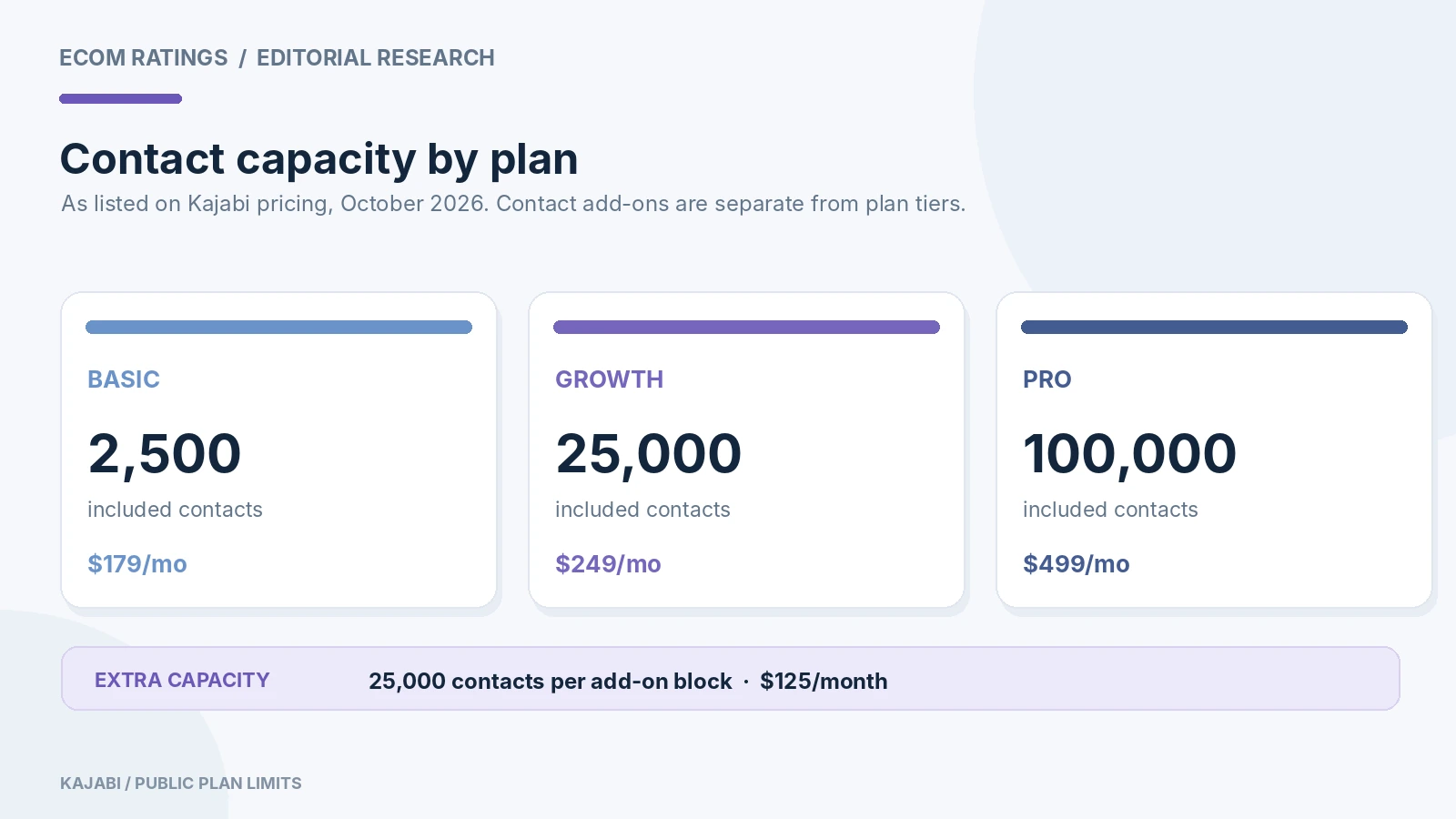
As displayed on Kajabi’s public pricing page in October 2026, Basic includes 2,500 contacts, Growth includes 25,000, and Pro includes 100,000. The plans also differ in products, websites, communities, and administrative users, so contact capacity is not the only possible reason to upgrade. The same page says customers who hit a plan limit can add capacity or move to another plan, and lists blocks of 25,000 extra contacts at $125 per month.
| Plan | Included contacts | Listed monthly price | Annual-billing equivalent |
|---|---|---|---|
| Basic | 2,500 | $179 per month | $143 per month, billed annually |
| Growth | 25,000 | $249 per month | $199 per month, billed annually |
| Pro | 100,000 | $499 per month | $399 per month, billed annually |
These are public list prices as shown on the cited pricing page, not a quotation for a specific account. Tax, regional pricing, legacy contracts, special promotions, and subscription timing may change the actual bill. Before changing a plan, compare the account’s current contractual price with the current checkout quote. The annual-billing equivalent is not a promise that the platform charges monthly at the lower annual rate.
The additional 25,000-contact block is particularly relevant because many creators assume the only option is to jump immediately to the next plan. An add-on may solve a pure capacity problem without changing other product limits. But it is not always the better economic choice. If Growth also unlocks tools the team already needs, the plan-level increase can provide more value than a narrowly purchased block. The decision should compare both price and capabilities.
What happens at 90%, at 100%, and after the grace period?
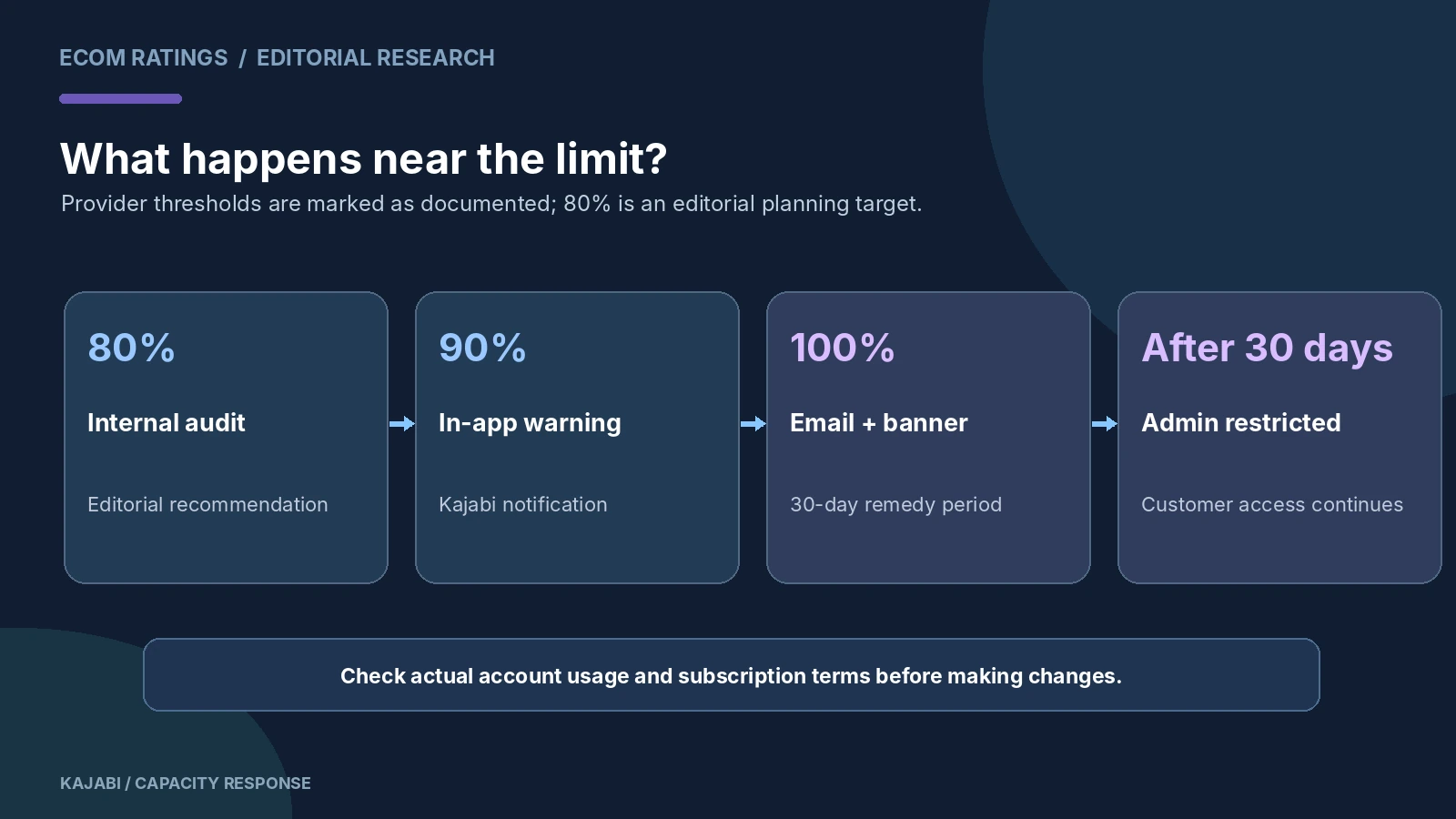
Kajabi’s contact-usage documentation describes a graduated warning sequence. At 90% usage, the administrator sees a notification and banner in the product. At 100%, Kajabi sends an email notification and updates the in-app banner. The account has 30 days to increase capacity or remove contacts. After that grace period, Kajabi says the administrator’s access becomes restricted: the owner can log in to account settings for upgrading, but cannot use the account normally until capacity issues are resolved.
The customer-facing experience is treated separately. Kajabi states that after an account is locked for contact overage, customers can still interact with the site’s website, emails, automations, courses, and other experiences. That is reassuring, but it is not a reason to rely on the grace period as a standard marketing strategy. Restricted administrative access could prevent the owner from making time-sensitive changes during a launch, addressing another issue, or adjusting a campaign.
A useful operational policy is to act well before 90%. At 80% of the included capacity, schedule a list audit and forecast the next campaign’s expected contact growth. At 90%, stop unnecessary bulk imports until you have a plan. At 100%, treat the grace period as a remediation window with an owner and a deadline, not as free capacity that should be consumed deliberately. The 80% threshold is an editorial recommendation; the 90%, 100%, and 30-day rules come from Kajabi’s documentation.
Worked example: a free lead magnet changes the arithmetic
Consider a Basic account with 1,900 records before a campaign. A downloadable lead magnet generates 450 new contacts. That brings the total to 2,350, or 94% of the plan’s 2,500-contact capacity. The team has now crossed Kajabi’s documented 90% warning level even if only some of those new contacts ultimately opt in or engage. Another 150 net new records would reach the stated capacity.
This is why a launch dashboard needs a contact-capacity metric as well as leads, conversion rate, and cost per acquisition. Suppose the campaign is planned to run for two more weeks. If it is still adding 35 people per day, the remaining 150 slots represent only about four days of runway. That math is an illustrative forecast; it does not imply Kajabi automatically stops campaigns at 100% on the same day. The important point is that ordinary marketing success can put operational controls under pressure.
The possible responses are safe cleanup, paid capacity, or upgrading to Growth; decide from the actual account forecast.
A second example: a large list is not necessarily an engaged list
Take a Growth account with 22,000 contacts, of whom only 8,500 are currently subscribed to marketing and 4,000 have engaged in recent campaigns. The business is using 88% of its included 25,000 contacts, although fewer than half of the records are active marketing subscribers. A team that looks only at email opens may think it has plenty of room. The full-contact total tells a different story.
A careful review could identify unneeded historical leads, but the team should distinguish them from customers and records required for operational or legal purposes. Kajabi’s help article on list maintenance recommends identifying certain inactive contacts and unsubscribing those who have not engaged for an extended period. Unsubscribing may help deliverability; it is not identical to removing the underlying contact record from the database and therefore should not be treated as an automatic solution to the usage cap.
Why unsubscribed, bounced, and inactive are different operational states
Unsubscribed means the contact is not a current marketing recipient. That might result from a manual choice, an opt-out link, or another status change. Hard bounced means an address returned a permanent delivery failure and may be suppressed. Inactive is a segment defined by Kajabi’s engagement criteria; the platform’s list-maintenance materials describe a specific non-customer, subscribed contact profile and recent non-engagement conditions for that segment. These are distinct data states and can overlap in ways that matter for record management.
An account owner should not perform indiscriminate deletion simply because a contact has not opened a marketing email. Email open tracking is imperfect, and inactivity does not prove that a customer no longer values a course or that accounting records may be discarded. A safer workflow is to segment by purchase history, consent status, recency, bounce state, and retention needs. Preserve records that are legitimately needed, and archive or remove only what can safely be removed under the applicable rules.
Kajabi’s contact-limit help suggests prioritizing records that are not customers, are unsubscribed, and were not added recently, along with other inactive or bounced contacts. That recommendation is a starting point, not a command to erase every such record. Run a dry audit, review the intended deletion criteria, and ensure staff understands the difference between unsubscribing and deleting.
Build a contact-capacity dashboard before the list gets large
A simple monthly dashboard requires six numbers: total contacts, included plan capacity, percentage used, net new contacts in the last 30 days, subscribed marketing recipients, and customers with access to Offers. From those numbers, calculate a capacity runway based on recent net growth. If a site has 18,000 total contacts on Growth and adds 1,400 net records per month, the remaining 7,000 slots represent roughly five months of capacity at the current pace. That is not a guarantee; it is a planning estimate.
Track bulk imports separately; they can consume capacity suddenly. Identify automated sources of duplicate or test contacts before buying more capacity.
Capacity planning should preserve genuinely useful contacts and remove only records with no valid retention purpose.
The economics of adding 25,000 contacts versus upgrading
The current pricing page states that extra contacts can be purchased in blocks of 25,000 for $125 per month. That makes the marginal cost of more capacity visible, but a merchant should compare the entire bill. Suppose a Basic merchant pays the public monthly list price of $179 and considers one extra contact block. An illustrative new recurring total would be $304 before any applicable taxes or negotiated adjustments. Growth’s currently listed monthly price is $249 and includes 25,000 contacts along with its other features. On those assumptions, Growth would be cheaper than buying the extra block on Basic.
But this is only a list-price example. A business on an older discounted plan, an annual commitment, or a different regional price might reach a different conclusion. Additionally, the timing of charges and credits during the plan change can matter. Use the upgrade screen to compare the actual net recurring cost and available features. A finance team should record the decision assumptions so the logic can be revisited after the next period of growth.
A useful rule is to compare three options every time: clean the list safely, add capacity to the current plan, and upgrade the plan. Do not assume the largest plan is the only professional choice or that capacity add-ons are always cheaper.
Email features and contact limits do not move in lockstep
Kajabi markets email and automation capabilities as part of an all-in-one platform, and its pricing page highlights marketing emails among core features. However, a plan’s included contact capacity is a separate constraint from whether the platform lets you create email sequences or landing pages. A creator can have access to sophisticated automations while still approaching a contacts cap. Conversely, upgrading solely for contact capacity may also change product, admin, or website allowances that the business never uses.
For marketing performance, separate the database into three useful populations: all records, marketable subscribers, and engaged subscribers. The first drives contact-capacity decisions. The second determines who may appropriately receive campaigns. The third informs content, deliverability, and list-health strategy. Those counts overlap but are not interchangeable, which is precisely why contact limits can surprise marketers accustomed to email-service pricing based only on sendable subscribers.
Consider consent when importing contacts from webinars, checkout flows, or another CRM. A person who provided an address to download a resource may not have agreed to every kind of future promotional email. Use Kajabi’s subscription status and double-opt-in tools as applicable. Correct permission records are not an obstacle to growth; they are part of sustainable growth.
Duplicate contacts: one person can still create multiple records
Kajabi’s duplicate-contact guidance explains that the platform uses email addresses to identify contacts. The same email normally maps activity to one contact record. But a person using two different addresses can produce two records even though they are the same human being. A team should not count those as a purely billing artifact or delete one without investigating purchases and access associated with each.
Search for repeated names, compare addresses and order history, and decide whether merging is supported and appropriate. A customer may intentionally maintain different business and personal identities, so a name match is not enough to combine records. The main objective is to avoid generating unnecessary duplicates during imports and to understand their impact on list quality and capacity.
How to run a safe pre-upgrade cleanup
Start with a read-only export from Kajabi’s Contacts area, which can be filtered or segmented. Kajabi notes that exported files are emailed to the account address and that the link expires after three days. Download the file immediately and preserve a timestamped copy in a restricted-access folder. That gives the team a reference if a later import or cleanup changes the composition of the list.
Create candidate segments: no purchases, not subscribed, old signup date, recent hard bounce, and inactive marketing status. Review small samples before applying any bulk action. If deleting contacts is appropriate, record the reason, the date, and the person approving the action. Evaluate whether deleting a contact affects access to an Offer or removes a record the business still needs. If uncertainty remains, seek guidance from Kajabi support rather than experimenting with live customer data.
After cleanup, compare the new total contacts against the plan’s usage display. If it remains close to the limit, the business needs a capacity decision even if marketing deliverability improved. Treat these as two related but separate outcomes.
A launch checklist for a growing Kajabi audience
Before a campaign: Verify current plan and included contacts. Record the all-contacts total. Estimate new leads from the previous comparable campaign. Check whether bulk imports or automations will add contacts from other systems. Define who will respond to capacity notices.
At the 90% notification: Audit list quality, pause optional imports, estimate time to 100%, and compare current upgrade or add-on prices. Set a decision deadline before the grace period becomes relevant.
At 100%: Assign a named owner to remediation, preserve the received notices, and keep a clear record of the 30-day window. Communicate internally that customer access may remain available while administrative capabilities become restricted after the grace period.
After changing capacity: Verify that the billing update and the contacts-usage display agree. Test the important customer and marketing journeys, and confirm that no unplanned list deletion or automation disruption occurred.
Every quarter: Revisit old lead sources, consent quality, duplicate records, and expected list growth. If the site regularly gains customers faster than marketing leads expire, budget for capacity as part of the business model rather than treating it as an emergency charge.
What not to assume about limits
Do not assume that unsubscribed contacts disappear from Kajabi’s overall Contacts universe. Do not assume that every email address in the database may receive promotions. Do not assume that warnings at 90% mean billing is automatically upgraded. Do not assume that a lock after the grace period blocks students from continuing their courses; Kajabi’s help page expressly describes the customer experience differently. And do not compare plan prices without checking the account’s own billing terms.
Measure the full database separately from sendable subscribers and engaged leads.
Bottom line
Kajabi contact limits matter because a growing lead list becomes part of your operating capacity. The current public plans include 2,500, 25,000, and 100,000 contacts, and Kajabi describes paid capacity blocks as an alternative to upgrading. It also uses a 90% warning, a 100% notice, and a 30-day remediation period before restricting administrative access. These facts make proactive measurement valuable long before a big launch.
The best decision is data-driven: measure all contacts, separate customers from marketable subscribers, forecast growth, review safely removable records, and compare the actual cost of contact blocks with the next plan. For another platform’s lead-volume economics, see Podia Email Pricing Explained. This article is specifically about Kajabi’s contact capacity, not general email marketing ROI.
Primary sources and methodology
- Kajabi: Pricing and contact tiers
- Kajabi: Understand contact usage limits
- Kajabi: Explore the Contacts tab
- Kajabi: Grow and maintain engaged contact lists
- Kajabi: Check for duplicate contacts
- Kajabi: Export contacts
Editorial method: Prices, limits, notifications, and contact definitions are attributed to Kajabi’s documentation checked October 26, 2026. Numeric campaign examples and recommended internal thresholds are illustrative editorial models, not customer-account observations.