
DEVELOPER GUIDE / MULTI-STOREFRONT · ECOM RATINGS
A decision tree for channel and customer group priority, variant fallbacks and QA.
Editorial research · Sources verified October 26, 2026 · Practical implementation guide
THE ESSENTIAL RULE · 5 precedence levels
Assignment specificity comes before channel defaults. Missing variant records fall back to catalog prices.
Checked against BigCommerce developer documentation: October 26, 2026. A merchant operates a US storefront and a separate European storefront. The same product appears on both, but a signed-in wholesale buyer sees an unexpected price. The merchant has created a price list for the European storefront and another for wholesale customers. Which one wins?
BigCommerce does not choose arbitrarily. Its Price List Assignments mechanism evaluates the shopper’s sales channel and customer group, then applies a defined order of precedence. The answer becomes less obvious when an assigned price list does not include a record for a specific product variant, when group discounts exist, or when a developer assumes a storefront-channel price automatically affects every external marketplace.
This guide focuses on the pricing-resolution workflow rather than reviewing BigCommerce as a whole. It includes example assignments, variant-level fallbacks, and an implementation checklist for merchants testing Multi-Storefront pricing.
First, separate storefront channels, groups and price lists
BigCommerce Multi-Storefront lets merchants run multiple shopper-facing experiences, with channels identifying where a transaction originates. A customer group classifies buyers for permissions and pricing policies. A price list supplies a set of price overrides, with price records associated with individual product variants. A price list assignment connects a list to a sales channel, customer group, or their combination.
Those assignments are not multiple independent discounts that always stack on top of one another. BigCommerce documents that only one applicable price list takes precedence at a time. If a matching price record is unavailable, the price can fall back to the catalog’s default record rather than to some other list the merchant expected would fill the gap.
The documented priority order
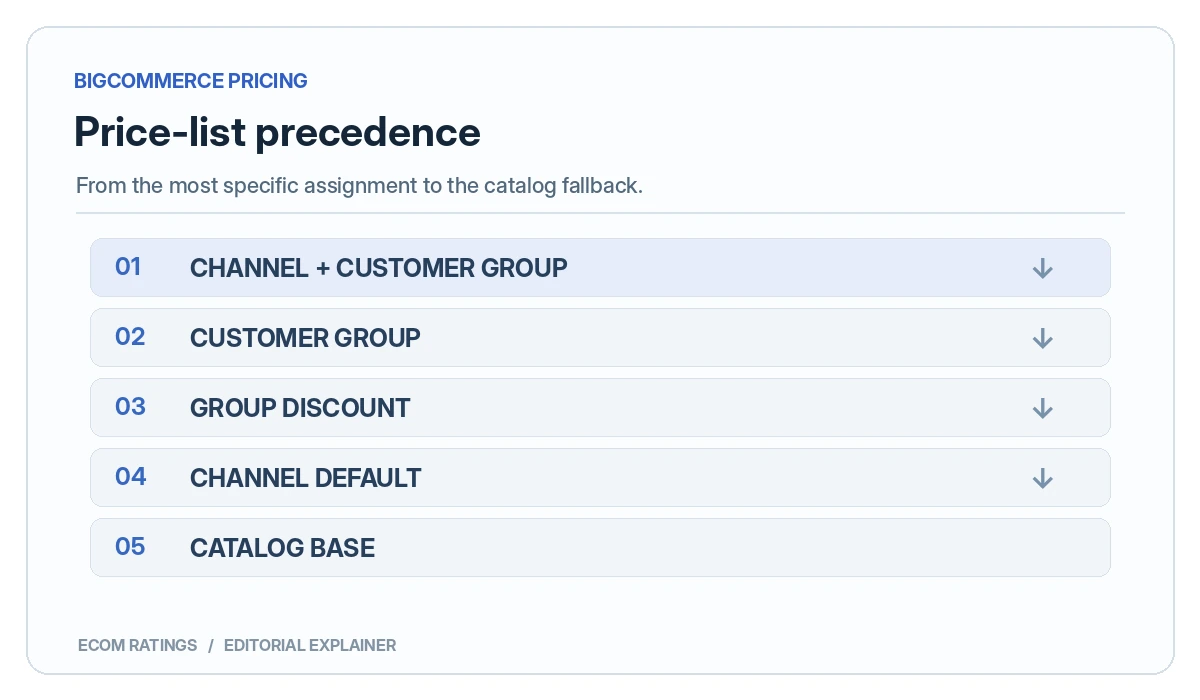
The BigCommerce Price Lists API reference documents the following resolution sequence:
- Exact combination: a price list assigned to both the shopper’s current customer group and current channel.
- Customer-group assignment: if the combined match is absent, a list assigned to the shopper’s customer group.
- Customer-group discounts: where applicable, those discounts take precedence before the channel-only default list.
- Channel default price list: a list assigned to the current sales channel without a customer-group restriction.
- Catalog base price: used when no higher-priority pricing rule supplies an applicable price.
There is a practical wrinkle: the API reference says a missing variant price record in a selected price list falls back to the catalog price (or an auto-converted value in a multicurrency context). It is risky to assume that a missing entry causes BigCommerce to walk down every lower-priority list looking for an alternative.
Worked example: retail and wholesale buyers on two storefronts
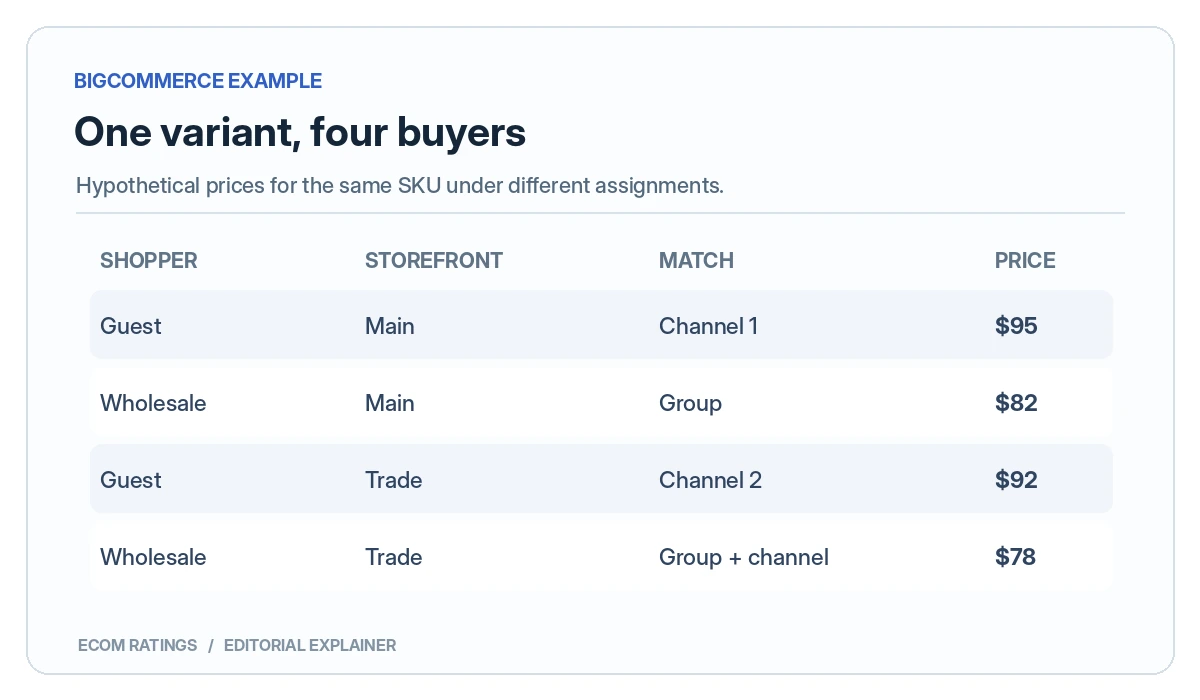
Consider one product variant, a hypothetical refill kit. Its catalog base price is $100. The merchant operates two storefront channels: Main Store (channel 1) and Trade Store (channel 2). It also uses a Wholesale customer group. For illustration, assume the configured override prices are:
| Pricing rule | Assignment | Example price |
|---|---|---|
| Catalog base | Default product variant | $100 |
| Main Store list | Channel 1 only | $95 |
| Trade Store list | Channel 2 only | $92 |
| Wholesale list | Wholesale customer group | $82 |
| Trade Wholesale list | Channel 2 + Wholesale group | $78 |
For a guest browsing Main Store, the channel-only rule could result in a $95 price. A Wholesale buyer on Main Store matches the customer-group list and could see $82. A guest on Trade Store could see $92. A Wholesale buyer on Trade Store matches the most specific combination and could see $78. All numbers are invented examples to explain priority; they are not live offers or official price figures.
Now remove the $78 record for this particular variant from the Trade Wholesale price list. BigCommerce documents that missing records in an active selected list use catalog pricing as a fallback. Therefore the merchant should not assume the customer automatically receives the $82 group-only amount. Test the actual variant and currency combination before using the price in a wholesale quote.
Price lists operate at the product-variant level
BigCommerce’s developer docs emphasize that price-list overrides are specified at the variant level. A merchant thinking only in terms of a product’s headline price can miss specific sizes, colors, pack quantities, or configuration options. Updating the parent product price does not automatically prove that all the variants in every list have the intended override.
For instance, a product might have single-unit and 12-pack variants. A wholesale price record added to the single-unit variant does not necessarily create a matching discount for the 12-pack. A QA worksheet should compare SKU, variant ID, current catalog price, target price list, active assignment, customer group, and storefront channel. This is especially important when an integration bulk-upserts many price-list records.
How customer group discounts complicate the model
BigCommerce documents customer-group discounts as part of the pricing priority. Those discounts can take precedence before a channel-only default list when no more specific list assignment matches. Its price-list usage notes also say that you cannot assign price lists to a customer group that has customer-group discounts until those discounts are removed. Merchants migrating from older group-discount configurations therefore need to inventory existing discounts before deploying new price lists.
A useful migration review separates three sets of rules: group discounts, group-specific price lists, and channel-specific price lists. Decide which mechanism is intended to own the product price for each buyer segment. Overlapping logic may create surprises even when every individual record appears valid in the admin interface.
Bulk pricing tiers are not the same as price-list assignments
BigCommerce supports volume-related pricing mechanics, but a bulk tier configured on a product is not simply added to every price list record. Its developer documentation states that a variant with a Price Record does not use existing product-level bulk pricing. Volume tiers can instead be associated with the relevant price record. For a wholesale program built on quantity breaks, this detail deserves its own testing matrix.
Suppose a catalog product has a discount for buying ten units, while an assigned B2B price list overrides the variant price. The expected quantity discount may no longer come from the original product-level schedule. If the intended result is “new wholesale unit price, with further savings at 20 units,” the quantity tiers need to be modeled and checked in the correct pricing layer.
A storefront channel is not every external sales channel
BigCommerce’s Price List API guidance notes that price list assignment to a storefront channel does not directly alter pricing in separate omnichannel environments such as external marketplaces. A developer should not assume a channel-specific Stencil storefront pricing policy automatically updates Facebook, Amazon, Instagram, or another integration.
For Multi-Storefront API integrations, BigCommerce also instructs developers to associate carts and checkouts with the correct channel_id. When the channel identity is missing or inconsistent, testing may accidentally inspect the wrong site’s behavior. Channel mapping is a data-integrity requirement, not just a user-interface label.
Practical QA matrix before going live
| Test | Why it matters | What to record |
|---|---|---|
| Guest, Main Store | Validates the channel default | Channel ID, SKU, displayed price |
| Wholesale, Main Store | Validates group precedence | Group ID, list assignment, final cart price |
| Guest, Trade Store | Validates second channel | Channel ID, currency, price |
| Wholesale, Trade Store | Validates combined channel/group match | Specific assignment, variant price |
| Missing override record | Tests documented catalog fallback | Variant ID and effective default price |
| Quantity threshold | Tests price-record tier interaction | Cart quantity and effective unit price |
| Cross-currency purchase | Tests conversion and currency context | Display currency and resulting order amount |
Run the matrix with actual guest and authenticated buyer sessions. Do not stop at a screenshot of the price list admin panel. A correct assignment can still produce an unwanted outcome if the tested product variant is missing a record or a group discount was overlooked.
Integration considerations for developer-led stores
Price lists and their records can be managed through BigCommerce APIs, including assignment endpoints under the V3 price lists API. The documentation provides create-assignment examples using customer_group_id, price_list_id and channel_id. Use those IDs to match business policy to the actual platform objects rather than trusting human-readable labels alone.
BigCommerce warns that multiple simultaneous bulk upserts on the same store can produce a rate-limit response. Its documentation also explains that assignment-specific webhooks are available, but a change to a price list does not necessarily produce ordinary product or SKU webhooks. Integrations that cache storefront prices should therefore have an explicit plan to invalidate stale prices after assignments or record changes.
A staging environment or controlled test subset is preferable to pushing several thousand overrides without first proving the precedence model. Record a small set of representative variants, map the intended groups and channels, test the storefront/cart totals, and only then scale the data operation.
Questions to ask before building regional price lists
- Is regional variation a currency difference or a genuine price policy? Conversion alone may not require the same configuration as negotiated B2B pricing.
- Which customers can see each storefront? Customer group membership and channel identity jointly determine the matching rules.
- Are discounts already attached to groups? Existing group-discount mechanisms may conflict with planned assignments.
- Are all variants covered? Missing records can fall back to catalog pricing.
- Where are quantity tiers stored? A price record may change how product-level bulk pricing applies.
- How will external channels get the correct prices? Do not infer automatic propagation from storefront-only assignments.
- What triggers cache refresh and reporting checks? Assignment changes require integration-aware monitoring.
Follow the selected list, not the cheapest advertised number
When merchants first see several price lists, they sometimes reason that the platform should pick the lowest available override. That is not the documented BigCommerce algorithm. BigCommerce resolves assignment specificity: a channel-plus-group assignment outranks a group-only assignment, which is followed by customer-group discounts, a channel default, and finally the catalog base price. The price in an unused lower-priority list does not become relevant merely because it is lower.
Suppose a retailer sets a generic online-channel price at $89 and a trade-only group list at $91. If the shopper belongs to the trade group and no more-specific combined assignment exists, the group list is the applicable policy even though it is $2 higher. Whether a given configuration should charge trade customers more is a separate commercial question. Technically, administrators need to inspect the selected rule before assuming there is a pricing bug.
The most revealing test is not “Which price is lowest?” but “Which assignment is matched, and does that selected list contain a record for this variant in this currency?” If the answer to the second question is no, the documented fallback is to the catalog price or automatic conversion, not necessarily to the next-lower list. This is the precise gap many short Multi-Storefront setup articles leave unanswered.
Currency handling is part of pricing logic, not a cosmetic label
BigCommerce’s price record model includes a currency field. Its documentation distinguishes transactional currencies from display-only conversions and describes automatic catalog-price conversion when a matching price record is missing in a multi-currency context. Consequently, testing the USD storefront does not establish that an EUR storefront will show the intended negotiated EUR amount. A missing EUR override may result in an auto-converted catalog price that is mathematically plausible but commercially wrong.
Build a controlled example: variant A has a base catalog price of $100, a US trade-list override of $82, and a planned EU trade override of €79. Before publishing the EU storefront, check that the correct EUR record exists on the selected list. If it does not, do not infer that $82 is simply converted at the current exchange rate. The product may follow a separate catalog conversion path because the selected record is absent.
In a test report, label currency explicitly at every stage: storefront display, cart, checkout, settled order, and financial export. A price list designed for negotiated regional contracts should use explicit price records where predictable local prices are required. Automatic conversion can be useful, but it is not an adequate substitute for a contract that specifies a fixed amount in a particular currency.
Customer group discounts: migration order matters
Suppose a merchant historically used a 10% customer-group discount and now wants to replace it with a group price list that contains SKU-specific overrides. The documented pricing hierarchy is one concern; configuration compatibility is another. BigCommerce states that a group with customer-group discounts cannot simultaneously receive a price-list assignment until those discounts are removed. A migration plan that ignores this restriction may fail before the first price-list record is tested.
A controlled migration begins with an inventory of current group discounts, product exclusions, and quantity rules. Next, convert the intended commercial terms into explicit price records where necessary, including every affected variant and currency. Only then plan the removal of incompatible group-discount rules, the assignment of the replacement list, and the buyer-session tests. To avoid a period of incorrect quotes, schedule the switch during a managed release window and retain a reversible configuration snapshot.
Quantity breaks deserve separate attention. BigCommerce notes that a variant with a price record will not use existing product-level bulk pricing. If wholesale buyers should receive a further unit discount at quantities of 12 or 24, the price record’s associated bulk tiers need to be checked rather than assumed. The contract price, assignment priority, and quantity tiers are different layers of the same commercial promise.
Headless frontends and caching introduce a second failure mode
A Stencil storefront gives BigCommerce’s pricing objects a familiar presentation context. A headless application, custom storefront, or middleware-driven quote engine adds another layer: the consumer must use the correct channel identity, authenticated customer group, currency, and price returned by the relevant APIs. It is possible to have a correct price-list assignment in the admin while a custom frontend shows an old or wrongly scoped amount from cache.
Document exactly where a final buyer price originates. Is the frontend reading a channel-specific contextual price, constructing one from a product base price, or caching results by SKU alone? A cache key containing only a SKU is unsafe for segmented pricing because two customers looking at the same item can be entitled to different amounts. At a minimum, the system design should account for channel, customer context, currency, and the relevant price-list state. The specific fields depend on the API integration, so this is an engineering acceptance criterion rather than a universal implementation recipe.
BigCommerce’s documentation identifies assignment webhooks and warns that a price-list assignment change does not necessarily produce ordinary product or SKU webhook events. Any integration that listens only for product updates risks stale price pages. Add a post-change price reconciliation job and test a warm-cache session as well as a fresh one. Most importantly, use checkout totals as the final acceptance test rather than relying exclusively on a cached product-detail component.
Bottom line
BigCommerce Multi-Storefront pricing becomes manageable when assignments are treated as a documented decision hierarchy, not as a pile of overlapping discounts. The channel-plus-group match has the strongest priority. Group-only rules and group discounts can outrank channel-only defaults. Price records exist at the variant level, and an uncovered variant can fall back to the catalog price. Merchants should model these outcomes in a small buyer-by-channel test matrix before rolling out a large regional or wholesale catalog.
For the platform-wide trade-offs, see the Ecom Ratings BigCommerce review and BigCommerce vs Shopify side-by-side comparison. This guide is specifically about BigCommerce’s price-list resolution.
Primary sources and verification
- BigCommerce: Price Lists and precedence rules
- BigCommerce: Price List API and assignments
- BigCommerce: Multi-Storefront API Guide
- BigCommerce: Multi-Storefront pricing setup example
- BigCommerce: price-list order of operations and usage notes
Editorial note: This article is an implementation guide, not a substitute for a live integration test. Validate price precedence, currency behavior, and product variant data against your store’s current configuration.
Ecom Ratings editorial disclosure: This is a documentation-based guide with original illustrative examples, not a live account benchmark. Feature availability and API behavior can change. Test against your own plan, configuration and current provider documentation before deploying pricing or access changes.